4-12
Instruments and Programming
X6 - P/N 6525032M1
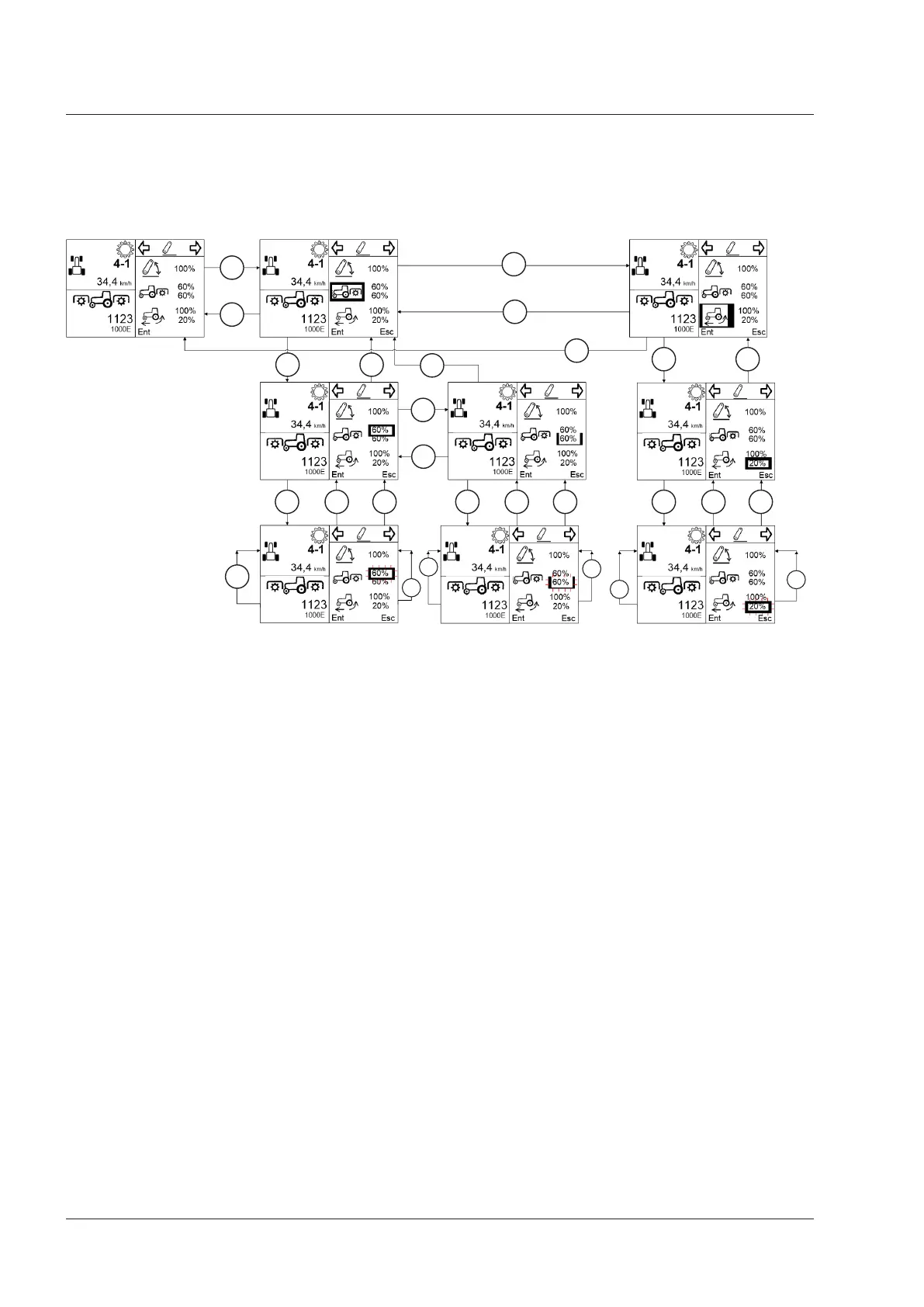
Setup of limits for auto PTO engagement/disengagement and slip values
For a setup of limits for auto PTO engagement/disengagement and slip values, follow the logic as indicated in the fol-
lowing diagram.
Key
1. Right button pressed down
2. Left button pressed down
3. Enter pressed
4. Esc pressed
5. Long pressure on Enter (2 seconds)
6. Right button pressed down: to increase a factory set value
7. Left button pressed down: to reduce a factory set value
After highlighting a parameter, press Enter to change its value. While the value is being changed, the value flashes.
When the change of a parameter is ended (flashing digit), press Enter to save the value. The digit stops flashing.
Press Esc while changing a parameter (digit flashing) to quit the change (the digit stops flashing) and return to the previ-
ously set value.
If a general error (minor or major) occurs during the input of values, the instrument cluster will display it only after the
value has been changed.
1
3
4
3 4
4
4
3
6
6
6
7
7
7
4 5 3 4 5 3 4 5
3 4
1
2
2



 To Next Page