5-46
Operation
X6 - P/N 6525032M1
Connecting an implement
WARNING: Always use the specific PPE for the opera-
tion concerned. Beware of burns caused by hot tractor
and engine parts. [4.1.n]
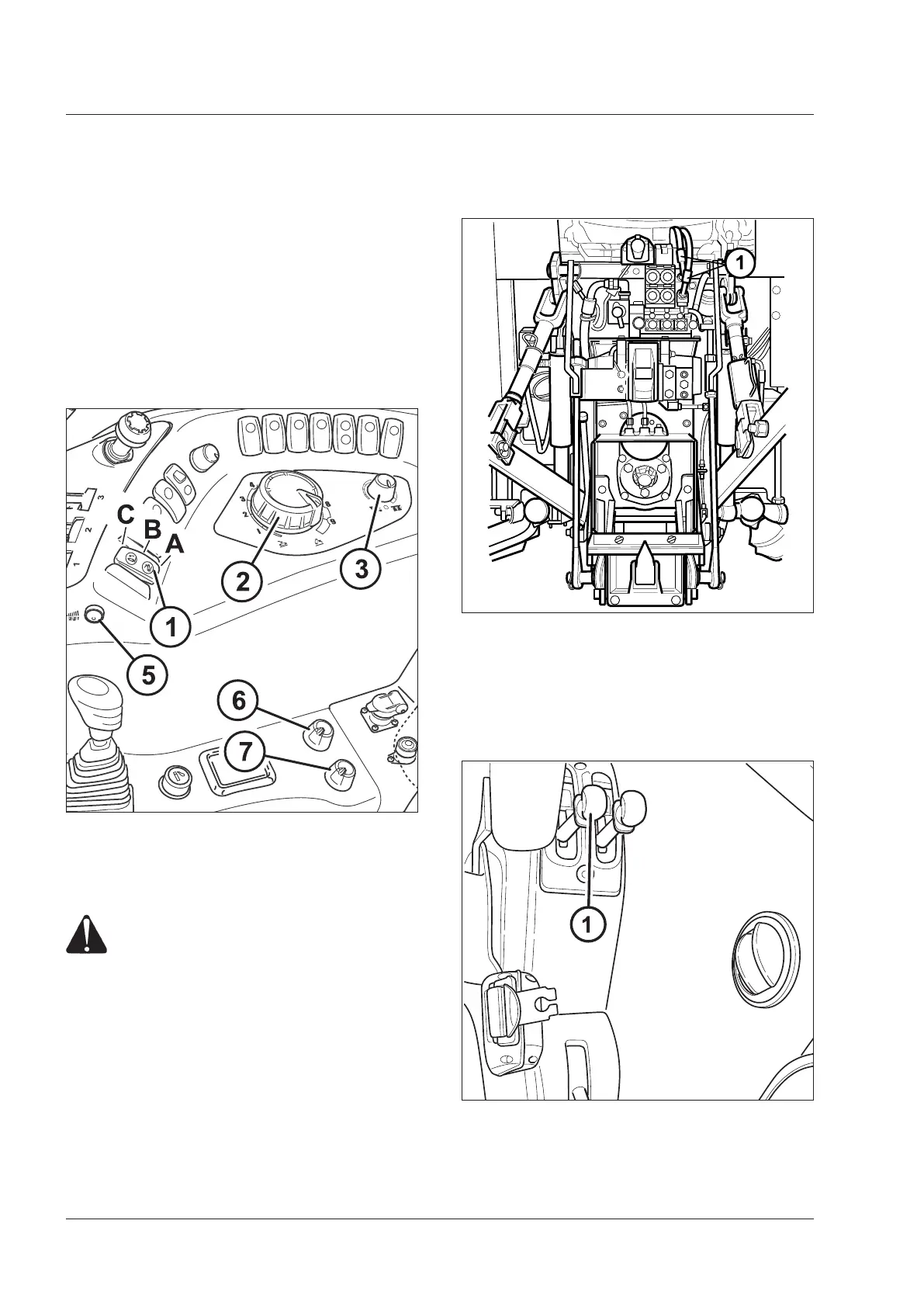
STEP 1
Turn the upper limit control knob (7) to the maximum
height setting (clockwise rotation).
- Raise the three-point linkage by turning the switch (1)
to Pos. C.
- Set the selector (3) to position control mode (Pos. 1) by
turning it in an anti-clockwise direction.
WARNING: If the control switch (1) is moved
to the links down position (A) and the work
height control knob (2) is moved, the arms
can be lowered. Set the lowering speed control
(6) to Pos. 0 (lock) to prevent any accidental
movement.
PICK UP HITCH
(if fitted, on request on certain markets)
NOTE: The following images are purely indicative and not comprehensive of all possible cases.
Pick-Up Hitch - Automatic hitching
Purely indicative image, not comprehensive of all pos-
sible cases.
STEP 2
Raise the hitch to maximum height.
STEP 3
Unlock the locking latches.
Use the lever (1) in the rear of the cab on the left side to
release the stops.



 To Next Page