Parts Identification
39
PLEASE READ WITHOUT
FAIL
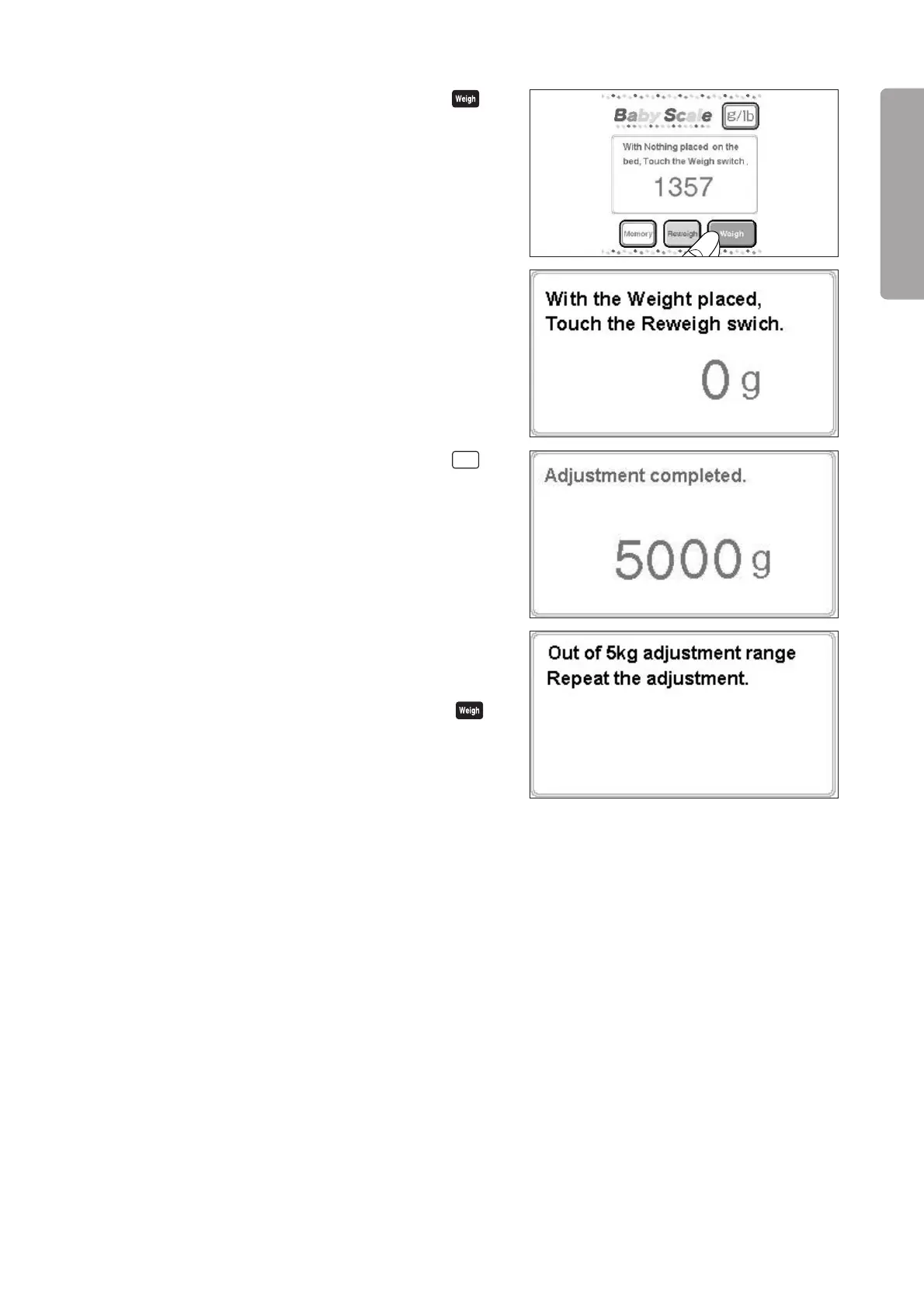
(4) After the weight reading has stabilized, touch ,
and a message “With the Weight Placed, Touch the
Reweigh switch” will appear. Place a 5 kg standard
weight gently on the center of the bed and wait for 5
~10 seconds until the weight reading stabilizes.
(5) After the weight reading has stabilized, touch
Reweigh
,
and the 5kg adjustment will be completed.
(6) If a message “Repeat the adjustment” should appear,
return to the 0kg adjustment.
With nothing placed on the bed, wait for 5 ~ 10 sec-
onds until the weight reading stabilizes. Touch
and the message “With the Weight Placed, Touch
the Reweigh switch” will appear. Place the 5 kg stan-
dard weight gently on the center of the bed and wait
for 5 ~10 seconds. Then repeat (5) to complete the
5kg adjustment successfully.



 To Next Page