3 Operation
3.1 Local operation
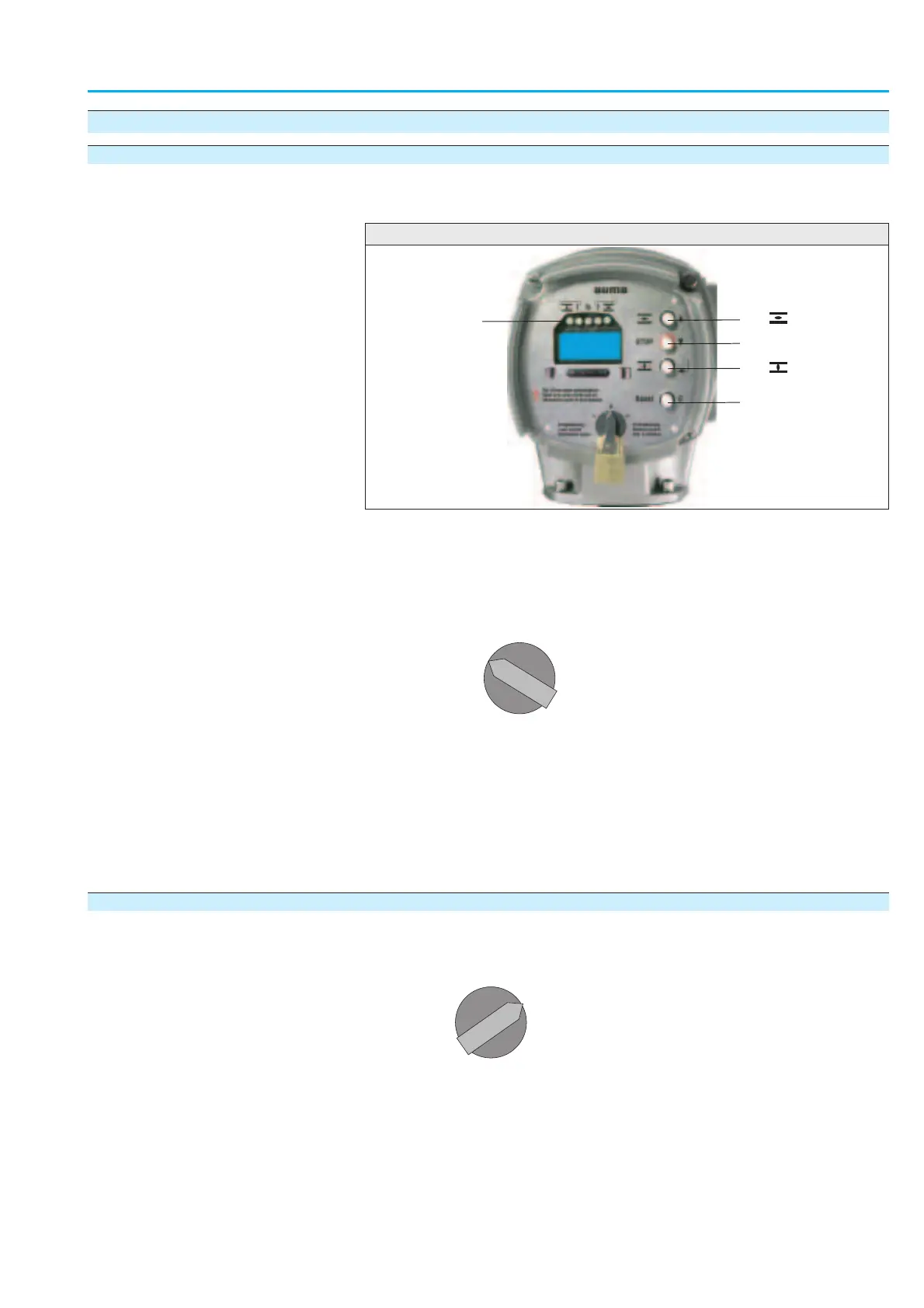
The local operation of the actuator is performed using the push buttons
(figure 3).
Ò Set selector s
witch (5) to position Local control (LOCAL).
The actuator can now be operated using the push buttons (1 – 3).
1. Run actuator in direction OPEN: Press push button (1).
2. Stop actuator: Press push button (2).
3. Run actuator in direction CLOSE: Press push button (3).
Information The OPEN - CLOSE oper
ation commands can be given either in
push-to-run operation or in the self-retaining mode.
3.2 Operation from REMOTE
Ò Set selector s
witch to position Remote control (REMOTE).
Now, it is possible to operate the actuator by remote control via the
fieldbus.
Information
.
Refer to page 58 to select between REMOTE MODE (open-close duty)
and
SETPOINT MODE (modulating duty).
.
The FAILURE MODE and EMERGENCY MODE operation modes are set
via parameters.
9
Actuator controls
Manual AUMATIC AC 01.1/ACExC 01.1 Profibus DP
1 Push button OPEN 4 Push button Reset
2 Push button STOP 5 Selector switch
3 Push button CLOSE 6 Indication lights/LEDs
0
I
I
0
I
I
1
4
1
2
3
5
Figure 3



 To Next Page