1
2
3
Combi Mode
Creating Stitch pattern combinations
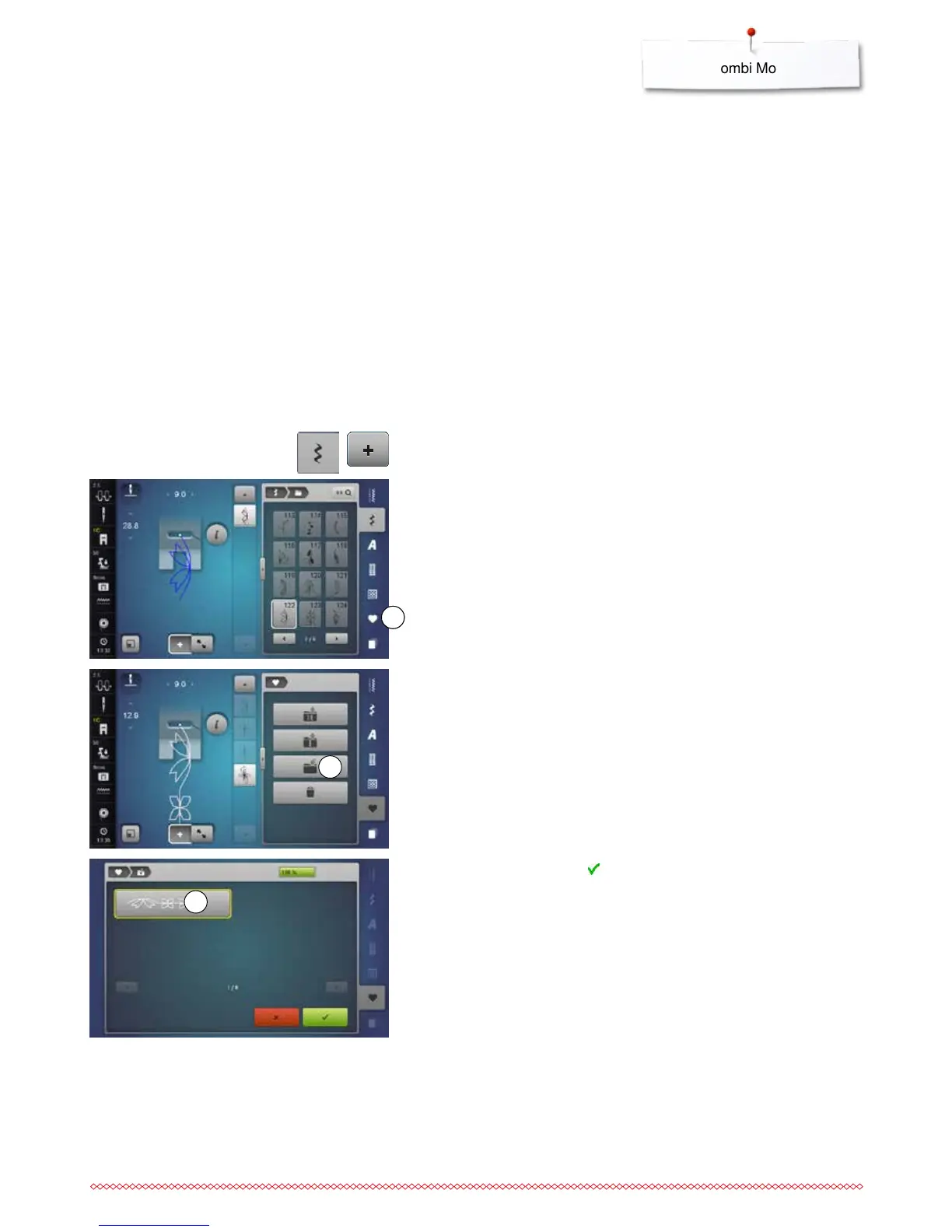
Programming and saving
⦁
touch the «Decorative stitch»-button
⦁
select category
⦁
touch the «Combi mode»-icon
⦁
select the desired stitch pattern directly or type in the number
⦁
make any alteration concerning stitch length, stitch width, needle position
etc.
⦁
select another stitch pattern
⦁
touch the «Personal program/Memory»-icon 11
⦁
touch the «Save»-icon 2
⦁
touch the «Save»-icon 3 or
►
the combination is saved
►
the Display closes
The sewing-/embroidery computer has a memory system where both, the
sewing and embroidery memories are saved.
In the sewing memory stitch patterns, lettering and numbers can be combined
and saved.
In the sewing memory each «Drawer» can store a maximum of 70 stitch
patterns as long as there is sufficient free space (capacity) available. If the
storage space (but not all drawers) is full, there may be too many embroidery
designs in the memory.
The memory is long-term, i.e. contents are kept until they are deleted. A power
cut or switching off the sewing computer does not have any effect on the
stored contents.



 To Next Page