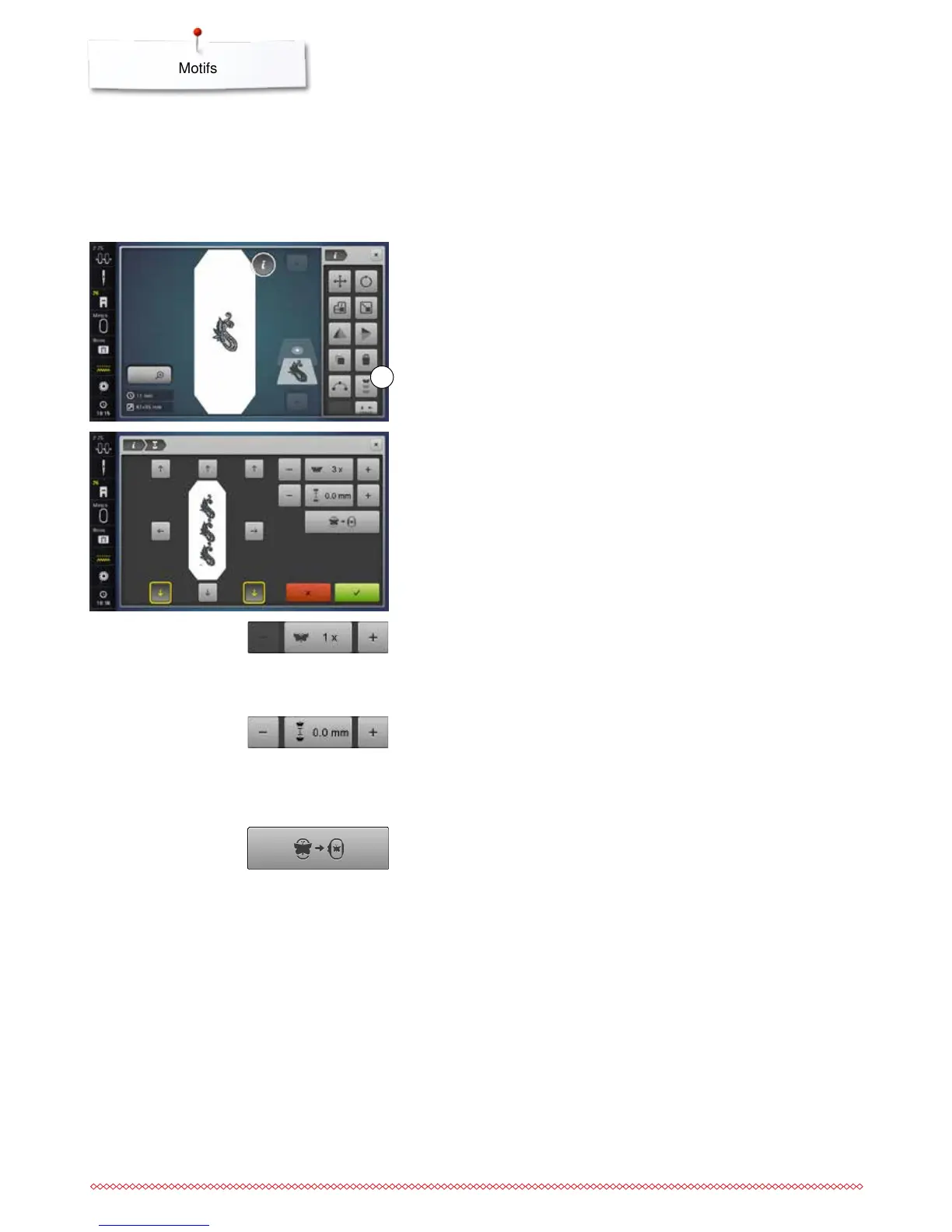
Endless Embroidery
When embroidering a border, it is advantageous to use the Mega or Jumbo
Hoop. The fabric requires less rehooping than with the Oval Hoop.
We recommend marking reference lines on the fabric, and using the template
when hooping and rehooping. Here, the reference lines must run parallel to the
lines on the template.
⦁
select the desired motif
⦁
touch the «i»-icon
⦁
touch the «Endless embroidery»-icon 1
►
the embroidery motif is duplicated as many times as possible to fill the hoop
►
the reference points - necessary for placement when rehooping the fabric -
are also stitched out
⦁
the arrow buttons may be used to add additional reference points in
different directions
Increase/decrease number of motifs
⦁
via the stitch width knob or the «+» or «-»-icons the number of motifs can
be increased or reduced
⦁
touch the field in the center
►
back to starting position
Increase/decrease spacing
⦁
via the stitch length knob or the «+» or «-»-icons the distance between the
motifs can be altered
►
Display is in mm
⦁
touch the field in the center
►
back to starting position
Fit to hoop
►
should more motifs be entered manually than will fit in the hoop, the hoop
appears in red
►
use the «Fit to hoop»-function to automatically adjust the size of the motifs
so they all fit in the hoop
⦁
touch the field in the center
►
back to starting position
1



 To Next Page