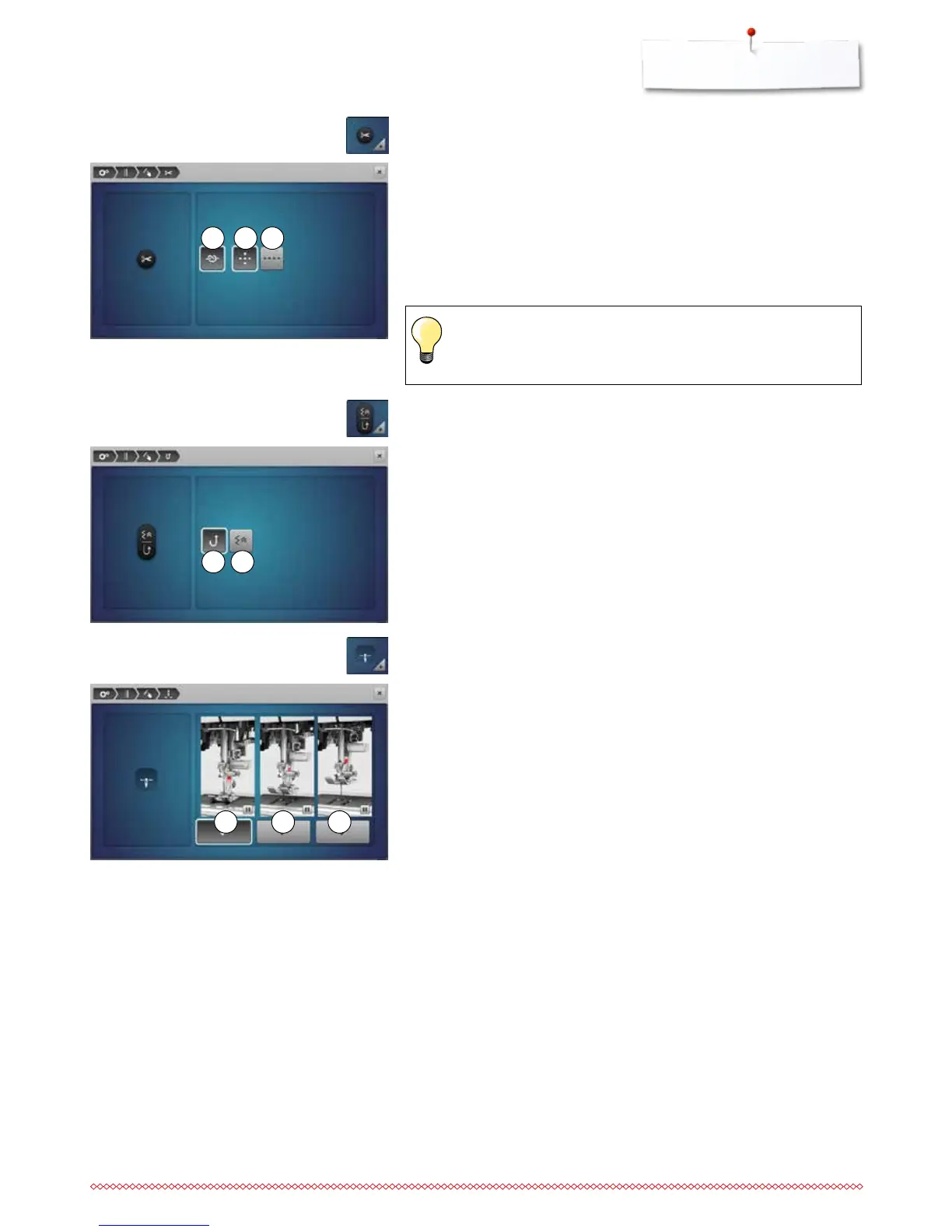
12 13 14
17 18 19
15 16
►
with activated icon 17, the presser foot remains down when the sewing
computer stops
►
with activated icon 18, the presser foot is raised enough to pivot the fabric
(hover position)
►
with activated icon 19, the presser foot is raised into its highest position
Presser foot position with needle stop down
⦁
touch the «Presser foot position»-icon
►
with activated icon 15 the sewing computer sews in continuous reverse
when pressing «Quick reverse»-button
►
with activated icon 16 the sewing computer sews backwards stitch-by-stitch
when pressing «Quick reverse»-button
Programming «Quick reverse»-button
⦁
press «Quick reverse»-icon
The number and type of the securing stitches before the thread is cut can be
programmed.
►
standard = no securing stitches programmed
⦁
touch icon 12
►
icon 13 is activated
►
four securing stitches are sewn at the place
⦁
select icon 14 to secure with small stitches sewn in a forward direction
⦁
via «+»/«-»-icons two to six securing stitches can be programmed
Automatic thread cutter and securing stitches
⦁
touch «Thread cutter»-icon
When sewing with BSR, no securing stitches are sewn.



 To Next Page