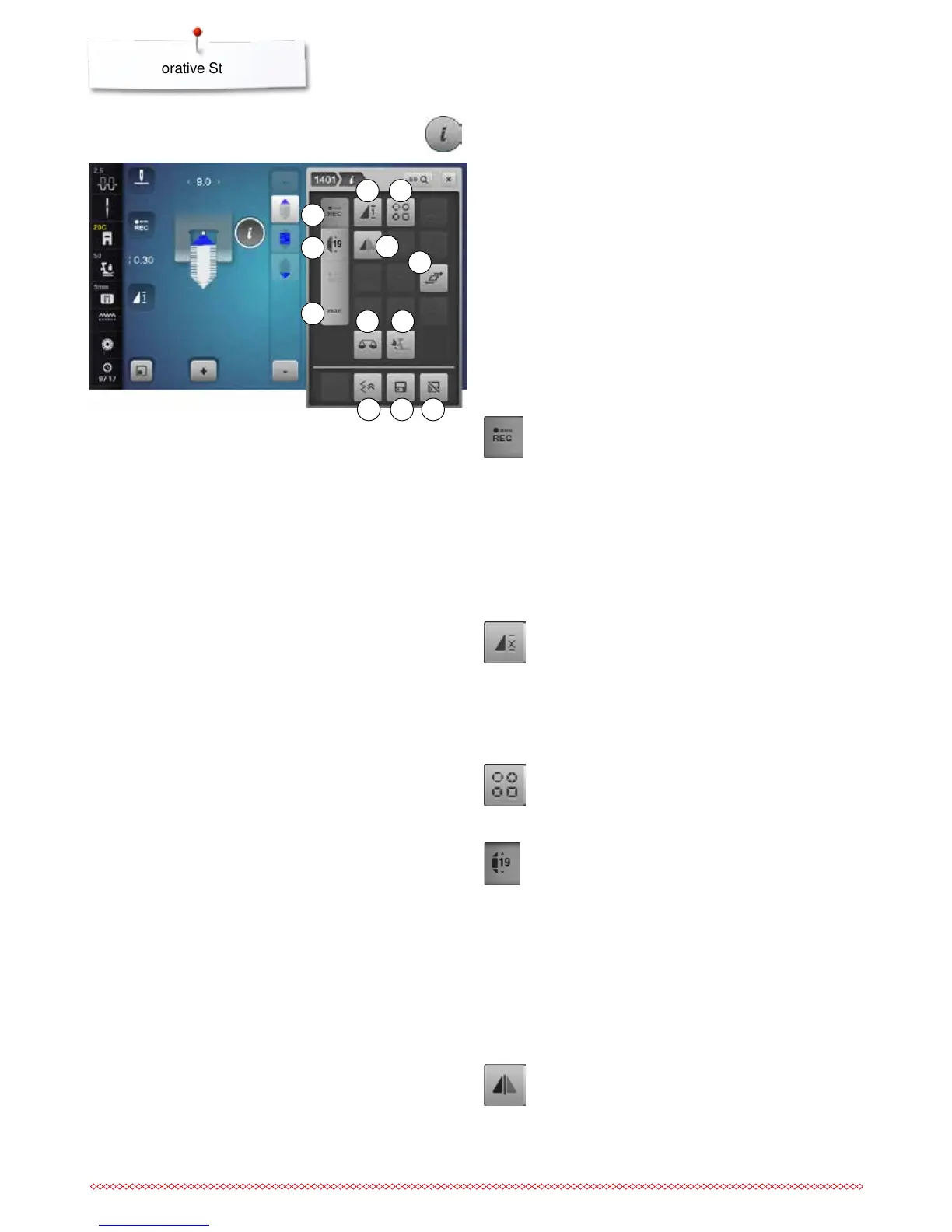
Programming the length of section 2
►
«REC»-icon is active (dark), when a tapering
pattern is selected
⦁
sew the first section
⦁
use «Quick reverse»-button to set the length of
section 2
►
once the length is programmed, the field is turned
off (inactive, bright)
►
after programming section 2, section 3 is sewn
automatically and the sewing computer stops
⦁
if a new length is to be programmed, touch the
«REC»-icon again
Programming the length of section 2 by Entering
mm
⦁
touch the «Tapering length»-icon
⦁
program the length using the stitch width or the
stitch length knob
⦁
touch the small «i» at the top of the Display
►
the Function Overview appears
⦁
sew the stitch pattern
►
all three sections are automatically sewn and the
sewing computer stops
⦁
if a new length is to be programmed, touch the
«REC»-icon again
Tapering Functions
⦁
touch the «i»-icon
1 Programming the length of section 2
2 Pattern repeat
3 Configuring the bead tapering
4 Programming the length of section 2 by Entering mm
5 Mirror Image left/right
6 Distorting stitch patterns
7 Manual setting the Length of Section 2
8 Balance
9 Balance BERNINA Dual Transport
10 Backstepping
11 Personal memory permanent
12 Reset
Pattern repeat
Standard = 1 pattern
►
the sewing computer stops at the end of an
individual stitch or a stitch combination
⦁
touch icon 2-9x
►
numbers 2-9 appear
►
the sewing computer stops after the programmed
number of single rapports
Configuring the bead tapering
⦁
touch the icon
►
an overview showing various tapering forms of
beads appears
Mirror Image left/right
The sewing computer sews the stitch pattern mirrored,
left/right referring to the sewing direction.
4
8
7
1
2 3
1110 12
9
6
5



 To Next Page