164
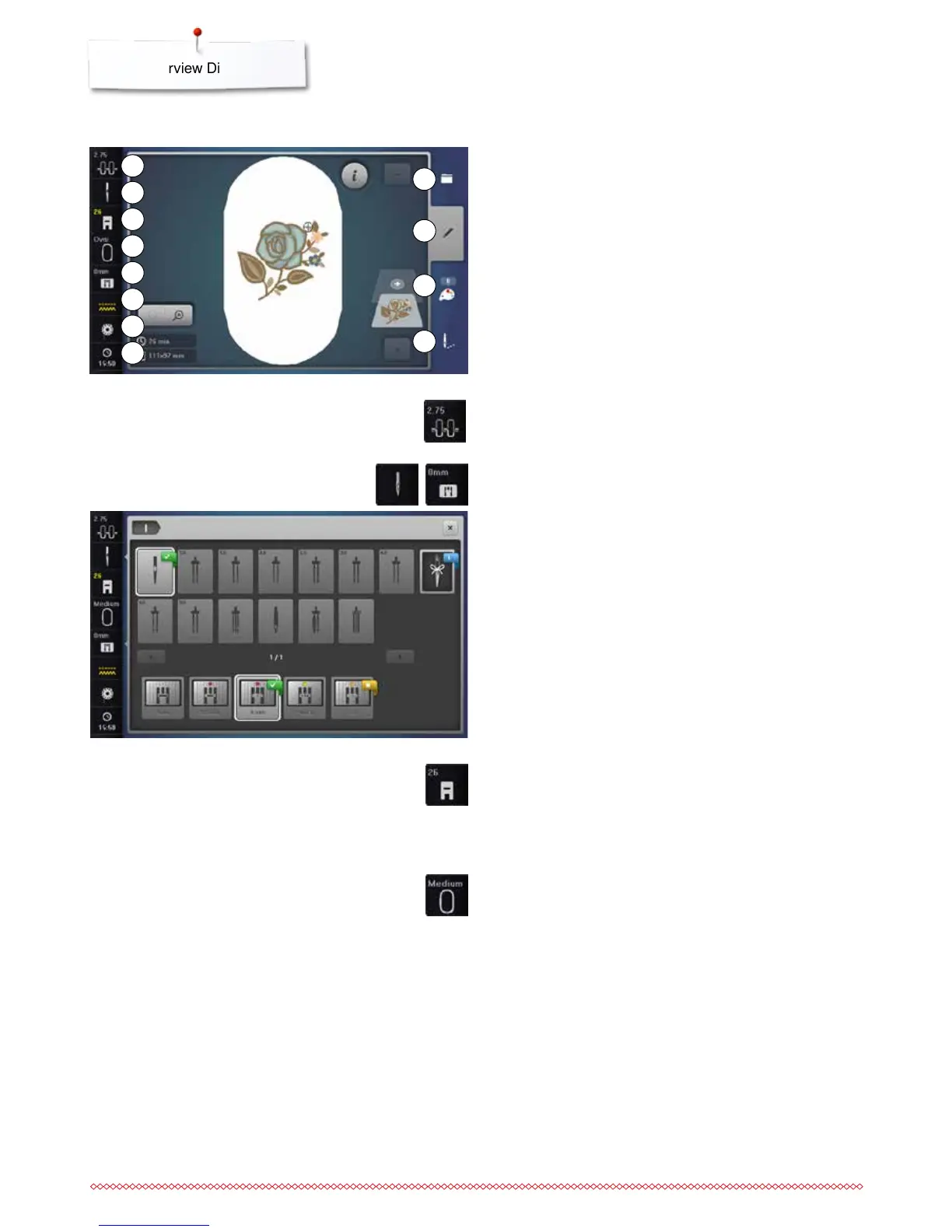
Presser foot Indicator/Presser foot selection
Embroidery foot No. 26 is displayed by default.
⦁
touch the icon
►
additional presser feet, such as Free motion couching foot
No. 43, are displayed and can be selected
⦁
attach and select the appropriate presser foot for the project
Select hoop/Hoop Indicator
►
the optimal hoop for the motif selected is displayed
⦁
touch the icon
►
the Display with the Select Hoop and further functions appear
«Edit»-Display
1 Upper thread tension
2 Security needle
3 Presser foot Indicator/Presser foot selection
4 Select hoop/Hoop Indicator
5 Security stitch plate
6 Feed dog recognition
7 Filling bobbin
8 Time Display
9 Selection
10 Edit
11 Color number
12 Embroidery menu
2
1
9
10
Upper thread tension
►
the current value is visible in the icon
Security Program
⦁
touch the «Needle»- or «Stitch plate»-icon
⦁
touch the desired «Needle»- and/or «Stitch plate»-icon
►
if an inappropriate stitch plate is selected, a warning will
appear in the icon
3
4
5
6
7
8
11
12



 To Next Page