Threading the Upper Thread
Automatic
⦁
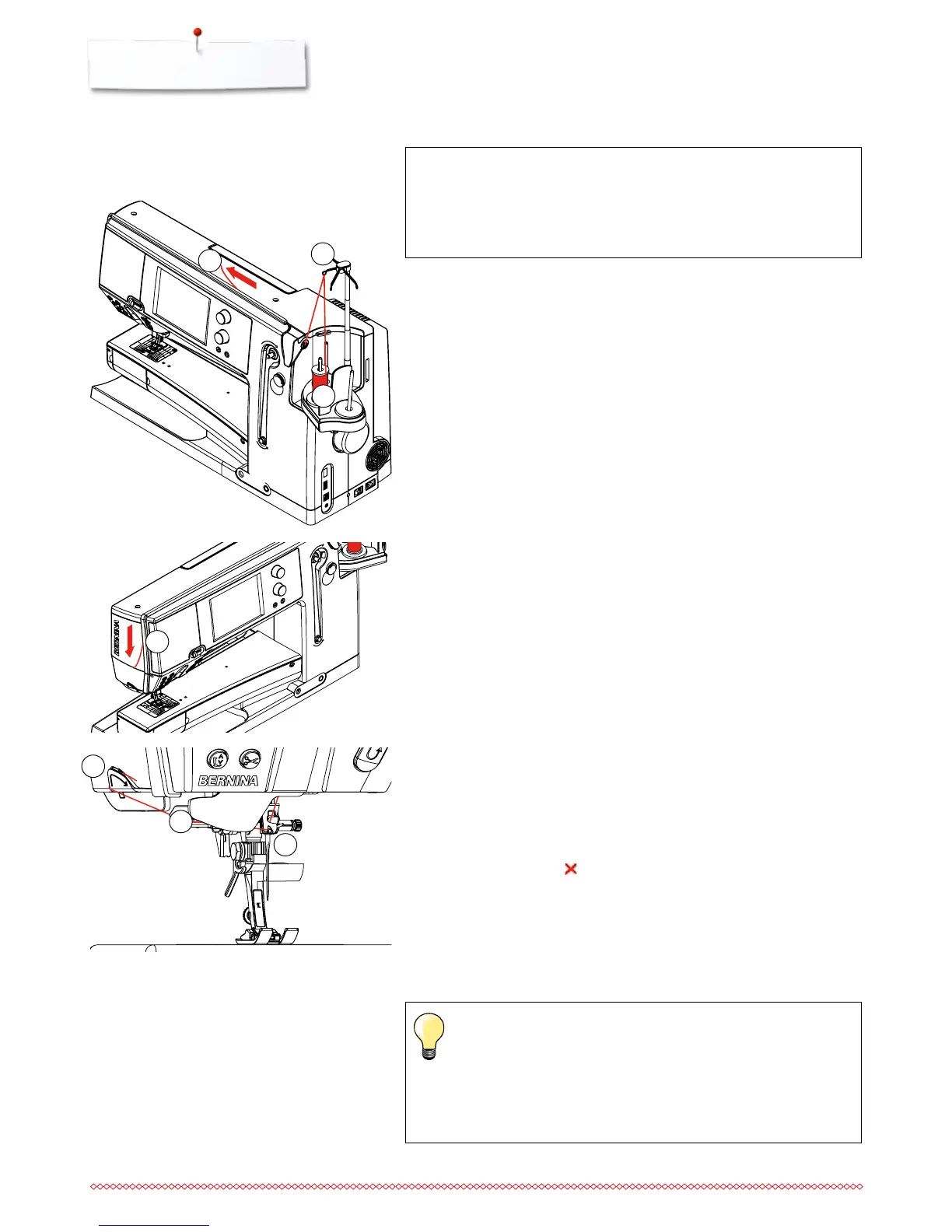
place thread spool on the rear or center spool pin 1
⦁
thread the corresponding guide 2 on the telescopic rod
⦁
hold with both hands and guide into the threading opening 3 of the sewing
computer until ...
when using unruly threads, slip the net over the upper thread
spool
large net for large spools, small net for small spools
this prevents the upper thread from slipping and gives an even
thread feed
place the thread(s) under the presser foot and to the back before
starting to sew
ATTENTION!
Do not start the threaded sewing-/embroidery computer if there
is no fabric on the stitch plate.
The sewing-/embroidery computer must be switched ON for
threading.
1
2
3
4
5
6
⦁
... taking it up to the thread guide in the needle clamp 4
⦁
then lead it to the left into the thread clamp 5 and pull it over the thread
cutter 6 from the back to the front
⦁
touch the «Automatic threader»-button
►
this will be indicated by a message and shown in an animation
►
during threading the «Start/Stop/hover»-button is illuminated red
►
if the thread has not been threaded correctly, an error message appears
⦁
close the message with and start again
►
if the thread has been threaded correctly the «Start/Stop/hover»-button is
illuminated green
Manual
⦁
follow the five first steps as described above
⦁
touch the «Manual threading»-icon in the Display
⦁
touch the «Automatic threading»-button, then thread the needle by hand
3



 To Next Page