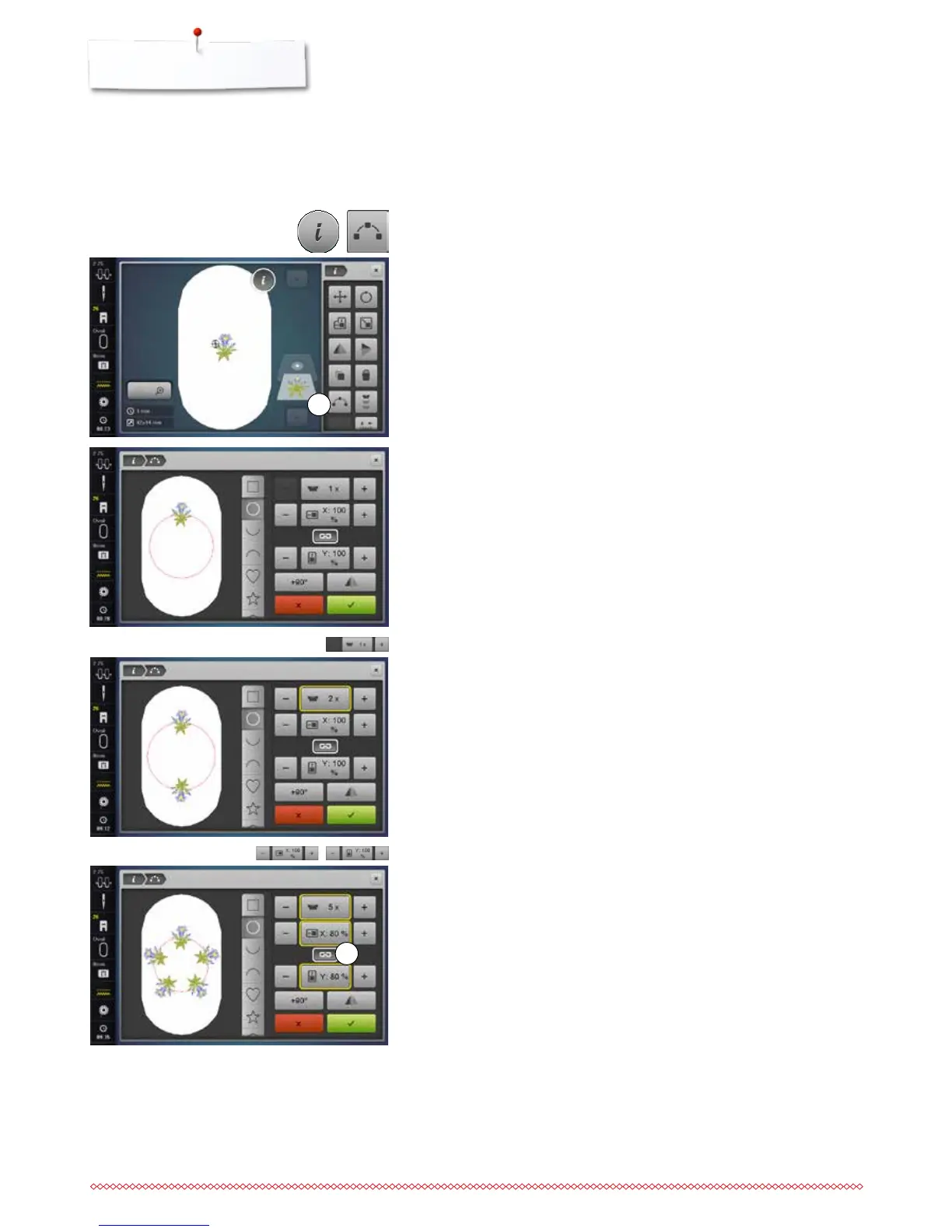
Shape designer
⦁
select the desired embroidery motif
⦁
select the desired hoop
⦁
touch the «i»-icon
⦁
touch the «Shape designer»-icon 1
Selecting the formation
Different formation shapes are available. By scrolling more shapes become
visible. The rectangular formation is active by default.
⦁
select the desired formation, e.g. circular formation
►
the motif is positioned on the circle line at the top in the center
Increasing/reducing the number of motifs
⦁
touch the «+»/«-»-icon with the finger or the Touchscreen pen or
⦁
turn the stitch width knob to the left or to the right
►
the number of motifs is increased/reduced
⦁
touch the yellow-framed icon in the center
►
the basic setting is reset
Altering the size of the formation shape
⦁
touch the «+»/«-»-icons with the finger or the Touchscreen pen
►
when icon 2 is activated, the size of the formation is enlarged/scaled down
proportionally
⦁
touch the yellow-framed icon in the center
►
the basic setting is reset
Motifs can be arranged in different default formations.
The embroidery motif can be placed anywhere with the finger or the
Touchscreen pen.
1
2



 To Next Page