Alarm
⦁
touch the «Clock»-icon
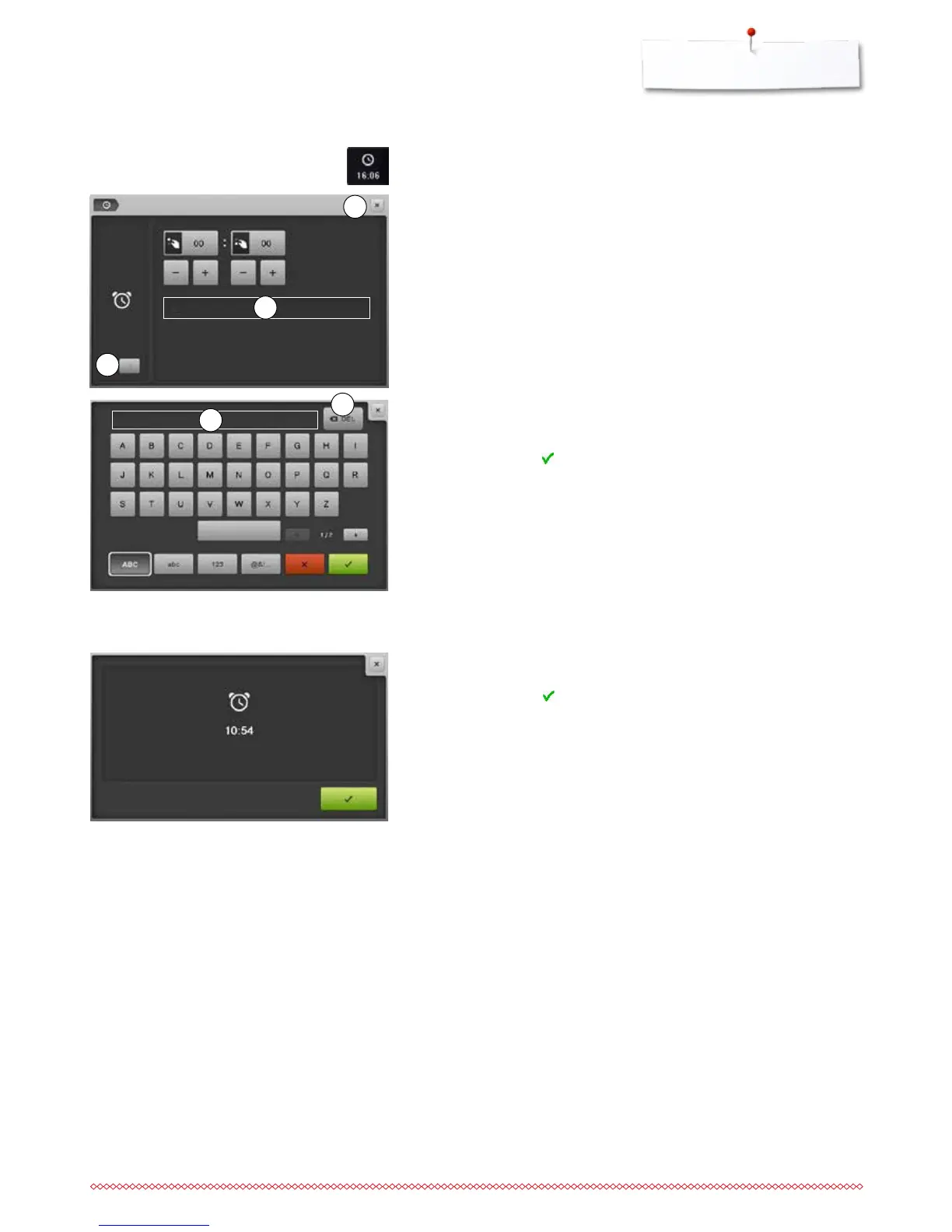
Setting the time of the alarm
By touching the icon 1 the input fields are activated or deactivated.
⦁
touch icon 1
⦁
turn stitch width or stitch length knob or
⦁
touch the «+»- or «-»-icon
►
the time of the alarm (hh:mm) is set
⦁
touch the text box 2
Alarm Display
When the entered time is due, the alarm Display appears.
⦁
confirm by touching
►
the alarm Display closes
Individual alarm message
⦁
create or edit the individual alarm message
►
the alarm message appears in the text box 3 above the keyboard
⦁
confirm by touching
⦁
touch the «Clock»- or «Close»-icon 5
►
the Display closes
►
the changed clock symbol indicates that an entry has been made
Deleting an alarm message
⦁
touch the text box 3
►
the entered text is deleted completely
Corrections
⦁
touch icon 4
►
the entered text is deleted from the right to the left
1
5
3
4
2



 To Next Page