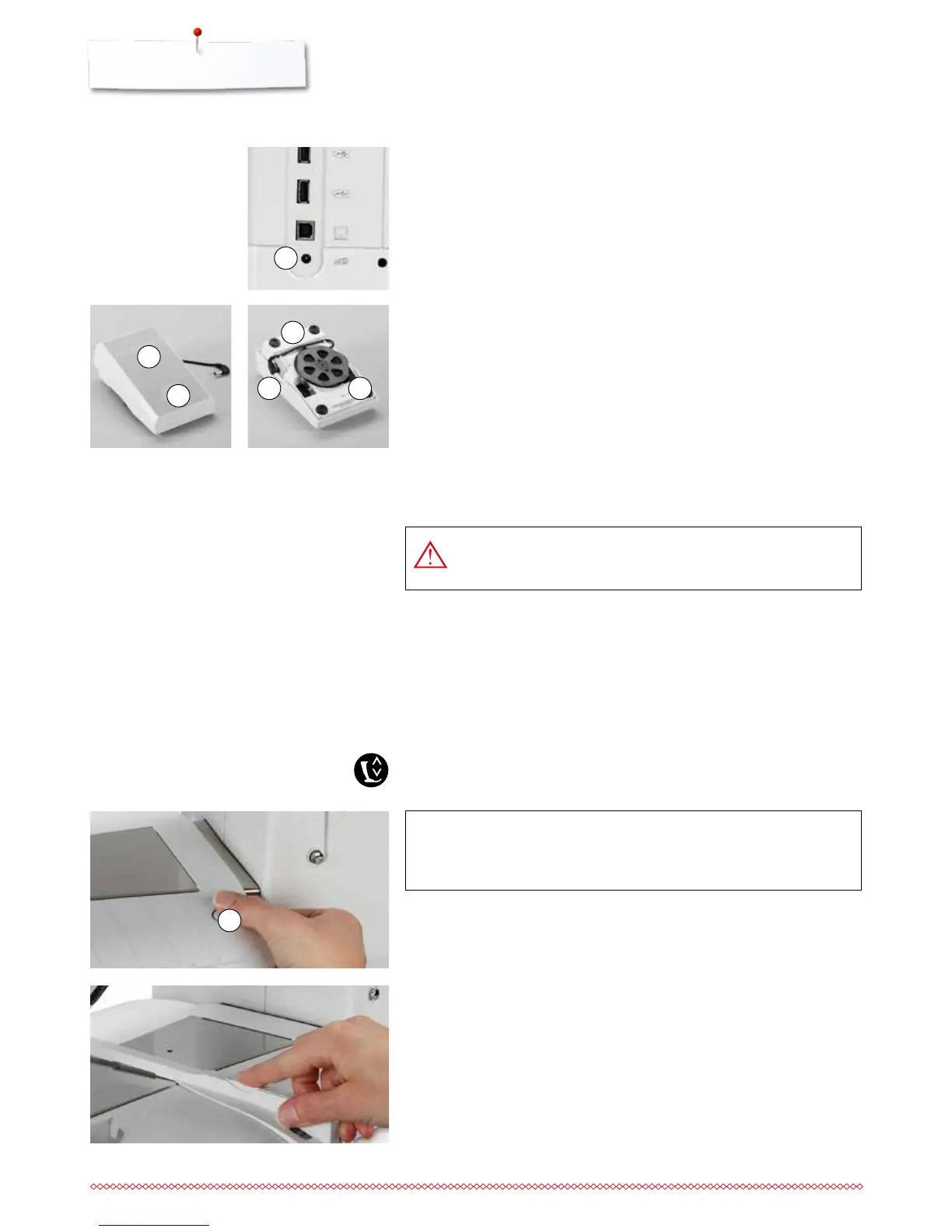
1
4
6 5
2
3
1
ATTENTION!
Remove the slide-on table only when bobbin cover is closed.
Connecting the foot control
⦁
unwind the cable
⦁
plug the cable in the outlet 1
⦁
unwind the cable to the desired length and slip into 4 or 5
Foot control
Sewing speed control
Control the sewing speed by pressing the foot control 2.
Raising or lowering the needle
⦁
sink the heel back 3 on the foot control
►
the needle adjusts the position up/down
In the Setup-Program additional functions for the «back heel kicking» can be
programmed.
Removing the foot control
⦁
wind the cable around the reel
⦁
plug cable into 6
USA/Canada only: Use only foot controller type LV-1 with
sewing computer B 880.
The slide-on table increases sewing surface.
Attaching the slide-on table
⦁
turn the handwheel or press the «Needle stop up/down»-button
(see page 15)
►
needle is raised
⦁
press «Presser Foot lift»-button
►
presser foot is raised
⦁
slide table to the right, over the free arm until it engages
Slide-on table
Seam guide
⦁
press the release button and insert into the groove (underside of table) from
left or right
Can be moved over the entire table length.
Removing the slide-on table
⦁
raise the needle and presser foot
⦁
press button 1 down
⦁
pull slide-on table to the left



 To Next Page