!
36 ATOMLAB 500 DOSE CALIBRATOR
Determining Dial Value Adjustments
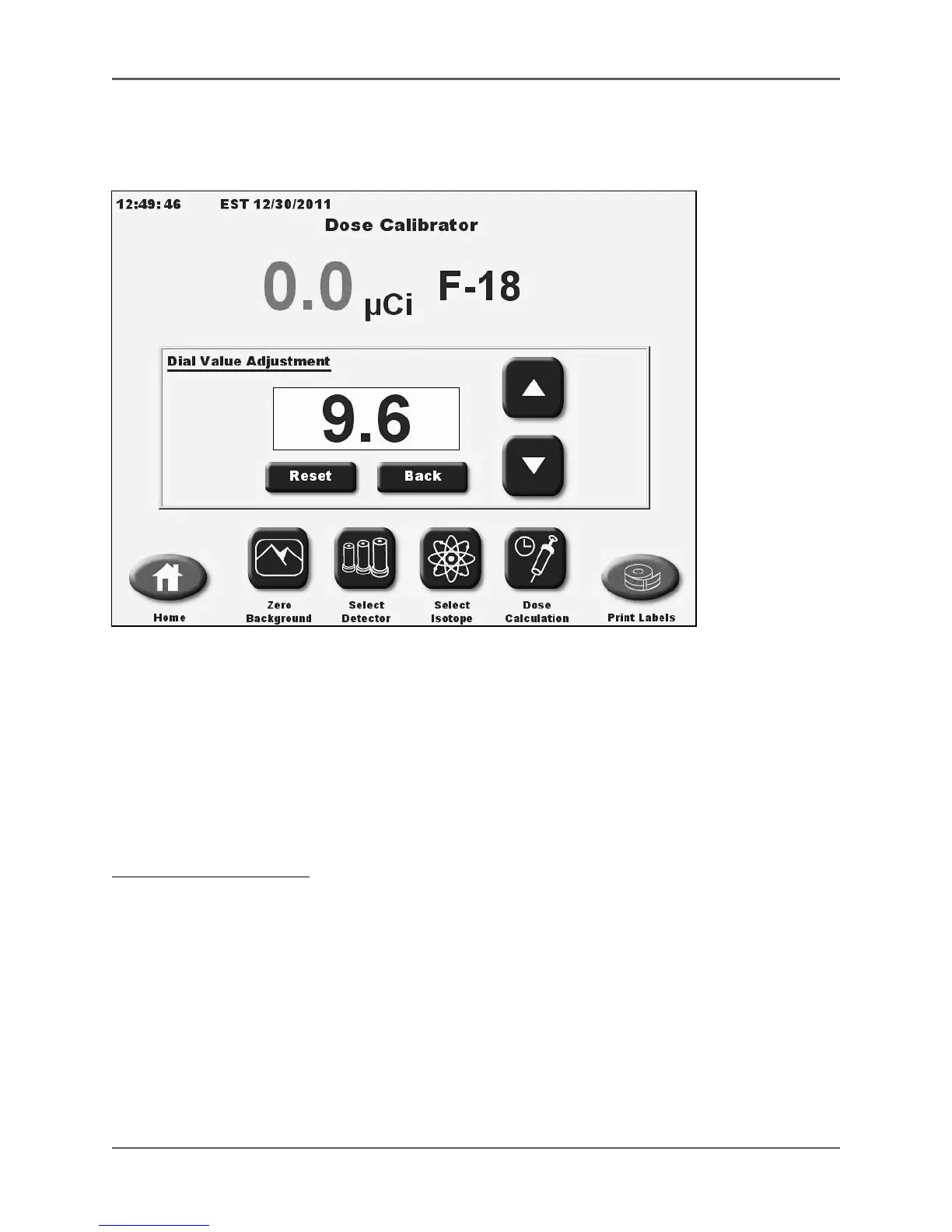
(See Figure 3.9).
Figure 3.9. The Dial Value Adjustment screen.
The dial value adjustment screen allows the user to easily determine a modified dial value for an
isotope when a sample of a known activity is available. This adjustment is ideal for Beta
isotope samples that come in different configurations from different pharmacies. The user can
determine the proper dial value for the specific syringe or vial that is being used. Note that the wall
thickness and material can greatly affect the activity for a Beta sample.
This screen is also helpful if modifying the F-18 dial setting for a NIST traceable Ge-68/F-18
source. It can also be used for determining the dial value of any other isotope.
To Adjust The Dial Value:
1. From the measurement screen, touch the displayed isotope name next to the activity
measurement. The dial value adjustment screen is displayed.
2. Place the known activity isotope sample into the detector. The activity is displayed on the
screen.
3. Use the <▲> and <▼> arrows to increase or decrease the dial value setting. Holding the
button increases the scroll speed.
4. When the live activity reading matches the known activity of the sample, the dial value
displayed is the dial value that should be used for this isotope and container configuration.
NOTE: Write down the dial value you have determined before exiting this screen as the dial
value will not be saved. !



 To Next Page