!
178 ATOMLAB 500 DOSE CALIBRATOR
Lineator Test
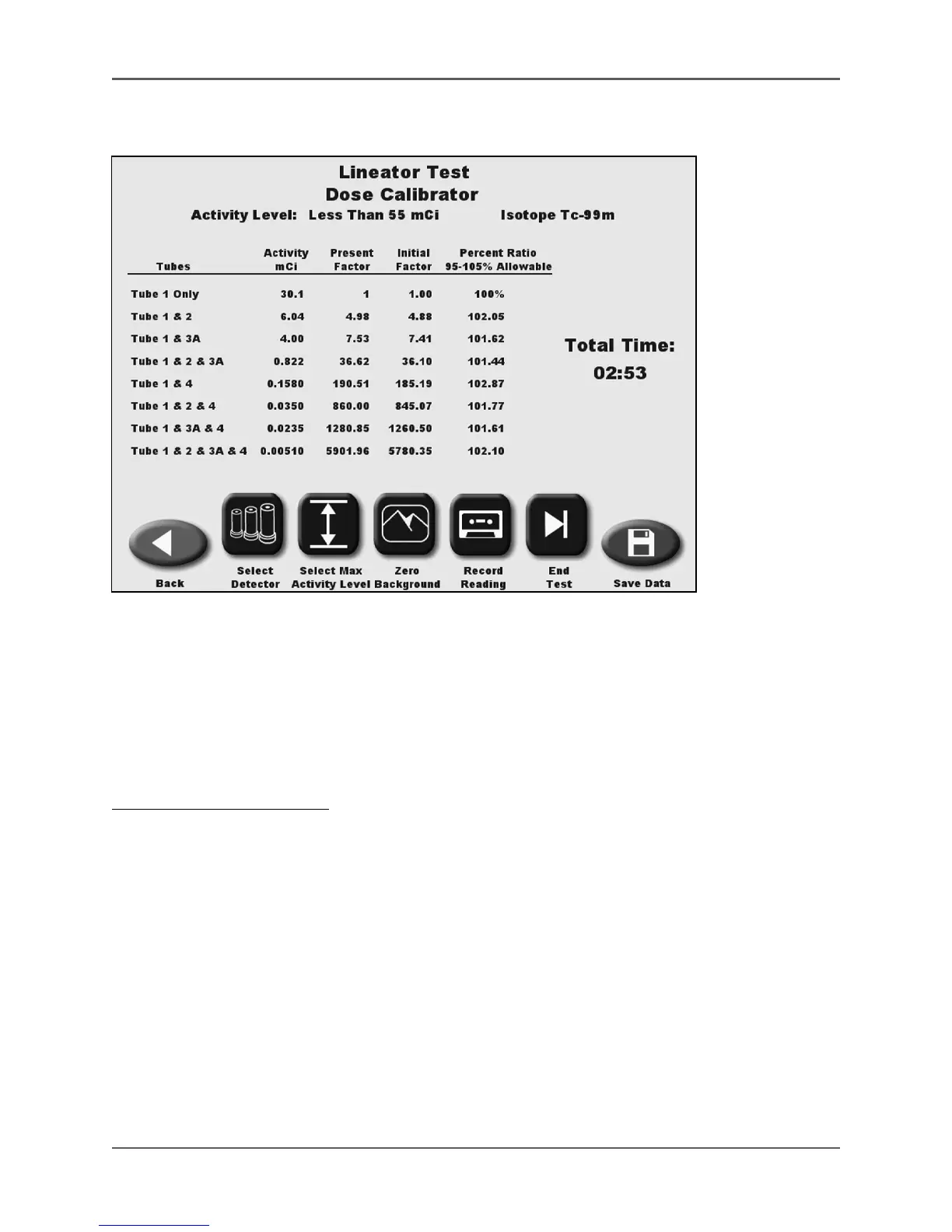
(See Figure 6.48 - 6.49.)
Figure 6.48. The Lineator Test screen.
The Lineator Test is performed with this dose calibrator after the initial factors for the Lineator
function have been taken and saved. The Lineator Test is a comparison of the initial factors with
the current factors.
The Linearity Test should be performed at installation and at least quarterly thereafter. The Atomlab
500 system allows recording of two linearity tests, one less than 55 mCi and one greater than
55 mCi. linearity should be within + or - 5%.
To Perform A Linearity Test:
1. From the QA Dose Calibrator menu, touch <Linearity Testing>. The Linearity Testing
screen
is displayed.
2. Touch <Lineator Test>. The Lineator Test screen is now displayed.
• Touch <Back> to return to the Linearity Testing screen.
• Touch <Select Detector> to select a different detector, if multiple detectors are connected.
• Touch <Select Max Activity Level> to toggle between maximum activities of less than 55
mCi and greater than 55 mCi.
NOTE: The system defaults to less than 55 mCi. If your test starts with an activity greater than
55 mCi you must select this range.
• Touch <Zero Background> to zero the background reading if necessary.
NOTE: The starting activity used for the Linearity Test should be a similar activity to the Initial
Linearity Test.



 To Next Page