!
Biodex Medical Systems, Inc. © 2016 87
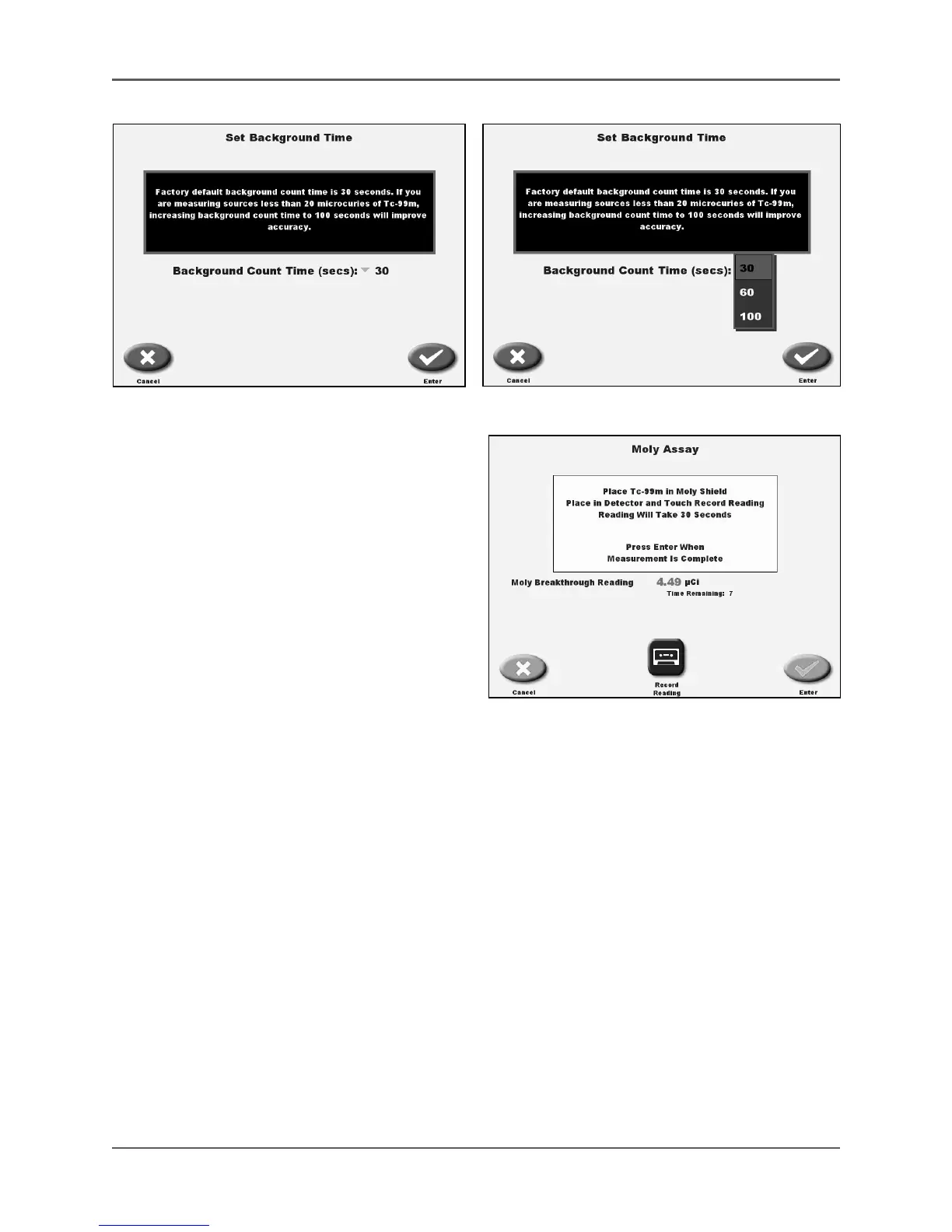
Figure 5.4. Set Background Time screen. Figure 5.5. Set Background Time.
NOTE: You must perform a Mo-99 background
count using the empty Moly Shield before
performing a Moly Assay.
6. Select <Zero Background> to begin a
background count time lasting 30, 60 or
100 seconds depending on what you have
selected for your background time.
NOTE: You must perform a Mo-99
background count using the empty Moly
Shield before performing a Moly Assay.
7. Select <Enter> to record the Moly
backkground.
8. Place the vial or syringe of Tc-99m into theMoly Shield and place it into the detector.
9. Press <Record Reading>. The system will prompt you to wait 30 seconds for the activity
reading.
NOTE: You can press <Record Reading> to recount the Moly if desired.
10. Press <Enter> to return to the Moly Assay screen to count the vial or syringe of Tc-99m
without the Moly Shield.
11. Remove the Tc-99m vial or syringe from the Moly Shield and place a vial or syringe into the
detector.
12. Touch <Record Reading> to record the Tc-99m activity. The Moly Assay Results screen is
now displayed giving the Moly concentration of µCi Mo/mCi Tc-99m.
Figure 5.6. The Moly Assay Reading screen with Moly
Assay activity displayed.



 To Next Page