P1 Patient Monitor User’s Manual
8-24
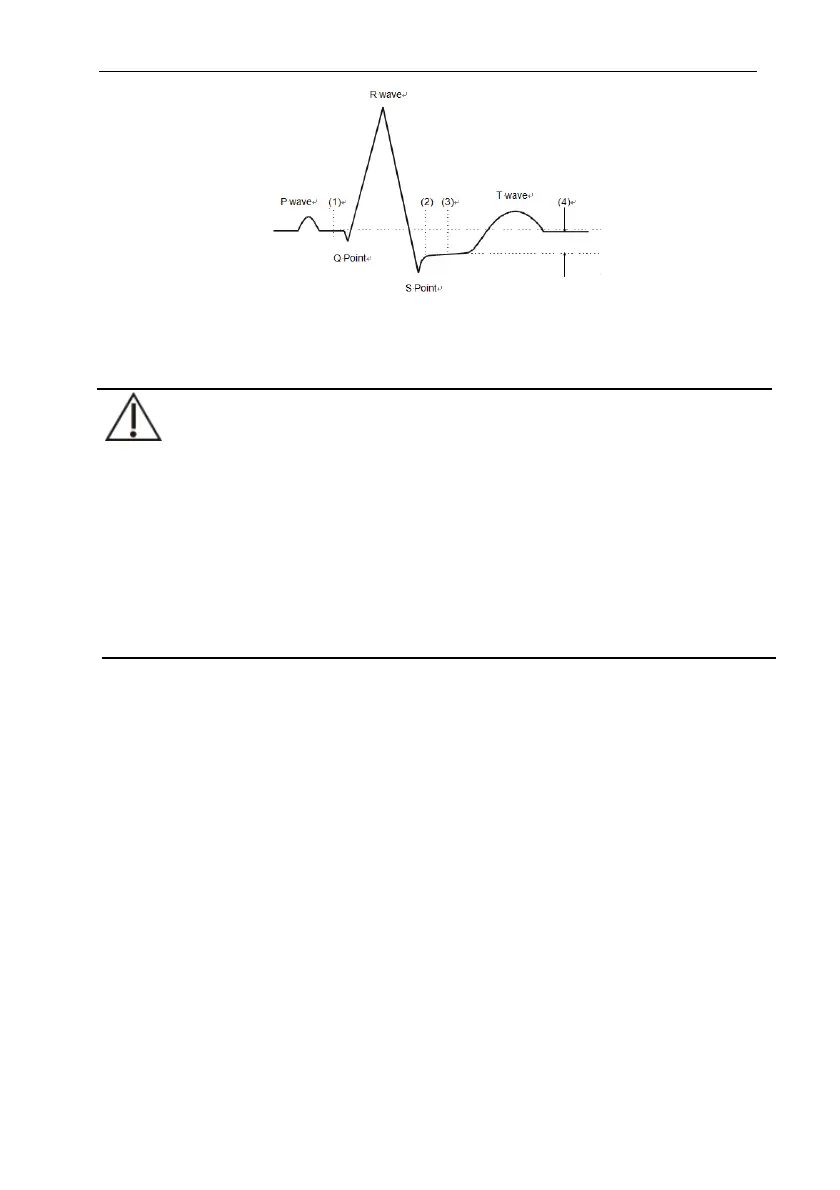
(1) ISO Baseline Point (2) J Point (3)ST Measurement Point (4) ST Value
8.7.9.2. Setting ST Point, J Point and ISO Point
CAUTION:
When you start monitoring or the patient's heart rate or ECG waveform has
obvious changes, it may affect the length of QT interval, thus affecting the
position of ST points, so the positions of ISO and ST points need to be adjusted.
Incorrect setting of ISO point or ST point may lead to false ST segment
depression or elevation. Please always ensure that the location of ST
measurement point is suitable for the patients under monitoring.
The steps for setting ST, J and ISO points are as follows:
1. Select ECG parameter area, waveform area, ST parameter area or ST
waveform area to enter 【ECG】 menu.
2. Select 【ST】 submenu【Adjust】submenu.
3. Select 【ST Point】 to set the position of ST Point.
The setting of 【Auto Adjust】 defines the method of adjusting the ISO point and J
point. When the 【Auto Adjust】 switch is turned on, the module automatically adjusts
the positions of ISO and J points according to the current waveform. When the 【Auto
Adjust】 switch is off, you can manually adjust the positions of 【ISO】 and 【J】
through “+” and “-”.
The ISO point (isoelectric) position is given relative to the R-wave peak.
Position the ISO point in the middle of the flattest part of the baseline
(between the P and Q waves).



 To Next Page