P1 Patient Monitor User’s Manual
12-4
Manual: Manually start a NIBP measurement.
Auto: The monitor automatically and repeatedly performs NIBP
measurements at set intervals.
STAT:
With 5 minutes, the measurement is continuously performed, and then
the monitor returns to the original mode.
Sequence:
The monitor measures automatically according to the set cycle
length and interval.
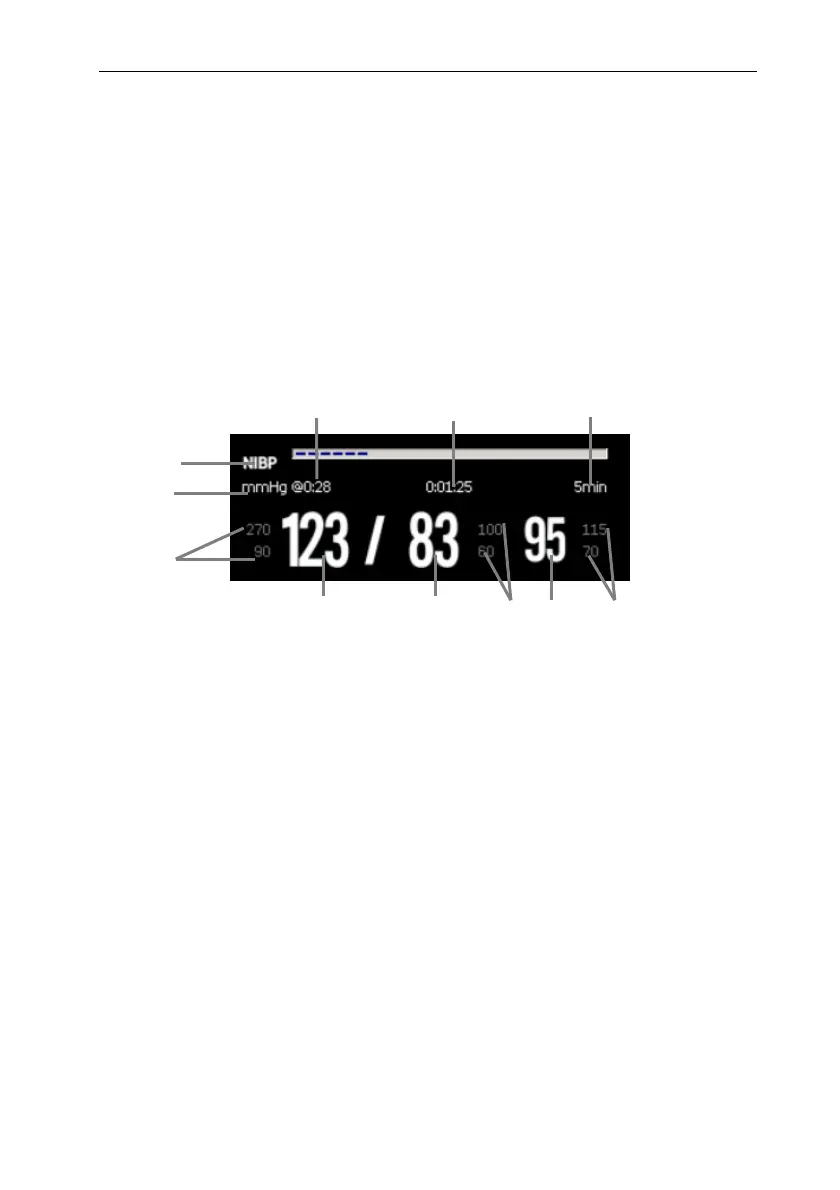
12.5. NIBP Display
(1) Parameter Label
(2) NIBP Unit: mmHg or kPa
(3) The last NIBP measurement time
(4) Time to the next measurement (for Auto mode and Sequence only).
(5) Measurement mode: The measurement interval time is displayed during
Auto NIBP
measurement, and the current measurement period and measurement interval time are
displayed during Sequence measurement.
(6) Mean pressure alarm limit
(7) Mean pressure (displayed after measurement completed) or cuff pressure (displayed
during the measurement)
(8) Diastolic pressure alarm limit
(9) Diastolic pressure
(10) Systolic pressure
(11) Systolic pressure
alarm limit
1
4
5
11
3
2
10 9
8
7
6



 To Next Page