P1 Patient Monitor User’s Manual
12-7
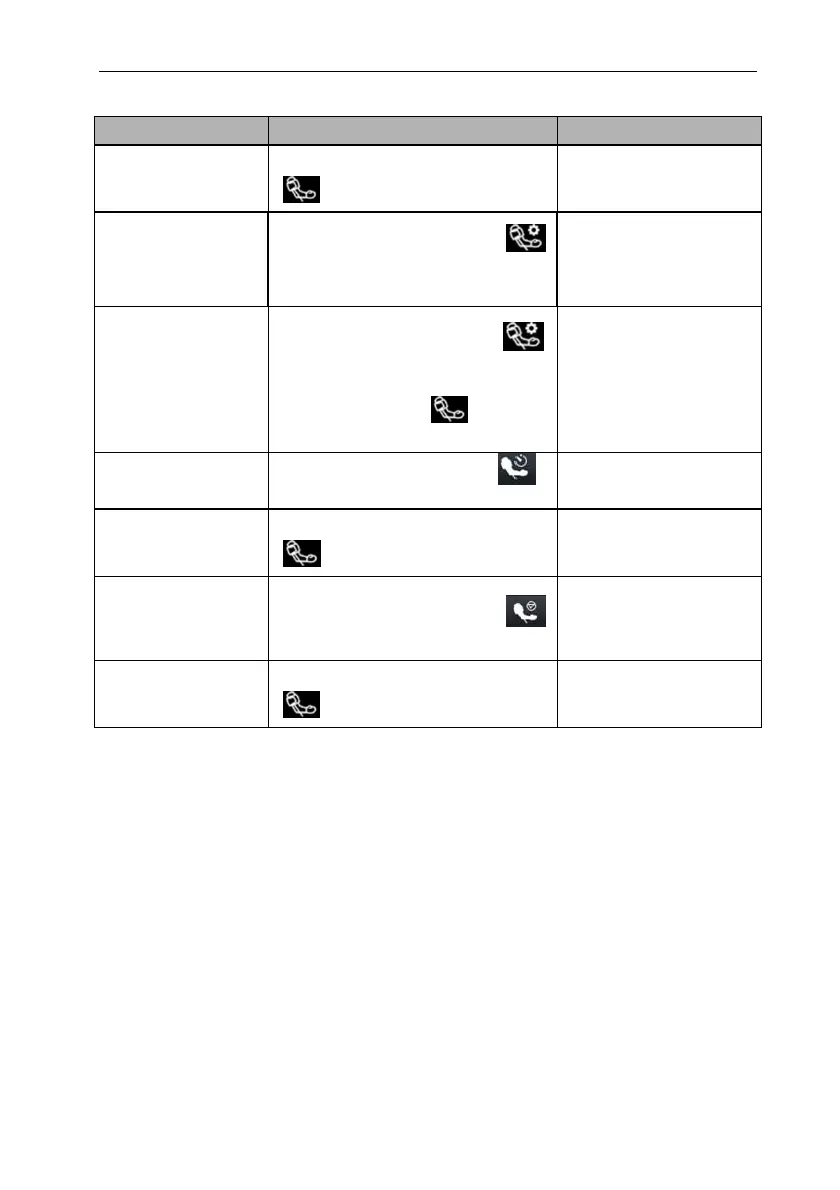
NIBP menu:
Task Via quick key Via NIBP menu
Start a manual
measurement
Select【NIBP Start/Stop】quick key
Select【Start】
NIBP Auto
measurement
Select【NIBP Measure】quick key
Select interval time
Select【Setup】
submenuset【Interval
Time】
NIBPSequence
measurement
Select【NIBP Measure】quick key
Select
【
Sequence
】
Select【NIBP
Start/Stop】quick key
Select【Sequence】
submenuset NIBP
Sequence
measurementSelect
【Start】
Start STAT
measurement
Select【NIBP STAT】quick key
Select【STAT】
Stop the current NIBP
measurements
Select【NIBP Start/Stop】quick key
Select【Stop】
End Auto NIBP or
Sequence
measurement
Select【NIBP Stop All】quick key
Select【Stop All】
Stop STAT
measurement
Select【NIBP Start/Stop】quick key
Select【Stop】or 【Stop All】
12.8. Viewing the Dynamic blood pressure analysis
Dynamic blood pressure analysis can intuitively understand the patient’s blood
pressure changes and distribution over a period of time. The steps of viewing the dynamic
blood pressure analysis are as below:
1. Select the NIBP parameter area to enter the【NIBP】menu.
2. Select【Analysis】submenu.
12.9. NIBP Settings
12.9.1. Setting the NIBP Alarm
To set the NIBP alarm properties, follow this procedure:



 To Next Page