P1 Patient Monitor User’s Manual
10-4
SpO
2
and also partially indicates the signal quality.
Above 1 is optimal;
Between 0.3 and 1 is acceptable;
Below 0.3 indicates low perfusion. When 0.3≤PI<1, the PI values will be
displayed in yellow background; PI<0.3, PI values will be displayed in red
background, and SpO
2
parameter values are displayed as hollow words.
Reposition the SpO
2
sensor or find a better site. If low perfusion persists,
choose another method to measure oxygen saturation if possible.
(5) Pulse rate: the number of pulses detected per minute (from the pleth waveform)
(6) ∆Sp
:
∆Sp
|
Sp
|
For Masimo module
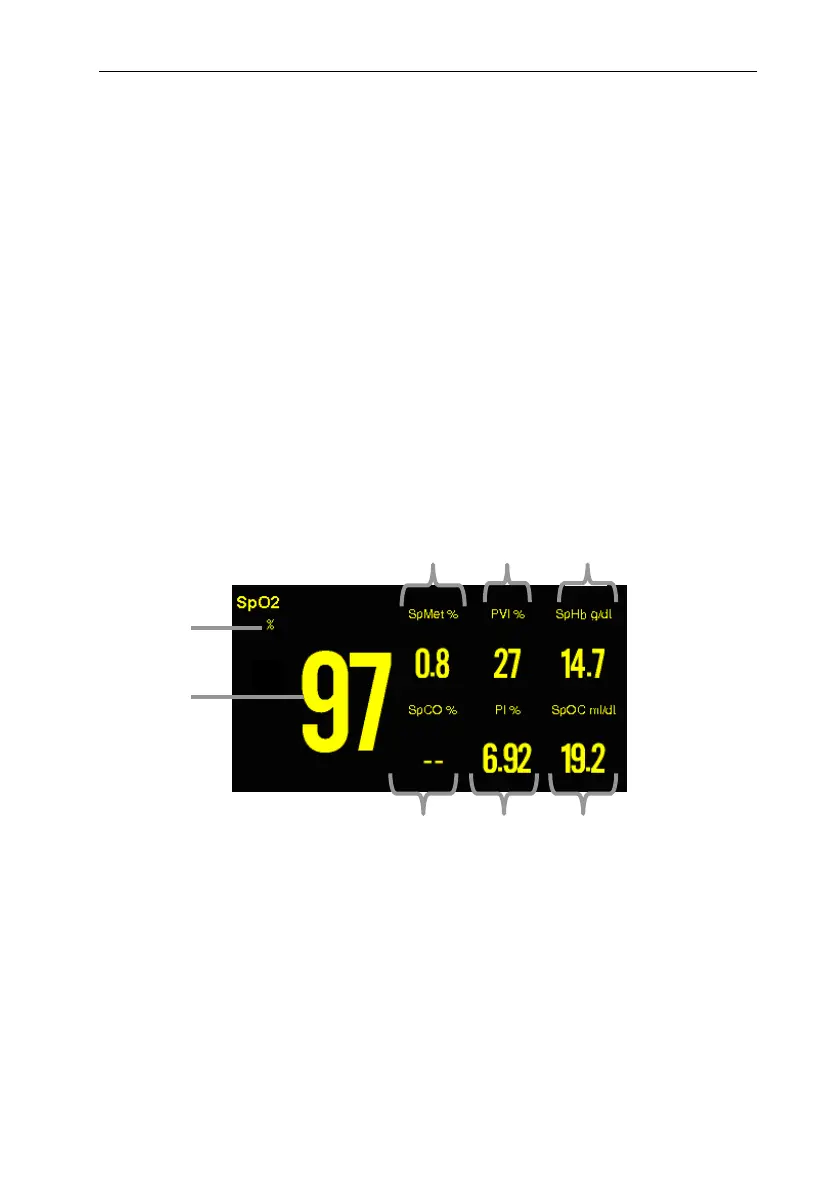
The Masimo module is intended to monitor the SpO
2
, SpMet, PVI, SpHb, SpOC, PI,
SpCO of patients. The following figure shows the SpO
2
display screen, the display on
your monitor may be looked slightly different.
1. SpO
2
value;
2. SpO
2
unit;
3. SpMet (Methemoglobin Saturation) value and unit;
4. PVI (Pleth Variability Index) value and unit;
5. SpHb (Total Hemoglobin) value and unit;
6. SpOC (Oxygen Content) value and unit;
7. PI (Perfusion Index) value and unit;
8. SpCO (Carboxyhemoglobin Saturation) value and unit.
678
2
3 4 5
1



 To Next Page