P1 Patient Monitor User’s Manual
54
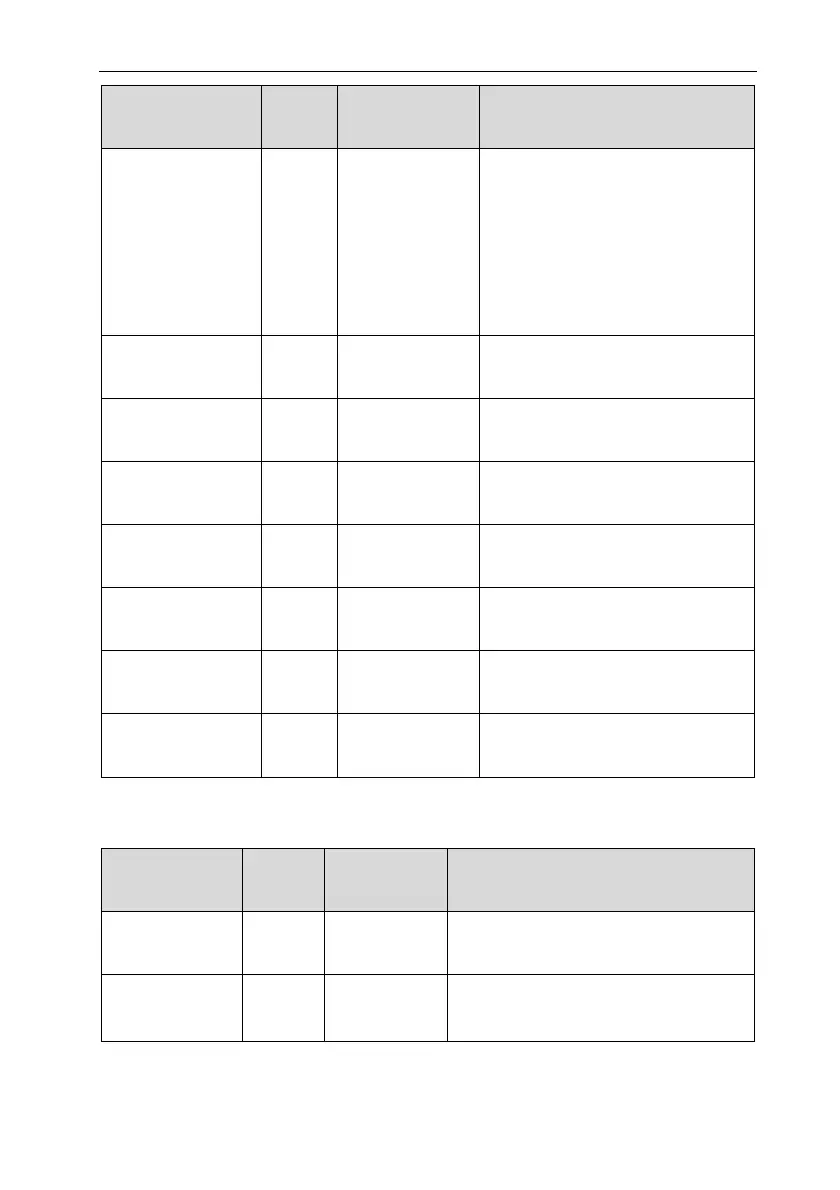
Alarm messages
Default
priority
Alarm clear
method
Cause and solution
connection between the SpO
2
sensor and the SpO
2
main cable
falls off. Confirm that SpO
2
main
cable and sensor are connected
normally. If the alarm still cannot
be eliminated, replace the sensor.
SpO
2
Low
Confidence
Low Not clearable PI<0.3% or signal quality <60.
SpO
2
Update
Timeout
Low Not clearable 25s SpO
2
measurement data not
updated.
SpO
2
Motion
Interference
Low Not clearable Patients move too much, affecting
measurement.
SpO
2
Searching Pulse Prompt
/ SpO
2
module is searching for
pulse.
SpO
2
Sensor
Incompatible
Med Not clearable
Non-factory SpO
2
sensor are used.
Please replace the original sensor.
SpO
2
Sensor Has
Expired
Med Not clearable
SpO
2
sensor has expired. Please
replace the sensor.
SpO
2
Sensor is A
out
to Expire
Prompt /
SpO
2
sensor is about to expire.
Please replace the sensor in time.
D.2.5 TEMP Technical Alarm
Alarm messages
Default
priority
Alarm clear
method
Cause and solution
TEMP Self-test
Error
Med Not clearable
Board failure. Please contact the
manufacturer for repair.
〈TEMP label〉
Sensor Off
Med
Completely
clear
Check the connection of the sensor and
reconnect the sensor.



 To Next Page