info@biopac.com
support@biopac.com
www.biopac.com
BIOPAC Hardware | STIMULATORS MP3X | Page 2 - 9 Updated: 2.27.2013
Also called —
Pulse frequency
Repetition rate
Events per second
Pulse rate (Hz) = 1000 / Repetition period (milliseconds)
Pulse Repetition
Use when referring to either Pulse rate or Pulse period.
Pulse level
The amplitude of the pulse, expressed in Volts.
The output of the BSLSTM is 0 Volts when the pulse is not active.
Number of pulses
The number of successive pulses that will be sent out at the selected Pulse
Width, Pulse Rate, or Pulse Period, and Pulse Level.
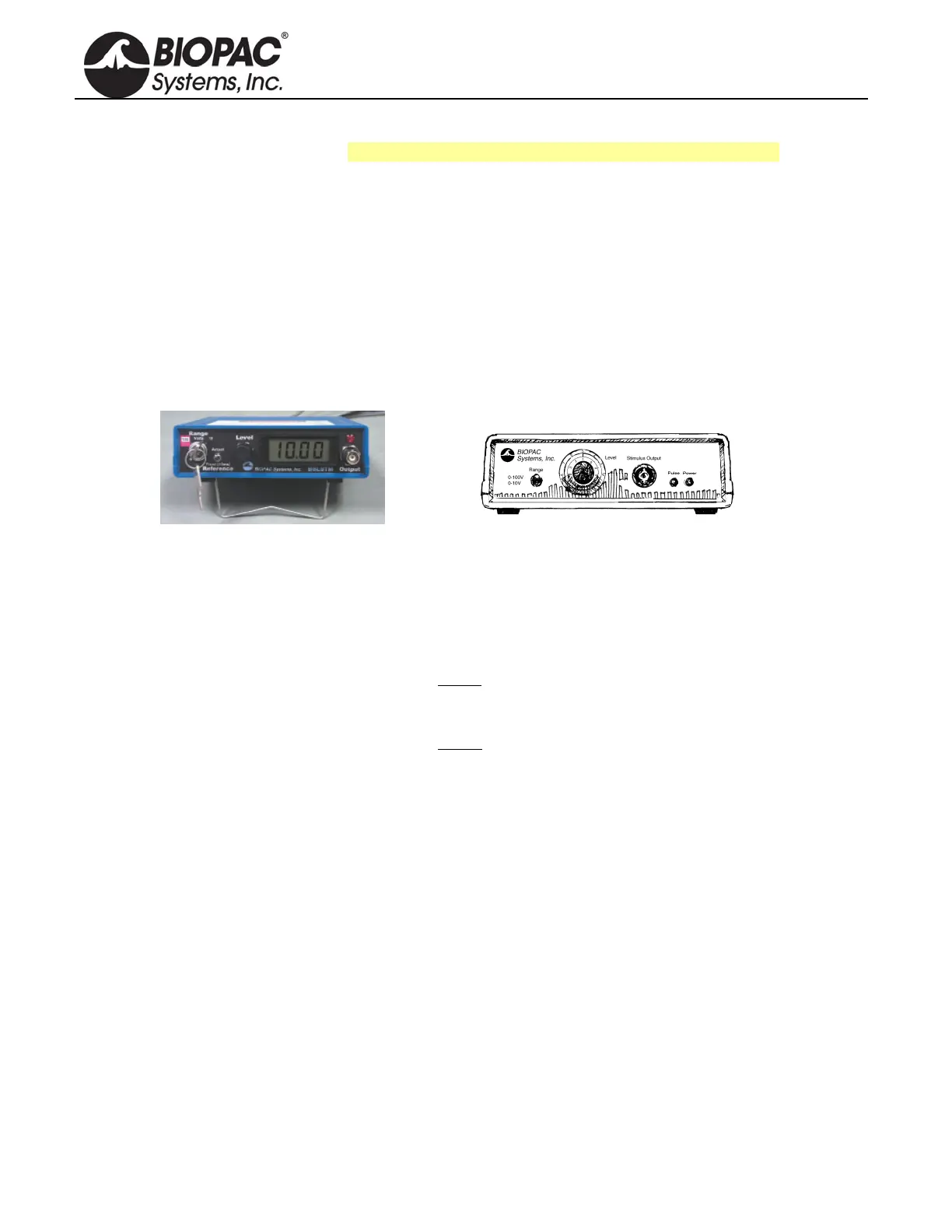
FRONT PANEL TERMINOLOGY
BSLSTMA/B — Digital Display & Keyed Switch BSLSTM — Dial Reading & Flip Switch
Range control
Establishes the stimulus pulse output level range in Volts (0-10 Volts or 0-100 Volts).
BSLSTMA/B key control: Turn right to select a range of 0-10 Volts.
Turn left to select a range of 0-100 Volts.
Remove the key for added safety and control.
BSLSTM switch control: Flip down to select a range of 0-10 Volts.
Flip up to select a range of 0-100 Volts.
If the Range is changed before
recording begins, the Preset must also be
changed (under the “Setup channels” option of the MP3X menu) in order to
maintain direct Level recordings.
If the Range is changed during
recording, the user should manually enter a
software marker to note the change (by holding down F9 on a PC or Esc key on
a Mac). The pulse Level could then be determined by (mentally) moving the
decimal place to the right or left, depending on how the Range was changed.
Reference
BSLSTMA/B only: Refers to the pulse width of the signal on the Reference Output (on
the back panel).
Actual reflects the actual output width.
Fixed (15 ms) establishes a pulse width of 15 ms, regardless of the actual
pulse width.
The Reference control only affects the pulse width; in either case, the pulse level reflects
the actual output level.
Level
Level is used in conjunction with Range to set the stimulus pulse output level.
BSLSTMA/B digital display: Turn the Level control (right to increase, left to decrease)
to establish the desired Level, as indicated on the digital display.
BSLSTM knob dial: The Level knob has a “Major scale” and a “Minor scale” which
indicate the voltage level as shown below:
Range switch Major scale Minor scale
0-10V Volts Volt / 10
0-100V Volts x 10 Volts
Turning the Level knob clockwise increases the voltage level, and turning it
counterclockwise decreases the voltage. In the following close-up of the Level knob, the


 To Next Page