info@biopac.com
support@biopac.com
www.biopac.com
BIOPAC Hardware | SS25LA | Page 1 - 2 Updated: 8.12.2013
SS25LA HAND DYNAMOMETER
Use the hand dynamometer to measure grip force—use in isolation
or combine with EMG recordings for in-depth studies of muscular
activity. The lightweight, ergonomically designed transducer
provides direct readings in kilograms or pounds. The simple
calibration procedure makes this device easy to use for precise force
measurements, and the isometric design improves experiment
repeatability and accuracy. The SS25LA is a basic unit, designed for
student lessons; it can also be used in the MRI, with proper module
setup, since it employs plastics in the spring constant.
The highest performance dynamometer is TSD121C, which employs
a four terminal, laser-trimmed, wheatstone bridge built onto
metal elements.
Hardware Setup
Connect the SS25LA Simple Sensor to a CH input on the front panel of an MP3X unit.
Proper grip: Place the palm across the shorter bar and wrap fingers to center the force.
Scaling — Software Setup for the MP3X
1) Select Set Up
Channels under the MP3
X
m
e
nu and enable
one analog ch
annel.
2) Select the des
ired Clench Force Pres
et (kg or lbs, the example to the
right is shown in units of kg.)
3) Click on the Setup button.
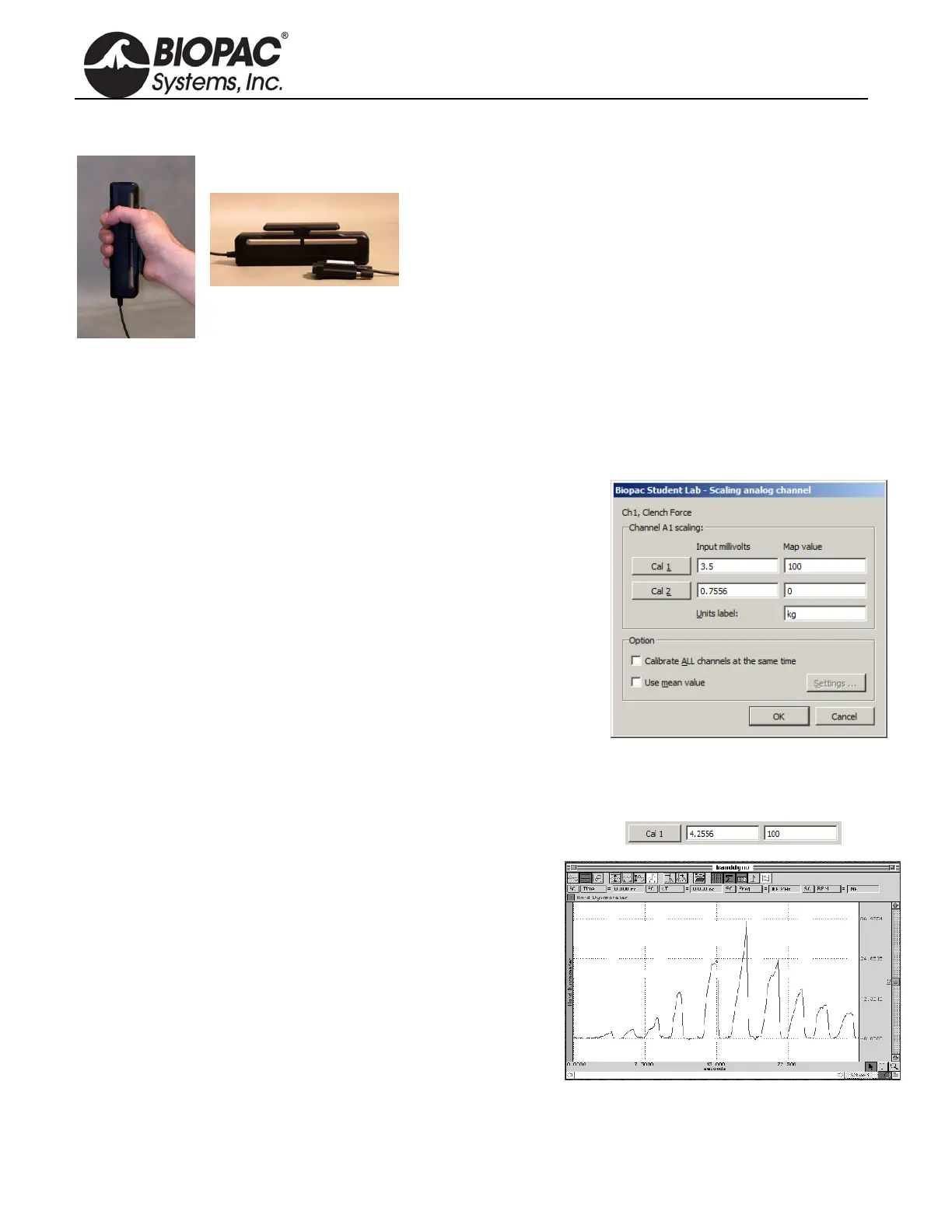
4) Click on the Scaling button to activate a dialog box similar to the one
shown at right.
5) In the Map value column, note the default scaling of “0” for Cal2 and
“100” for Cal1. These represent 0 and 100 kilograms, respectively.
6) Place the SS25LA on a flat surface.
7) Click the Cal2 button to obtain an initial calibration reading. A value similar to the above example “0.7556”
will appear.
8) To obtain the Cal1 input value, add the Cal2 input value to the default Cal1 3.5 mV per 100 kg value.
(In this example, this value would be 0.7556 mV + 3.5 mV = 4.2556 mV.)
NOTE: The above instructions are for BSL 4 and higher. In
BSL 3.7.7 and earlier, placement of the CAL1 and
CAL2 scale values are reversed.
Calibration Confirmation
a) Click “Start” to begin data acquisition.
b) Place the SS25LA on a flat surface and then place a known
weight on the uppermost portion of the grip.
c) Review the data to confirm that the known weight is reflected
accurately in the data (sample at right).
d) Adjust the Scaling parameters and repeat steps a-c as necessary.


 To Next Page