info@biopac.com
support@biopac.com
www.biopac.com
BIOPAC Hardware | NIBP Systems | Page 4 - 8 Updated: 6.7.2013
SOFTWARE SETUP (AcqKnowledge 4.1 and higher)
1. Launch AcqKnowledge
2. Select the “Create/Record a new experiment” option.
3. Select MP150 > Set Up Channels > “Add New Module...”
a. From the new module list, select UIM100C-A1 (or whichever channel CBL150-PRE pressure
cable is connected to) and click “Add.”
b. From the UIM100C Transducer list, select “NIBP200A – Small Animal Tail BP, Pressure” or
“NIBP250 – Small Animal Tail BP, Pressure” and click OK.
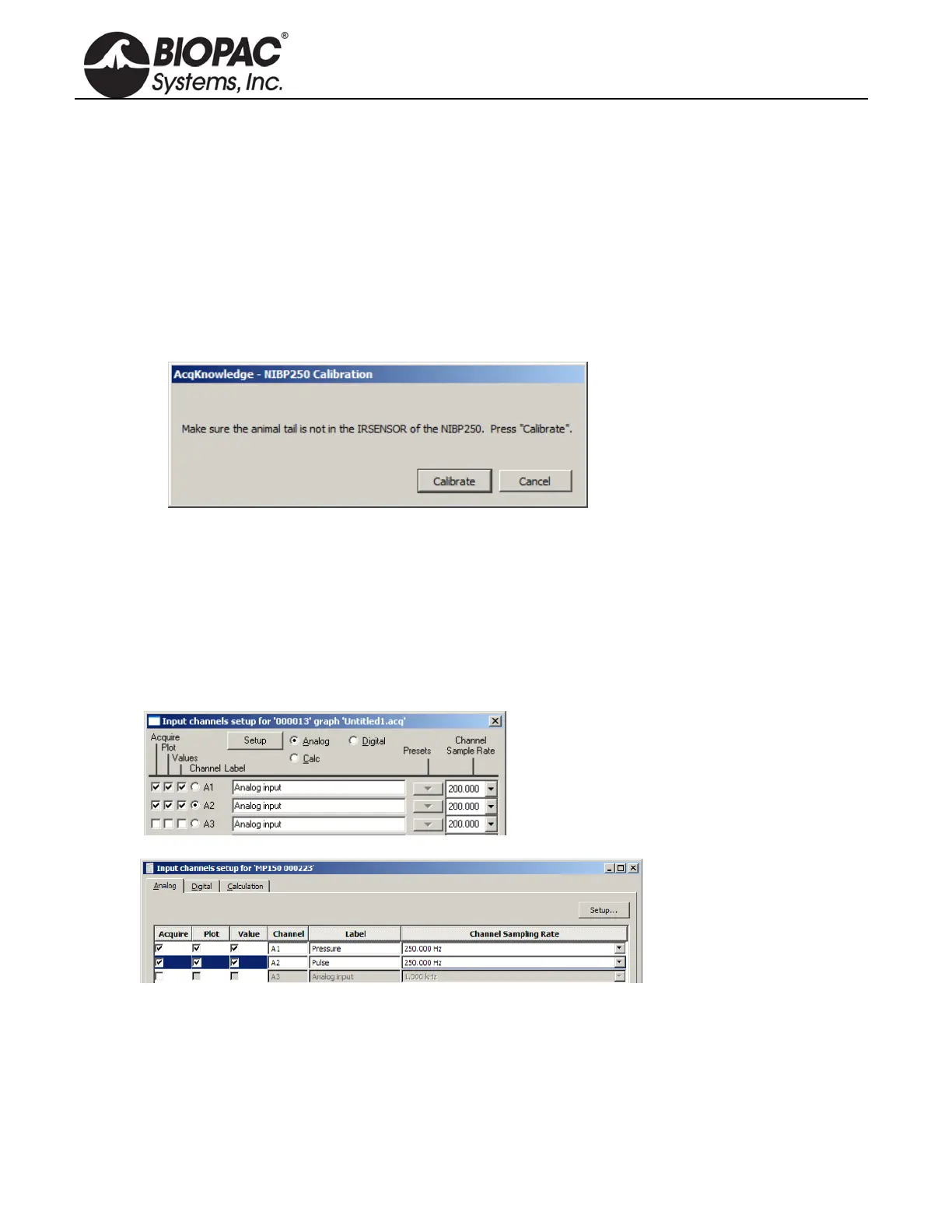
c. Click “Calibrate” in the resulting Calibration dialog.
4. Repeat “Add New Module…” portion of Step 3.
a. From the new module list, select UIM100C-A2 (or whichever channel CBL150-PLS pulse cable
is connected to) and click “Add.”
b. From the UIM100C Transducer list, select “NIBP200A – Small Animal Tail BP, Pulse” or
“NIBP250 – Small Animal Tail, Pulse” and click OK.
SOFTWARE SETUP (AcqKnowle
dge 4.0 and earlier)
1. Launch the BIOPAC software.
2. Choose MP menu > Set up Channels.
or
3. Enable analog inputs A1 and A2 to Acquire Data, Plot on Screen and Enable Value Display.
If desired, enter channel Labels: A1 Pressure and A2 Pulse
4. Calibrate for the pressure measurement of IRSENSOR.
a. Select A1 (Pressure) and click Setup and establish these settings:


 To Next Page