info@biopac.com
support@biopac.com
www.biopac.com
BIOPAC Hardware | NIBP Systems | Page 6 - 8 Updated: 6.7.2013
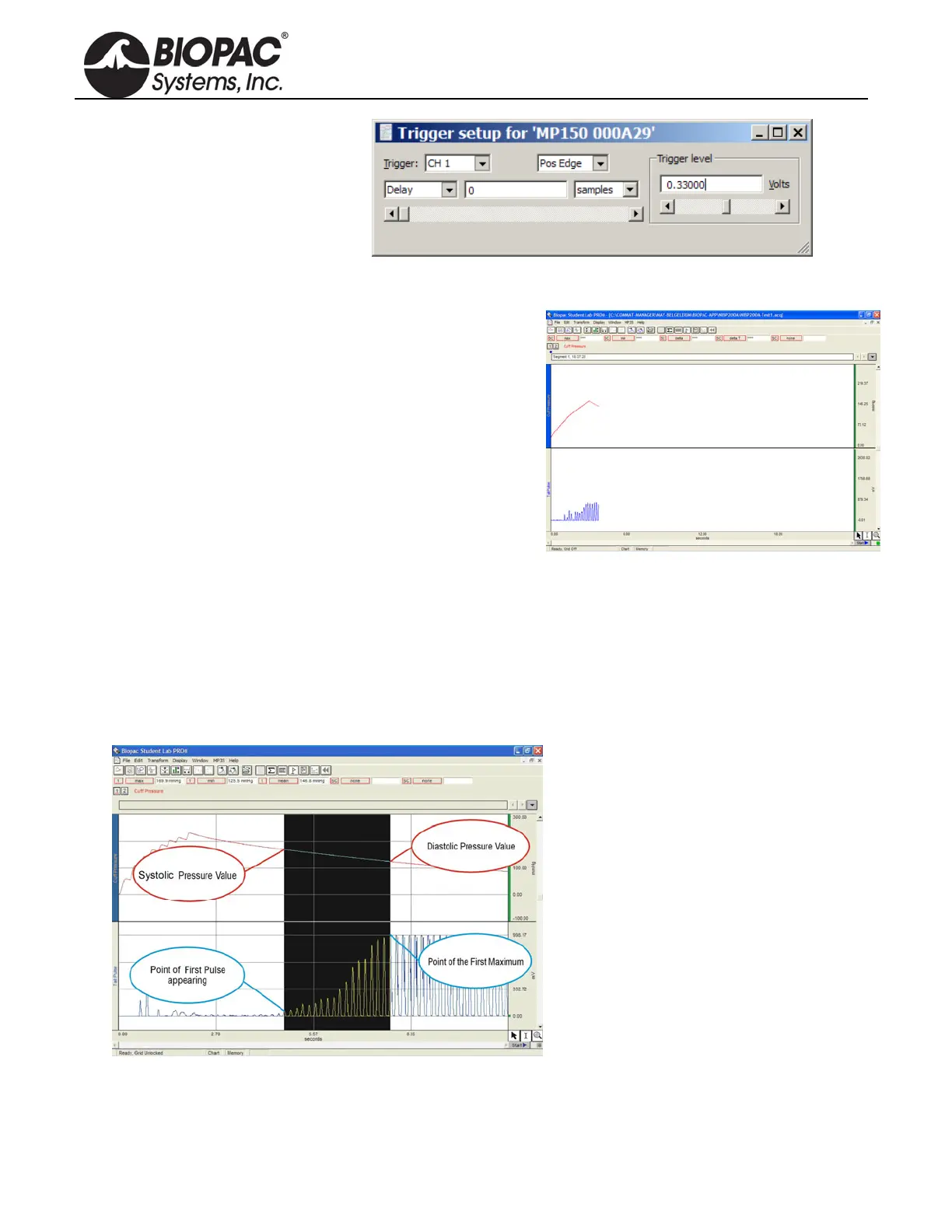
Source = CH 1
Pos Edge
Trigger Level = 0.33
(based on 1 V ≈ 100 mmHg)
Delay = 0
9. Close out of Set up Triggering.
RECORDING
1. Confirm that the animal is ready and that the
IRSENSOR is attached to the tail.
2. Click “Start” in the BIOPAC software window.
3. Press START button on the front panel of NIBP200A.
IRSENSOR will pum
p up the Cuff automatically.
When the Cuff Pressure on A1 reaches 30 mmHg,
the cuff pressure and tail pulse signals will be
generated.
The recording will stop automatically after 24
seconds.
4. Press START to continue with the next measurement
and repeat as necessary.
5. Choose File > Save or Save as when done.
TIP A generally accepted application is that for each animal, 10 measurements are recorded and
mean values are calculated. In the append mode, 10 consecutive measurements can be made
in the same file.
NIBP200A ANALYSIS
Calculation
of Systolic, Diastolic and Mean.
1. Click the Calculation Label.
2. Select from the list Max , Min, Mean for three different Labels.
3. Select Channel 1 as channel option.
4. Select cursor ‘I’ from the cursor option on the bottom right of the screen.


 To Next Page