Math 90
Window Applications and Characteristics
Rectangle
These are normally used when the signal is transient (completely contained in the time-
domain window) or known to have a fundamental frequency component that is an integer
multiple of the fundamental frequency of the window. Signals other than these types will
show varying amounts of spectral leakage and scallop loss, which can be corrected by
selecting another type of window.
Hanning
These reduce leakage and improve amplitude accuracy.
However, frequency resolution is also reduced.
Hamming
These reduce leakage and improve amplitude accuracy. However, frequency resolution is also
reduced.
Flat Top
This window provides excellent amplitude accuracy with moderate reduction of leakage, but
with reduced frequency resolution.
Blackman It reduces the leakage to a minimum, but with reduced frequency resolution.
Table 9.2 FFT Window
• Press the Auto set softkey to automatically set the appropriate parameters for the FFT measurement.
• Press the Display softkey to select Split, Full Screen or Exclusive display mode.
Split: Time domain waveform and frequency domain waveform are displayed separately. The time domain wave-
form is on the upper half screen, while the frequency domain waveform is located within the lower half of the
display. In Split mode, if Zoom is enabled, the zoom waveform and the frequency domain waveform are displayed
on the lower half screen together.
Full Screen: Time-domain waveform and frequency-domain waveform are displayed together.
Exclusive: Only the frequency-domain waveform is displayed.
• Press the Mode softkey to select Normal, Max-Hold or Average. When you select Average, it is necessary to
set the average times.
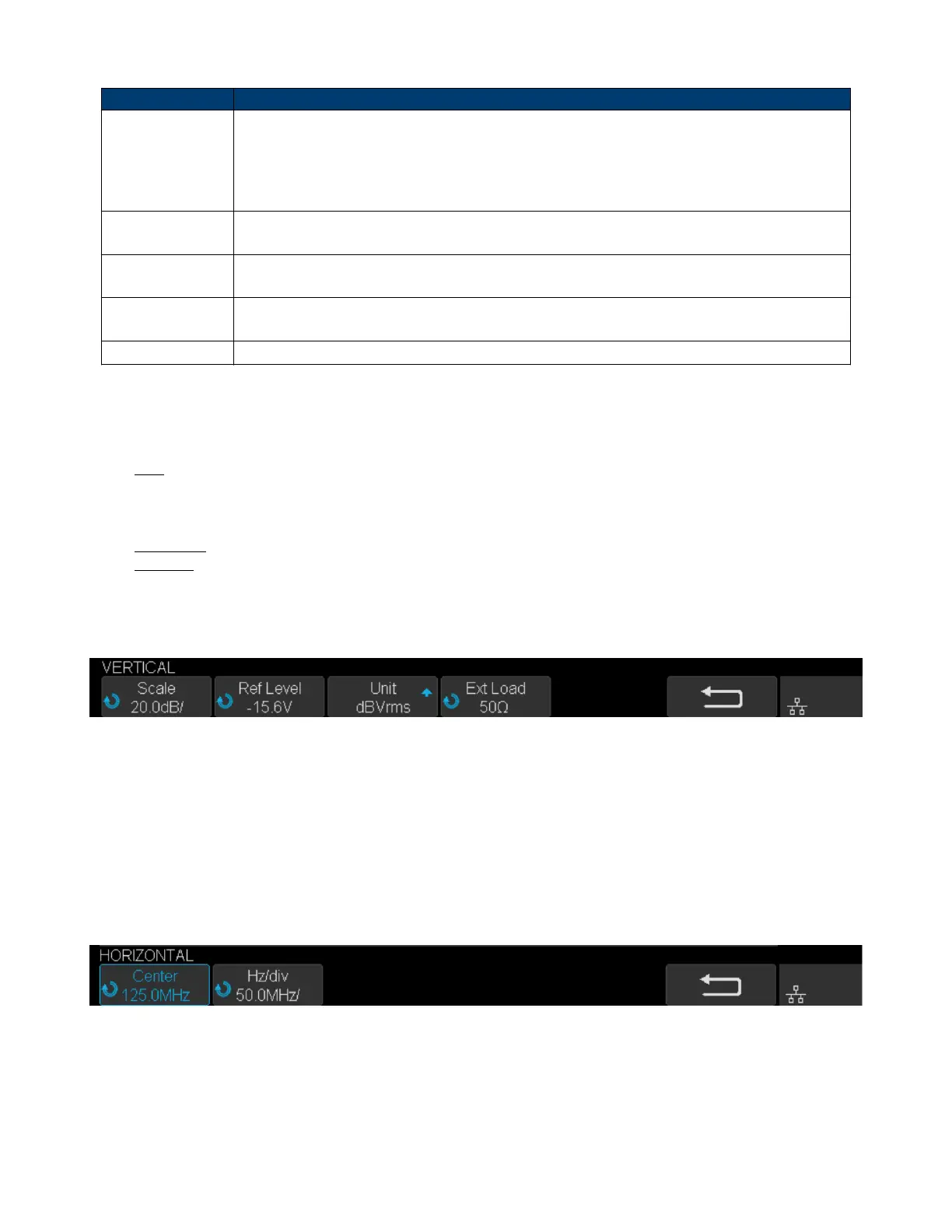
5. Press the Vertical softkey to enter VERTICAL menu.
Figure 9.5 Vertical Menu
• Press the Scale softkey, and then turn the Universal Knob to select the desired vertical FFT scale
• Press the Ref Level softkey, and then turn the Universal Knob to select the desired vertical FFT oset.
• Press the Unit softkey to select the unit of vertical axis. The units of the vertical axis can be dBVrms, dBm,
Vrms or dBArms, Arms, which use a logarithmic scale or a linear scale to display vertical amplitude respectively.
• Press the Ext Lode softkey and then turn the Universal Knob to select the external load value.
5. Press the Horizontal softkey to enter HORIZONTAL menu.
Figure 9.6 Horizontal Menu
• Press the Center softkey, and then turn the Universal Knob to select the desired center frequency.
• Press the Hz/div softkey, and then turn the Universal Knob to select the desired resolution frequency.













 To Next Page