102
Playing
Back
on
a
TV
Screen
1.
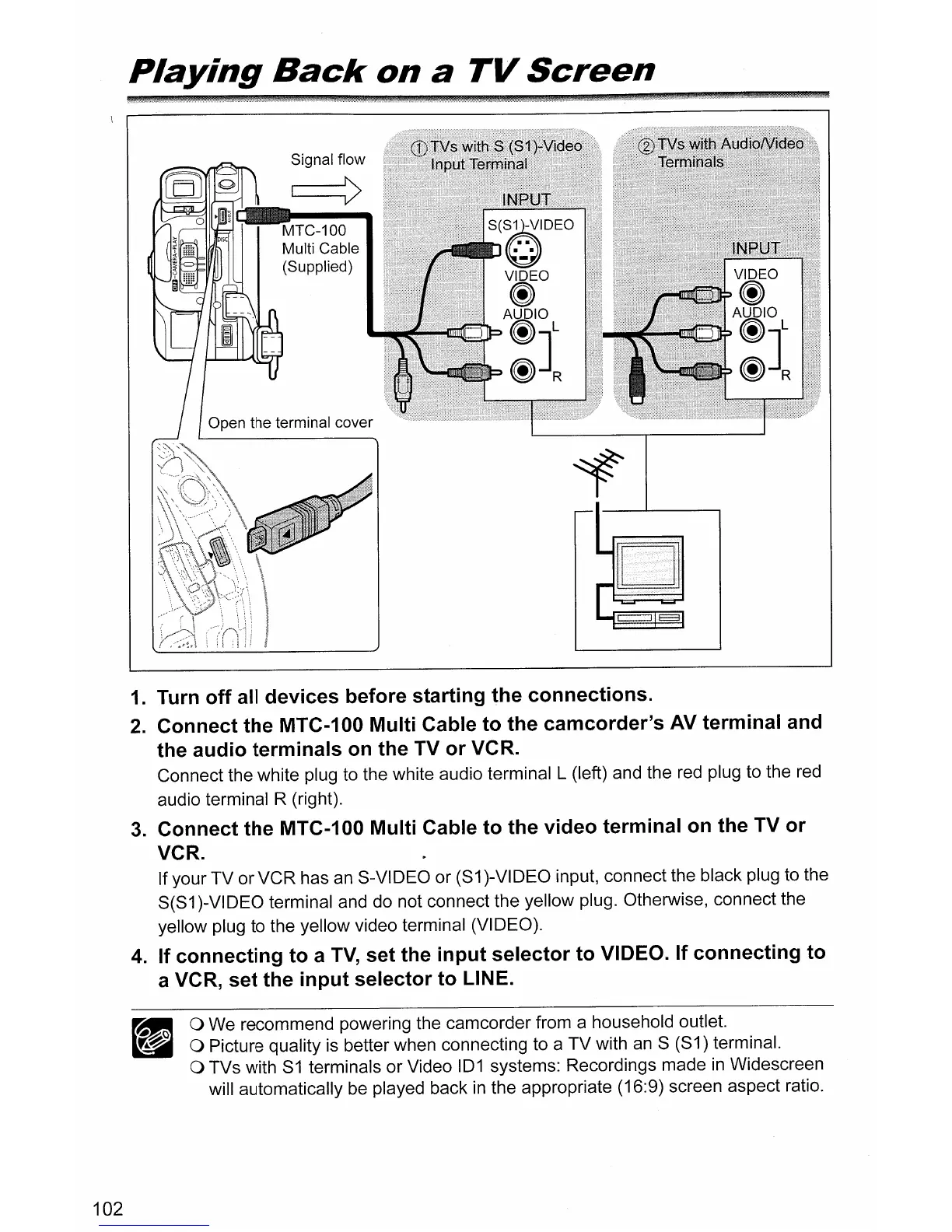
Turn off all devices before starting the connections.
2.
Connect the MTC-100 Multi Cable to the camcorder's
AV
terminal and
the audio terminals
on
the TV or VCR.
Connect the white plug to the white audio terminal L (left) and the
red
plug to the
red
audio terminal R (right).
3.
Connect the MTC-100 Multi Cable to the video terminal
on
the TV or
VCR.
If your TV or VCR has
an
8-VIDEO or (81 )-VIDEO input, connect the black plug to the
8(81 )-VIDEO terminal and do not connect the yellow plug. Otherwise, connect the
yellow plug to the yellow video terminal (VIDEO).
4.
If connecting to a
TV,
set the input selector to VIDEO. If connecting to
a VCR, set the input selector to LINE.
o We recommend powering the camcorder from a household outlet.
o Picture quality is better when connecting to a TV with
an
8 (81) terminal.
o TVs with
81
terminals or Video
101
systems: Recordings made
in
Widescreen
will automatically be played back
in
the appropriate (16:9) screen aspect ratio.



 To Next Page