EasyManua.ls Logo

Canon DC20 - Adjusting the Volume

Canon DC20
200 pages
Print Icon
To Next Page IconTo Next Page
To Previous Page IconTo Previous Page
Loading...
.
kX;'QMM
Adjusting
the
Volume
- -~
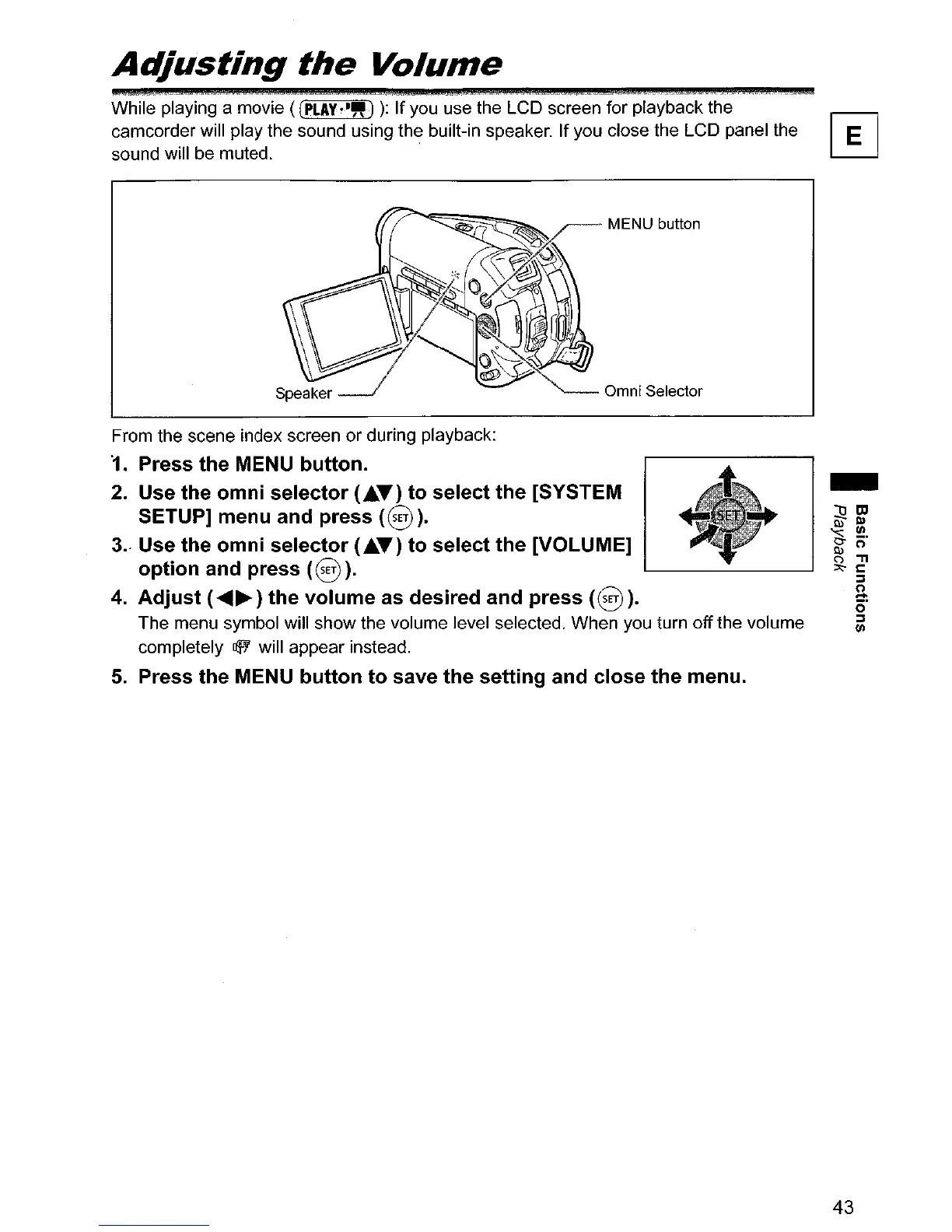
While playing a movie
«(PLAY'~")
):
If
you use the LCD screen for playback the
camcorder will play the sound using the built-in speaker. If you close the LCD panel the
sound will be muted.
From the scene index screen or during playback:
'1.
Press
the
MENU button.
2. Use the
omni
selector
(.T)
to
select
the
[SYSTEM
SETUP] menu and press
(8).
3.<
Use the
omni
selector
(.T)
to
select
the
[VOLUME]
option
and press
(8).
4.
Adjust
(
.........
)
the
volume
as desired and
press
(8
).
The menu symbol will show the volume level selected. When you turn off the volume
completely
lIjo/
will appear instead.
5.
Press
the
MENU
button
to
save
the
setting
and
close
the
menu.
-
43

Table of Contents

Other manuals for Canon DC20

Related product manuals