Available
Settings
List
(MENU)
Available menu items vary depending on the operation mode. Default settings are
in
boldface text. For details on each function, see the reference page. Functions without a
reference page are explained below the tables.
~CAMERA
SETUP
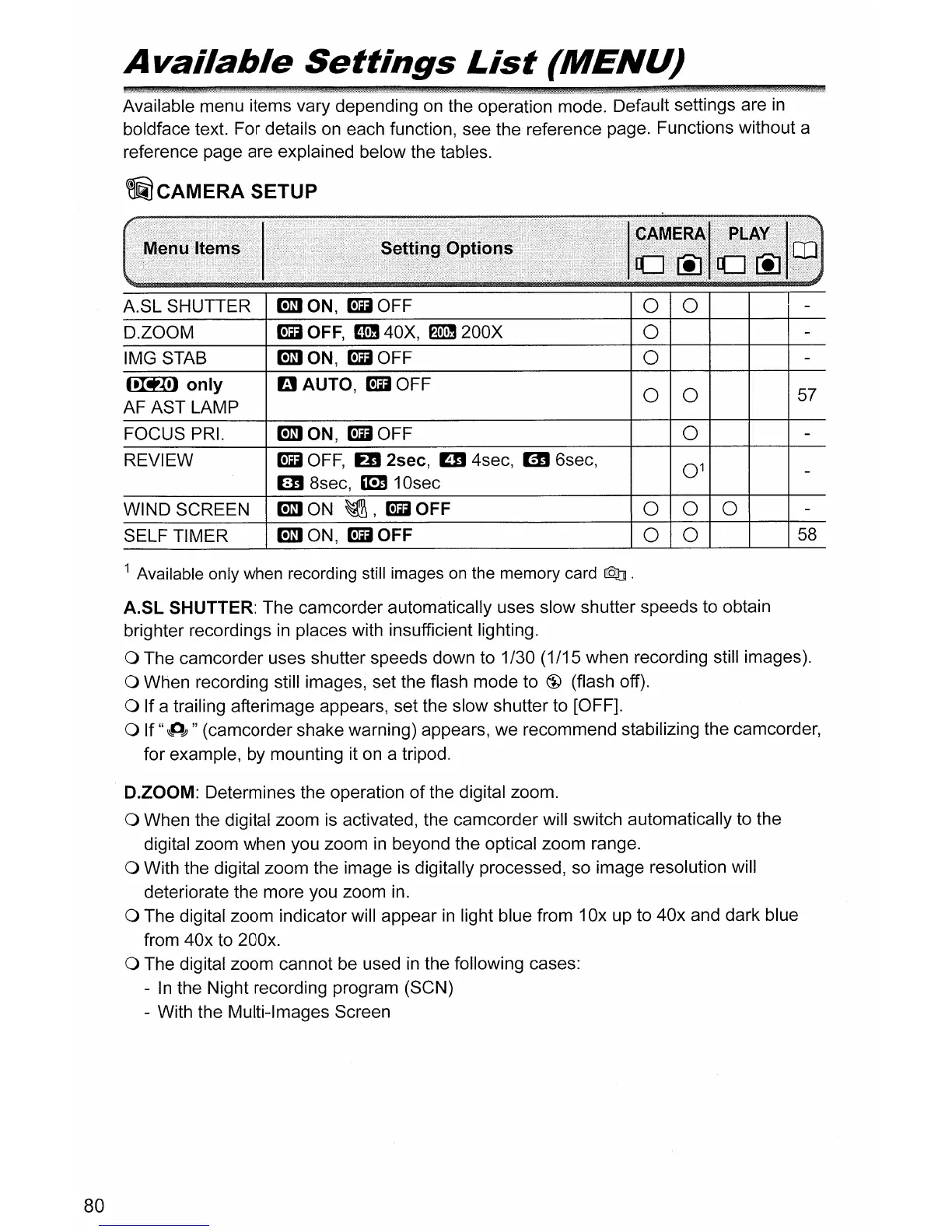
A.SL SHUTTER
D.ZOOM
IMG STAB
mlON,
~OFF
~
OFF,
mJ
40X,
f1IDJ
200X
mlON,
~OFF
o 0
o
o
~only
AF AST LAMP
FOCUS PRI.
REVIEW
WIND SCREEN
SELF TIMER
BAUTO,
~OFF
mlON,
~OFF
~
OFF,
ED
2sec, mJ 4sec, m 6sec,
lED
8sec, mJ 1
Osec
mlON
~,~OFF
mlON,
~OFF
o 0
o
000
o 0
57
58
80
1 Available only when recording still images on the memory card
Q]
.
A.SL
SHUTTER: The camcorder automatically uses slow shutter speeds to obtain
brighter recordings
in
places with insufficient lighting.
a The camcorder uses shutter speeds down to 1/30 (1/15 when recording still images).
a When recording still images, set the flash mode to @ (flash off).
a If a trailing afterimage appears, set the slow shutter to [OFF].
a If
"~dJ"
(camcorder shake warning) appears, we recommend stabilizing the camcorder,
for example, by mounting it on a tripod.
D.ZOOM: Determines the operation
of
the digital zoom.
a When the digital zoom is activated, the camcorder will switch automatically to the
digital zoom when you zoom
in
beyond the optical zoom range.
a With the digital zoom the image is digitally processed, so image resolution will
deteriorate the more you zoom in.
a The digital zoom indicator will appear
in
light blue from 10x up to 40x and dark blue
from 40x to 200x.
a The digital zoom cannot be used
in
the following cases:
-
In
the Night recording program (SCN)
- With the Multi-Images Screen



 To Next Page