Step
1:
Preparing
the
Power
Supply
The camcorder can be powered by a battery pack or be connected to a household power
outlet. Charge the battery pack before use.
-
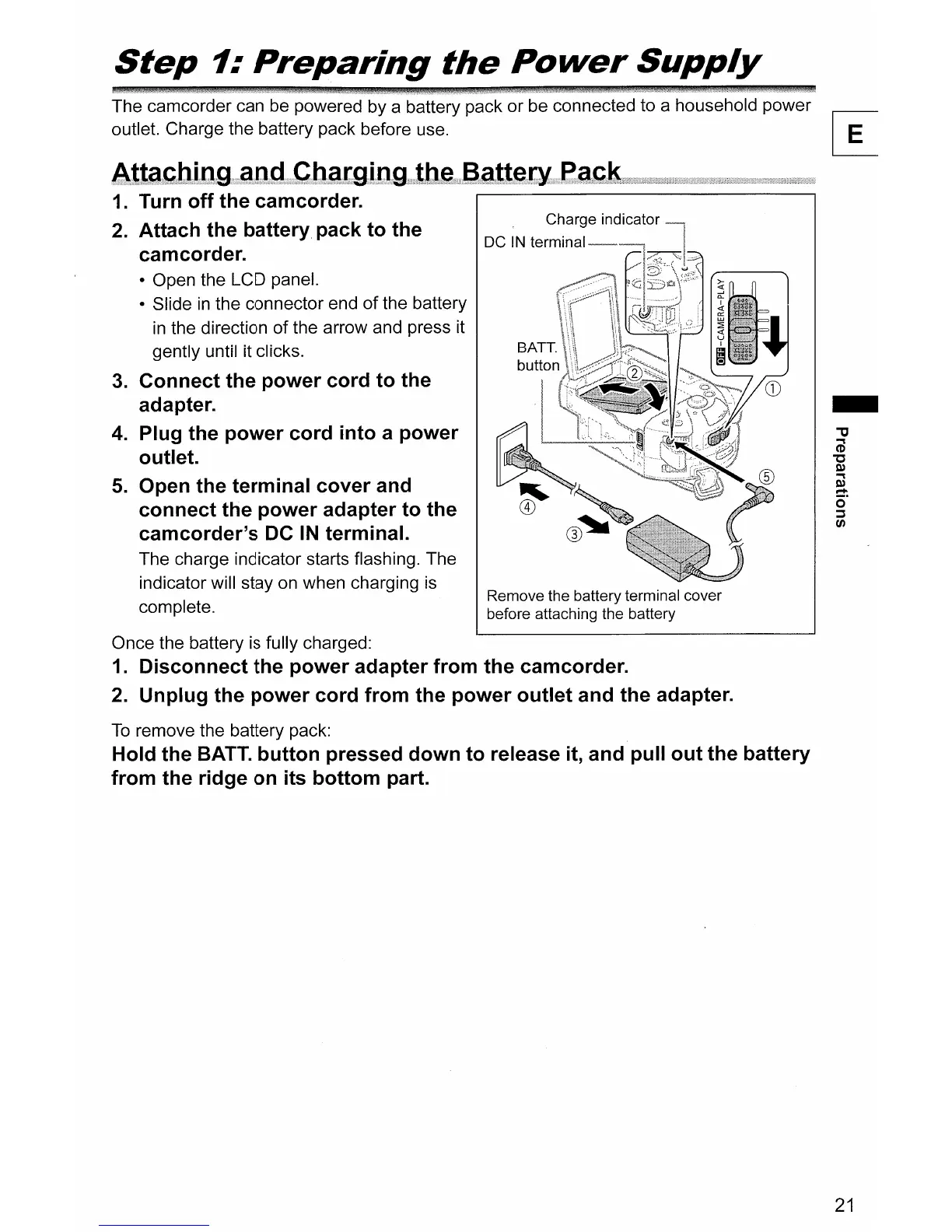
Remove the battery terminal cover
before attaching the battery
DC
IN
lerJlllllal------,
Atta~~bilJg?
a..llg?
C.batg.i.lJg.it.be.?aattetY~af,;k;.···
..
·
..
1.
Turn off the camcorder.
,...-------------------,
2. Attach the battery pack to the
camcorder.
• Open the LCD panel.
• Slide
in
the connector end
of
the battery
in
the direction
of
the arrow and press it
gently until it clicks.
3.
Connect the power cord to the
adapter.
4.
Plug the power cord into a power
outlet.
5.
Open the terminal cover and
connect the power adapter to the
camcorder's DC
IN
terminal.
The charge indicator starts flashing. The
indicator will stay on when charging
is
complete.
Once the battery
is
fully charged:
1.
Disconnect the power adapter from the camcorder.
2. Unplug the power cord from the power outlet and the adapter.
To
remove the battery pack:
Hold the
BATT.
button pressed down to release
it,
and pull out the battery
from the ridge on its bottom part.
21



 To Next Page