76
Selecting
the
Size
and
Quality
of
Still
Images
uu
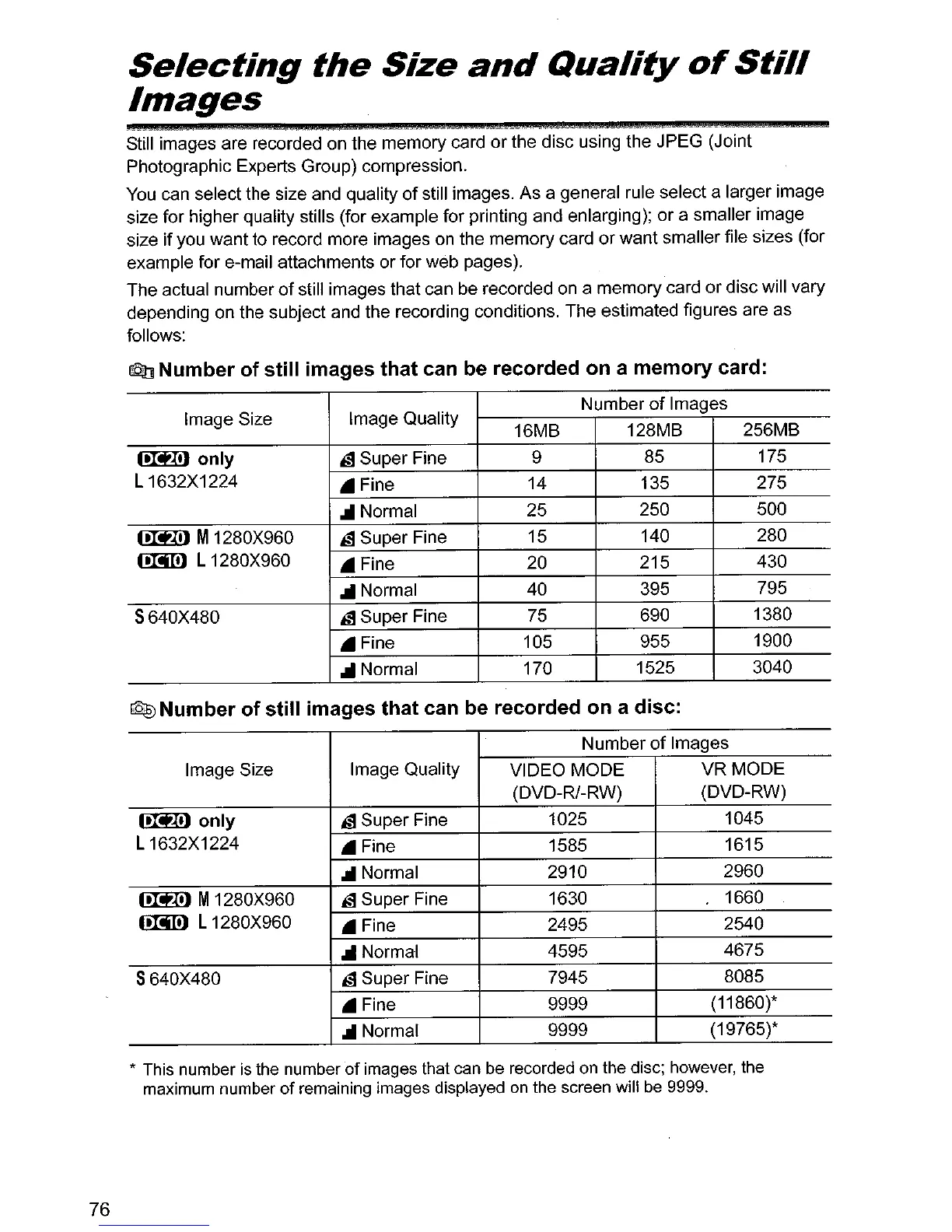
Still images are recorded on the memory card or the disc using the JPEG (Joint
Photographic Experts Group) compression.
You
can select the size and quality
of
still images. As a general rule select a larger image
size for higher quality stills (for example for printing and enlarging); or a smaller image
size if you want to record more images on the memory card or want smaller file sizes (for
example for e-mail attachments or for web pages).
The actual number
of
still images that can be recorded
on
a memory card or disc will vary
depending on the subject and the recording conditions. The estimated figures are as
follows:
~
Number
of
still images that can be recorded on a memory card:
Image Size Image Quality
Number
of
Images
16MB
128MB 256MB
~only
is Super Fine
9
85 175
L 1632X1224
.Fine
14
135 275
... Normal
25 250 500
~
M1280X960
is Super Fine
15
140
280
o.MID
L 1280X960
.Fine
20
215 430
...
Normal
40 395
795
S640X480
is Super Fine
75
690 1380
• Fine
105 955 1900
... Normal
170
1525
3040
~
Number of still images that can be recorded on a disc:
Number
of
Images
Image Size Image Quality
VIDEO MODE
VR MODE
(DVD-R/-RW)
(DVD-RW)
~only
is Super Fine 1025
1045
L 1632X1224
• Fine
1585
1615
... Normal
2910 2960
0Iti!l
M1280X960
is Super Fine 1630
1660
~
L1280X960
• Fine
2495 2540
",Normal
4595
4675
S640X480
is Super Fine 7945
8085
• Fine 9999
(11860)*
... Normal
9999 (19765)*
* This number
is
the number of images that
can
be
recorded
on
the disc; however, the
maximum number of remaining images displayed
on
the screen will
be
9999.



 To Next Page