Available
Settings
List
(FUNC.)
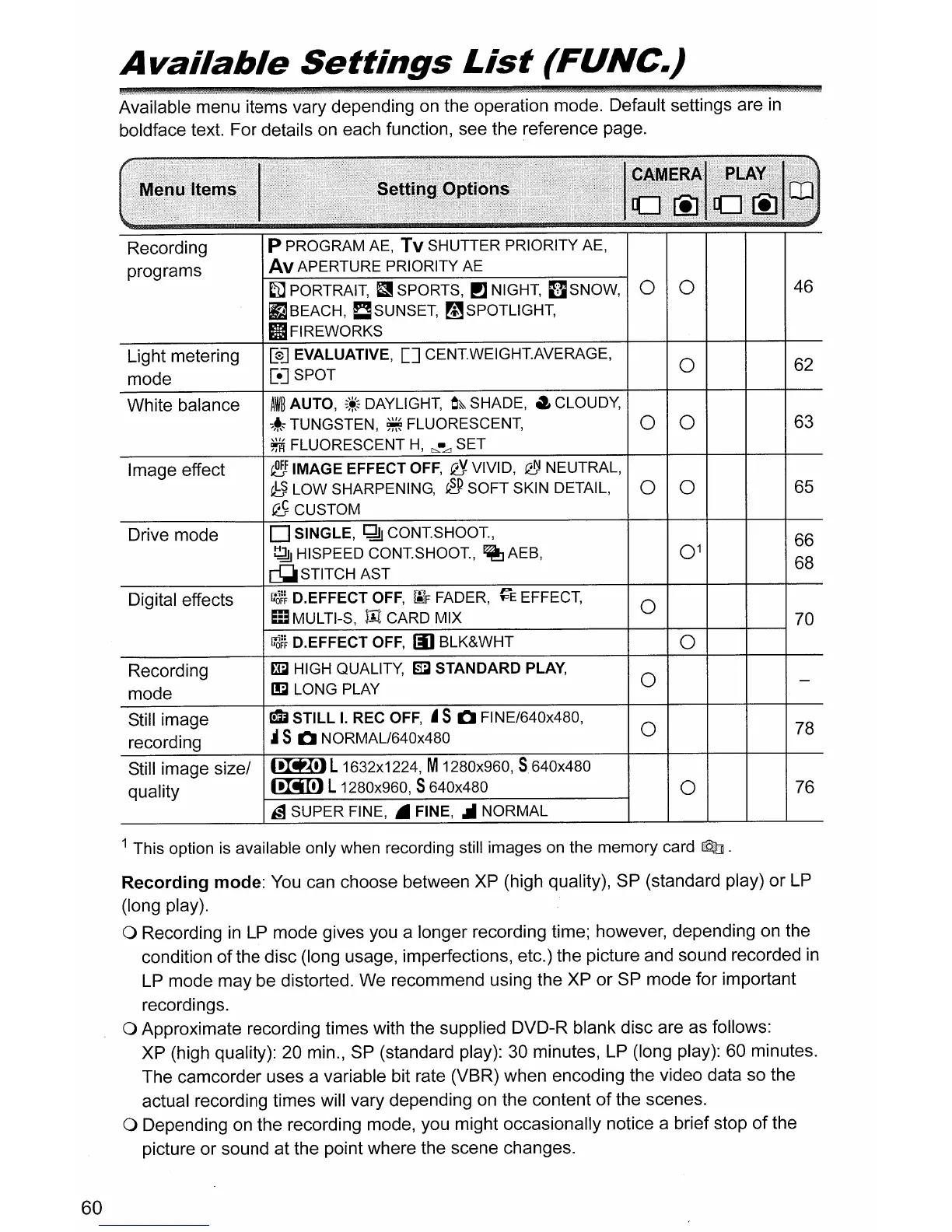
Available menu items vary depending
on
the operation mode. Default settings are
in
boldface text. For details
on
each function, see the reference page.
Recording
P PROGRAM AE, Tv SHUTTER PRIORITY AE,
programs
Av
APERTURE PRIORITY AE
fi1
PORTRAIT,
f.1I
SPORTS,
PJ
NIGHT,
[JSNOW,
0 0
fJ BEACH, C SUNSET, mSPOTLIGHT,
II
FIREWORKS
Light metering
[s]
EVALUATIVE,
[]
CENTWEIGHTAVERAGE,
0
mode
[e] SPOT
White balance
AW~
AUTO,
~~~
DAYLIGHT,
O~
SHADE,
.,
CLOUDY,
:;~;:
TUNGSTEN,
~
FLUORESCENT,
0
0
~
FLUORESCENT
H,
c:,.-LJ SET
Image effect
~
IMAGE EFFECT
OFF,
Q'J.
VIVID,
~
NEUTRAL,
~
LOW SHARPENING,
eP
SOFT SKIN DETAIL,
0 0
QS
CUSTOM
Drive mode
D SINGLE,
~
CONTSHOOT,
~
HISPEED
CONTSHOOT,
~
AEB,
0
1
~STITCHAST
Digital effects
r.-J~}
D.EFFECT
OFF,
[ilF
FADER,
~E
EFFECT,
0
iii
MULTI-S,
lIt.
CARD MIX
r.-J~}
D.EFFECT
OFF,
III
BLK&WHT
0
Recording
~
HIGH QUALITY,
~
STANDARD PLAY,
0
mode
~
LONG PLAY
Still image
QIi
STILL
I.
REC
OFF,
.5
CI
FINE/640x480,
0
recording
~
5
CI
NORMAL/640x480
Still image size/
~L
1632x1224, M1280x960,
5640x480
quality
~
L1280x960, S640x480
0
,;;1
SUPER FINE, • FINE,
.II
NORMAL
46
62
63
65
66
68
78
76
60
1 This option
is
available only when recording still images on the memory card
Q]
.
Recording
mode:
You
can choose between XP (high quality), SP (standard play) or
LP
(long play).
o Recording
in
LP
mode gives you a longer recording time; however, depending on the
condition
of
the disc (long usage, imperfections, etc.) the picture and sound recorded
in
LP
mode may be distorted. We recommend using the XP or SP mode for important
recordings.
o Approximate recording times with the supplied DVD-R blank disc are as follows:
XP (high quality): 20 min.,
SP
(standard play):
30
minutes,
LP
(long play): 60 minutes.
The camcorder uses a variable bit rate (VBR) when encoding the video data so the
actual recording times will vary depending
on
the content
of
the scenes.
o Depending
on
the recording mode, you might occasionally notice a brief stop
of
the
picture or sound at the point where the scene changes.



 To Next Page