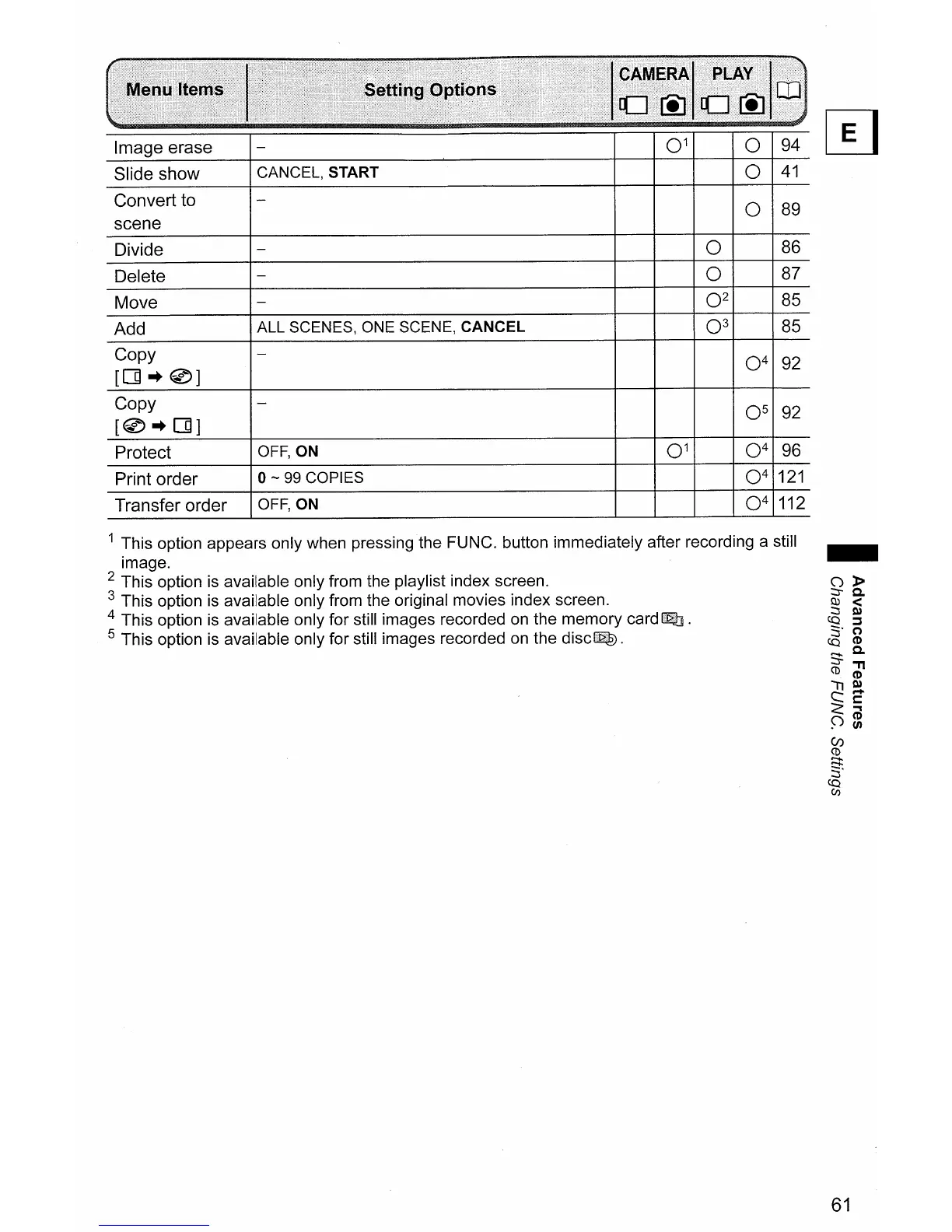
Image erase
Slide show
Convert to
scene
Divide
Delete
Move
Add
Copy
[[]-+0]
Copy
[0-+[]]
Protect
Print order
Transfer order
CANCEL, START
ALL SCENES, ONE SCENE, CANCEL
OFF, ON
0-
99
COPIES
OFF, ON
0
1
0
94
~
0
41
0
89
0
86
0
87
0
2
85
0
3
85
0
4
92
0
5
92
0
1
0
4
96
0
4
121
0
4
112
1 This option appears only when pressing
the
FUNC. button immediately after recording a still
image.
2 This option
is
available only from the playlist index screen.
3 This option
is
available only from the original movies index screen.
4 This option
is
available only for still images recorded
on
the memory card
Q]
.
5 This option
is
available only for still images recorded
on
the
disc~.
61



 To Next Page