_ DISPLAY SETUP
~
BRIGHTNESS
~
0
0
0
0
LCD MIRROR
[mON,
[mOFF
0
0
DATA CODE
mEl
DATE,
€)
TIME,
[]E€)
DATE & TIME,
0 0
llil
CAMERA
DATA,
[]Eellil
CAM. & DfT
45
mEl
DATE, e TIME, []Ee DATE & TIME
0
LANGUAGE@) DEUTSCH, ENGLISH, ESPANOL,
FRAN<;AIS, ITALIANO,
PYCCKVlIII ,
0 0
0 0
27
r§'i12js:$-sr..,
~u~~x,
e:!"~ol,
E3*~~
DEMO MODE
[mON,
[mOFF
0
0
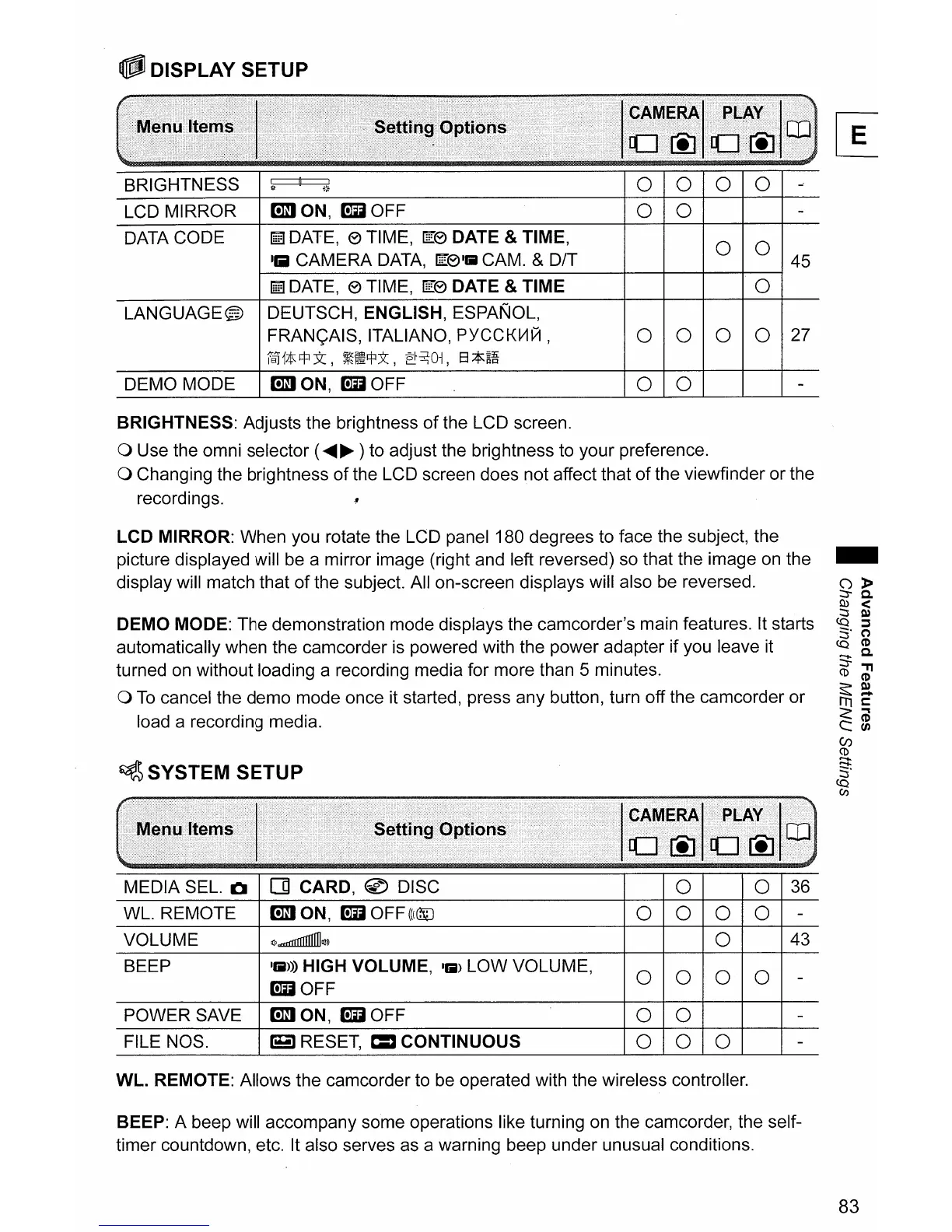
BRIGHTNESS: Adjusts the brightness
of
the LCD screen.
o Use the omni selector (
......
~
) to adjust the brightness to your preference.
o Changing the brightness
of
the LCD screen does not affect that
of
the viewfinder
or
the
recordings.
LCD
MIRROR: When you rotate the LCD panel 180 degrees to face the subject, the
picture displayed will be a mirror image (right and left reversed) so that the image on the
display will match that
of
the subject. All on-screen displays will also be reversed.
DEMO
MODE: The demonstration mode displays the camcorder's main features. It starts
automatically when the camcorder is powered with the power adapter if you leave it
turned on without loading a recording media for more than 5 minutes.
o
To
cancel the
demo
mode once it started, press any button, turn off the camcorder
or
load a recording media.
~
SYSTEM SETUP
~~#~~~~l
II
-
A'
MEDIA
SEL.
01
[]
CARD, @ DISC
0 0
36
WL. REMOTE
[mON,
[mOFF(((@J
0 0
0 0
-
VOLUME
Il]l...nlIIIIIIIIIlll]l»
0
43
BEEP
11iI»)
HIGH VOLUME,
11iI)
LOW
VOLUME,
0 0 0 0
[mOFF
-
POWER
SAVE
[mON,
[mOFF
0 0
-
FILE NOS.
r3
RESET, =
CONTINUOUS
0 0 0
-
WL.
REMOTE: Allows the camcorder to be operated with the wireless controller.
BEEP: A beep will accompany some operations like turning on the camcorder, the self-
timer countdown, etc. It also serves as a warning beep under unusual conditions.
83



 To Next Page