Playing
Back
Movies
1.
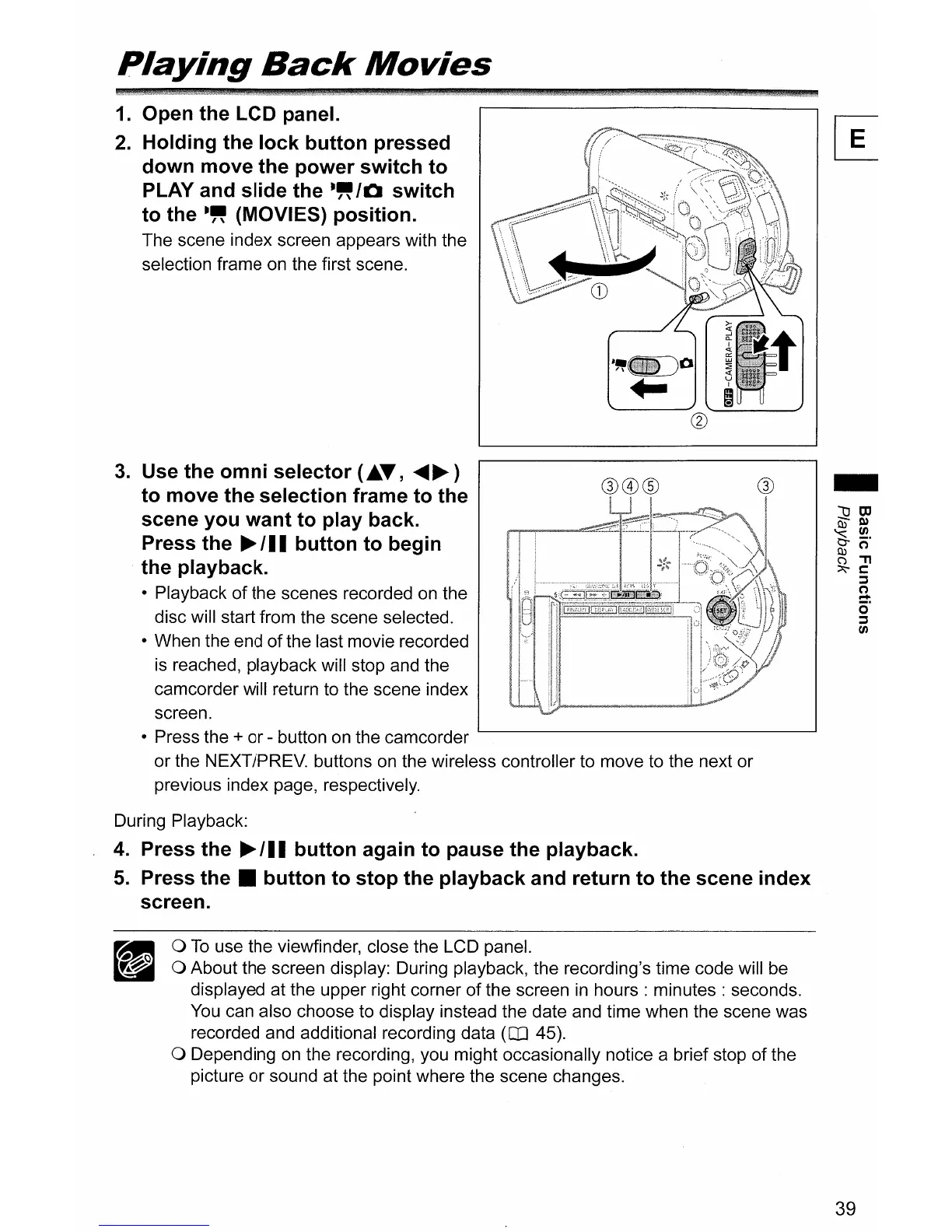
Open the LCD panel.
2.
Holding the lock button pressed
down move the power switch to
PLAY and slide the
-"/0
switch
to the
-"
(MOVIES) position.
The scene index screen appears with the
selection frame
on
the first scene.
®®®
3.
Use the omni selector
(~T,
~~)
to move the selection frame to the
scene you want to play back.
Press the
~
III
button to begin
the playback.
• Playback
of
the scenes recorded
on
the
disc will start from the scene selected.
• When the end
of
the last movie recorded
is
reached, playback will stop and the
camcorder will return to the scene index
screen.
• Press the
+ or - button on the camcorder
or the NEXT/PREV. buttons
on
the wireless controller to move to the next or
previous index page, respectively.
®
-
During Playback:
4.
Press the
~
III
button again to pause the playback.
5.
Press
the.
button to stop the playback and return to the scene index
screen.
o
To
use the viewfinder, close the LCD panel.
o About the screen display: During playback, the recording's time code will be
displayed at the upper right corner
of
the screen
in
hours:
minutes: seconds.
You
can also choose to display instead the date and time when the scene was
recorded and additional recording data
(CD
45).
o Depending
on
the recording, you might occasionally notice a brief stop of the
picture or sound at the point where the scene changes.
39



 To Next Page