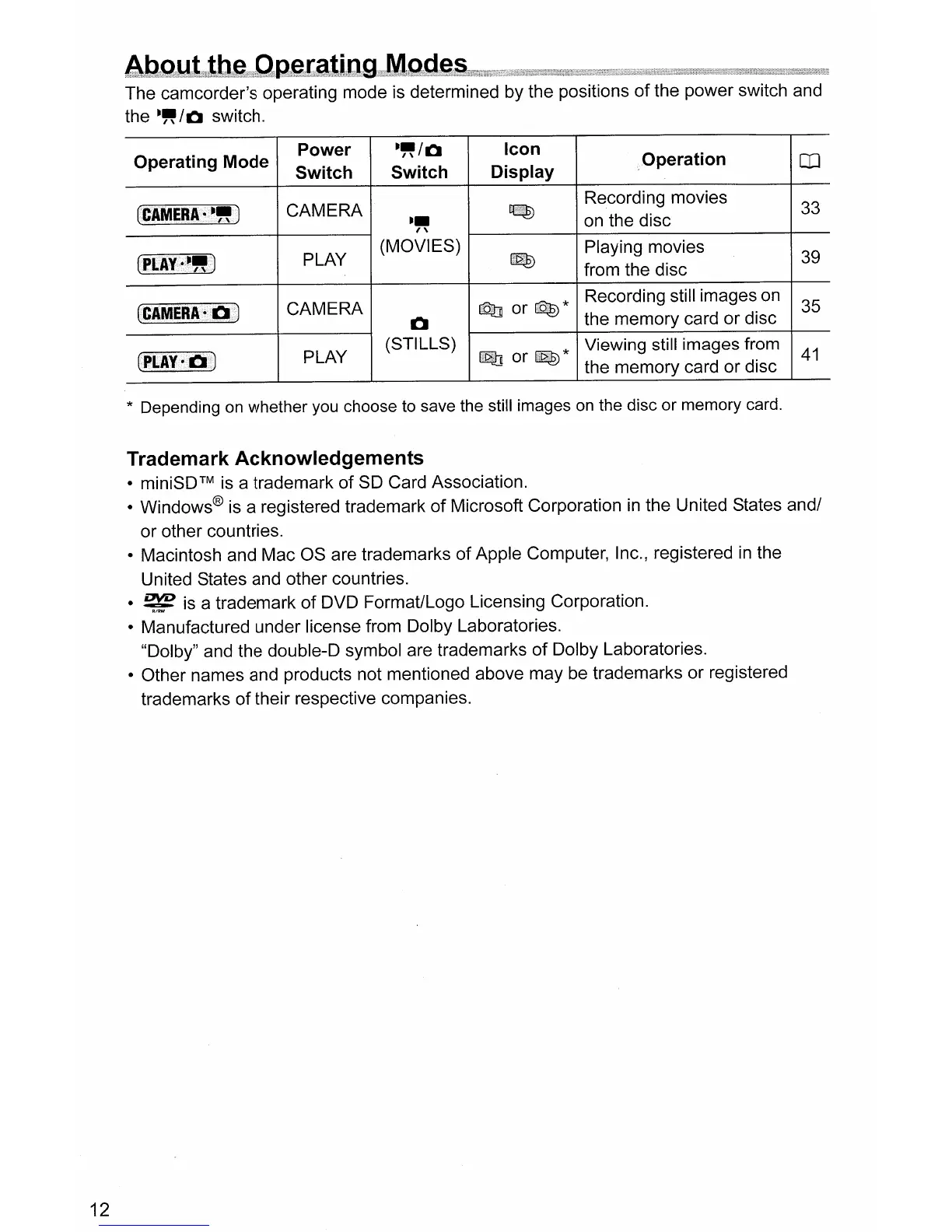
The camcorder's operating mode is determined by the positions
of
the power switch and
the
~"/Q
switch.
Operating Mode
(CAMERA
· -
..
)
(PLAY
.-
..
)
(CAMERA·
0 )
Power
~"/Q
Switch
Switch
CAMERA
~~
PLAY
(MOVIES)
CAMERA
0
PLAY
(STILLS)
Icon
Display
Q]
or
QE)
*
~
or~*
,Operation
Recording movies
on the disc
Playing movies
from the disc
Recording still images on
the memory card
or
disc
Viewing still images from
the memory card
or
disc
co
33
39
35
41
12
* Depending on
whether
you choose to save the still images on the
disc
or
memory
card.
Trademark Acknowledgements
•
miniSDTM
is a trademark
of
SO
Card Association.
• Windows® is a registered trademark
of
Microsoft Corporation
in
the United States and/
or
other countries.
• Macintosh and Mac OS are trademarks
of
Apple Computer, Inc., registered
in
the
United States and other countries.
•
~
is a trademark
of
DVD Format/Logo Licensing Corporation.
• Manufactured under license from Dolby Laboratories.
"Dolby" and the double-D symbol are trademarks
of
Dolby Laboratories.
• Other names and products not mentioned above may be trademarks or registered
trademarks
of
their respective companies.



 To Next Page