I'viaei
ntosh HD: Users:video:Pietu
res
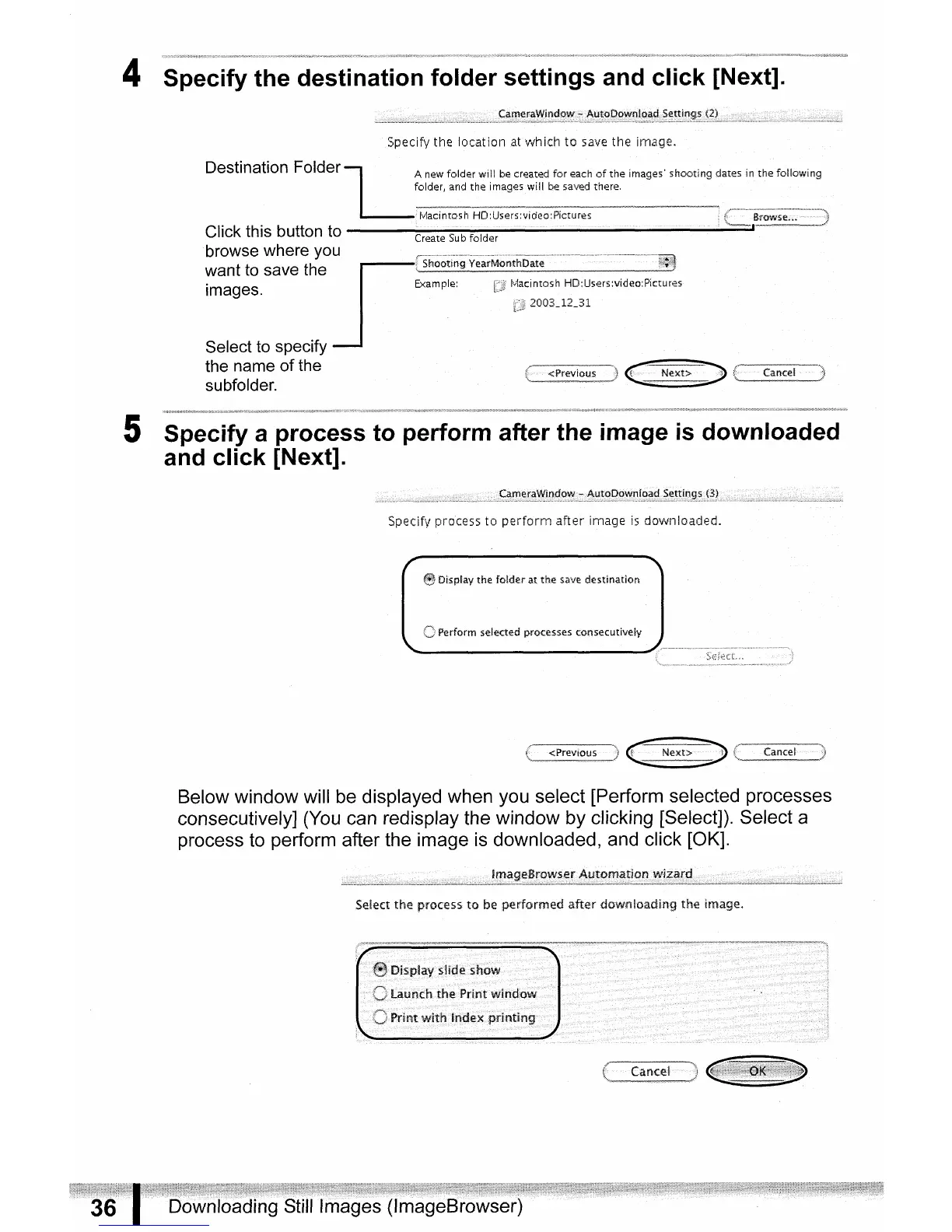
4 Specify the destination folder settings and click [Next].
Specify the
location
at
whicfl
to
save
tile
image.
Destination
Folder
LA
....
new folder will
be
created
for
each
of
the images' shooting d
..
a
...
t
..
eS
..
i.n
the
..
follOW;09
folder, and the images will
be
sav~d
there.
____
~"'""NYYNWY'~~.............._
__
,...,.....,
...
'"""""'"'AY~~_~~~~'
tvlacintQsh HD:Users:video:Pictures •
r'-
....
--.
·--B;~~·~·~····--·---------------'l
Click
this
button
to
Create
Sub
folder
\,_=,.~
__
"_---_':::'
__
~~~i
browse
where
you
want
to
save
the
images.
Select
to
specify
the
name
of
the
subfolder.
5 Specify a process to perform after the image
is
downloaded
and click [Next].
Specifv process
to
perform
after
image
is
downloaded.
eDisplay the
folder
at
the
save
destination
selected processes consecutively
Below
window
will
be
displayed
when
you
select
[Perform
selected
processes
consecutively]
(You
can
redisplay
the
window
by
clicking
[Select]). Select a
process
to
perform
after
the
image
is
downloaded,
and
click
[OK].
Select
the
process
to
be performed after downloa.dIng the Image.


 To Next Page