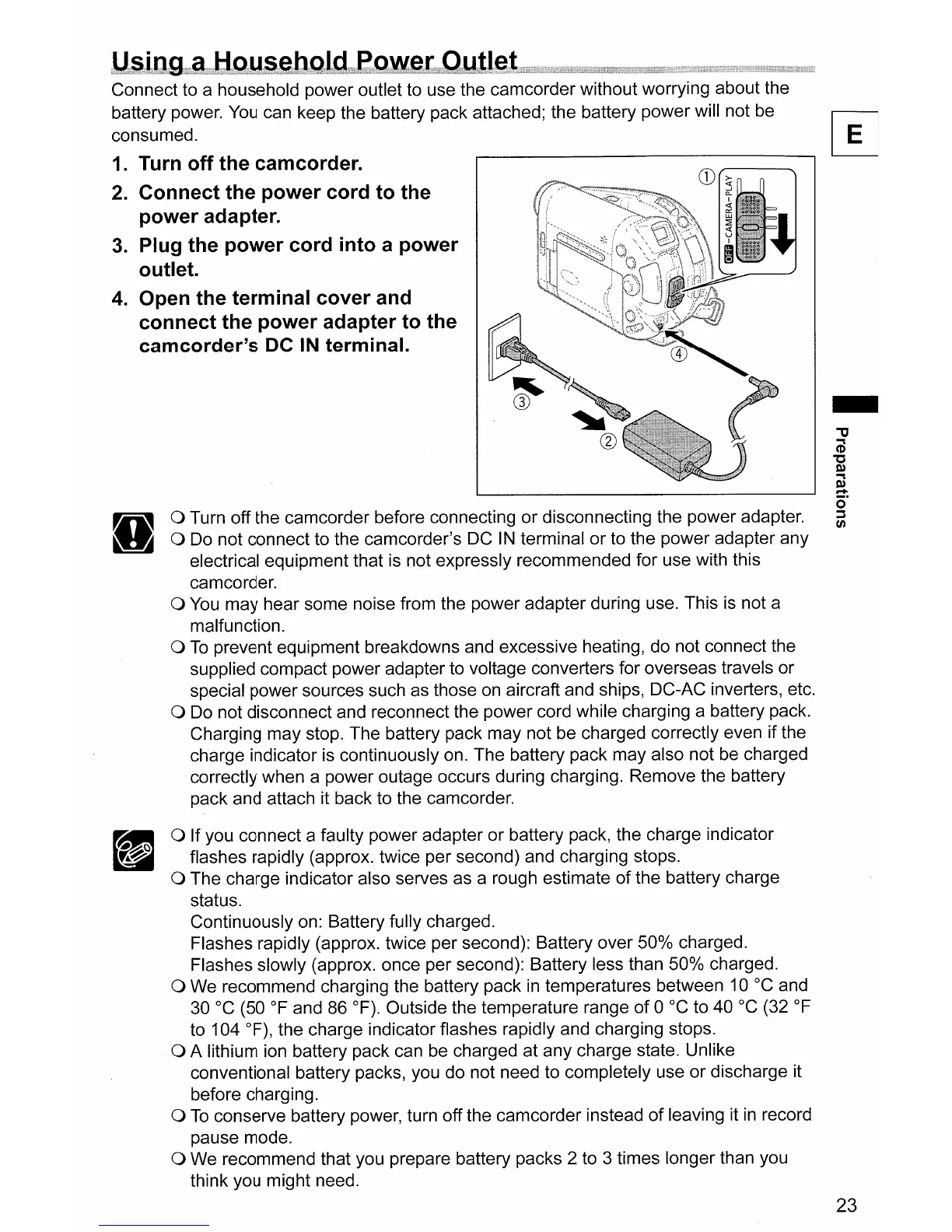
Connect to a household power outlet to use the camcorder without worrying about the
battery power. You can keep the battery pack attached; the battery power will not be
consumed.
1. Turn
off
the
camcorder.
2.
Connect
the
power
cord
to
the
power
adapter.
3.
Plug
the
power
cord
into
a
power
outlet.
4.
Open
the
terminal
cover
and
connect
the
power
adapter
to
the
camcorder's
DC
IN
terminal.
a Turn off the camcorder before connecting or disconnecting the power adapter.
a Do not connect to the camcorder's DC IN terminal or to the power adapter any
electrical equipment that
is
not expressly recommended for use with this
camcorder.
a
You
may hear some noise from the power adapter during use. This
is
not a
malfunction.
a
To
prevent equipment breakdowns and excessive heating, do not connect the
supplied compact power adapter to voltage converters for overseas travels or
special power sources such
as
those on aircraft and ships, DC-AC inverters, etc.
a Do not disconnect and reconnect the power cord while charging a battery pack.
Charging may stop. The battery pack may not be charged correctly even if the
charge indicator is continuously on. The battery pack may also not be charged
correctly when a power outage occurs during charging. Remove the battery
pack and attach it back to the camcorder.
a If you connect a faulty power adapter or battery pack, the charge indicator
flashes rapidly (approx. twice per second) and charging stops.
a The charge indicator also serves as a rough estimate
of
the battery charge
status.
Continuously on: Battery fully charged.
Flashes rapidly (approx. twice per second): Battery over
50%
charged.
Flashes slowly (approx. once per second): Battery less than
50%
charged.
a We recommend charging the battery pack
in
temperatures between
10°C
and
30 °C (50
of
and 86
OF).
Outside the temperature range
of
0 °C to
40°C
(32
of
to 104
OF),
the charge indicator flashes rapidly and charging stops.
a A lithium ion battery pack can be charged at any charge state. Unlike
conventional battery packs, you do not need to completely use or discharge it
before charging.
a
To
conserve battery power, turn off the camcorder instead
of
leaving it
in
record
pause mode.
a We recommend that you prepare battery packs 2 to 3 times longer than you
think you might need.
-
23



 To Next Page