51
Quick Control
3
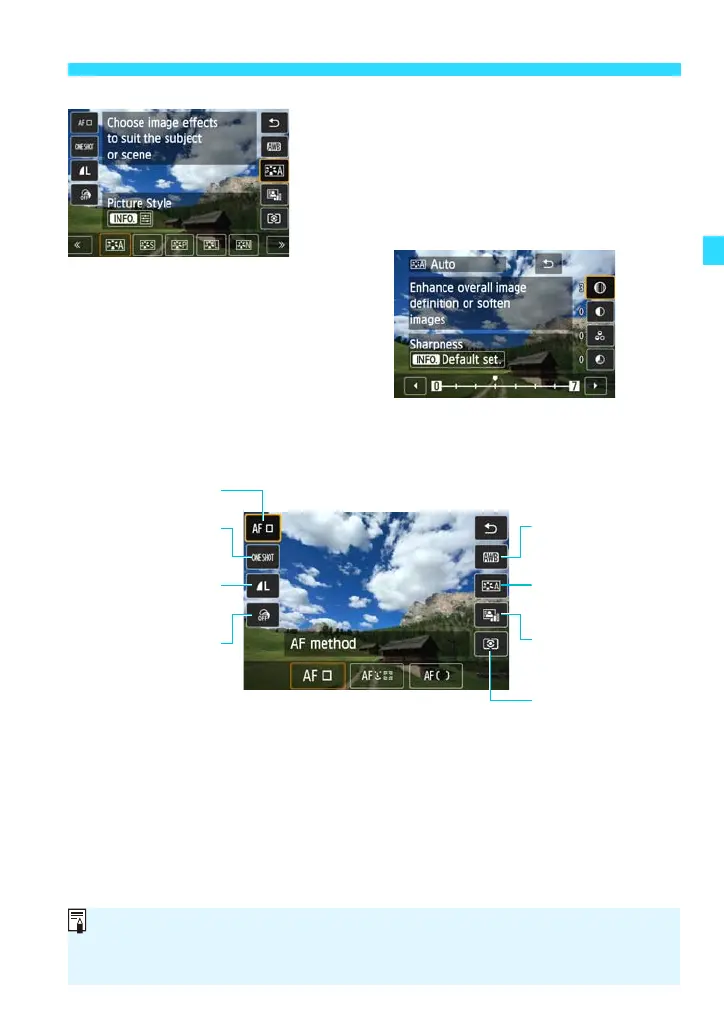
Set the desired function setting.
Select the function setting by tapping an
icon displayed at the bottom of the
screen.
There are also functions with more
settings when you tap [ze].
To return to the shooting screen, tap [2]
or press <0>.
White balance
(p.168)
Picture Style
(p.106)
Auto Lighting
Optimizer (p.153)
Metering mode
(p.146)
AF method (p.113)
AF operation
(p.110)
Image-recording
quality (p.97)
Creative filters
(p.260)
You can also perform the setting procedure with the Main Dial’s <S> or
<5> and <0>.
The settable functions differ depending on the shooting mode.







 To Next Page