61
d Using the Touch Screen
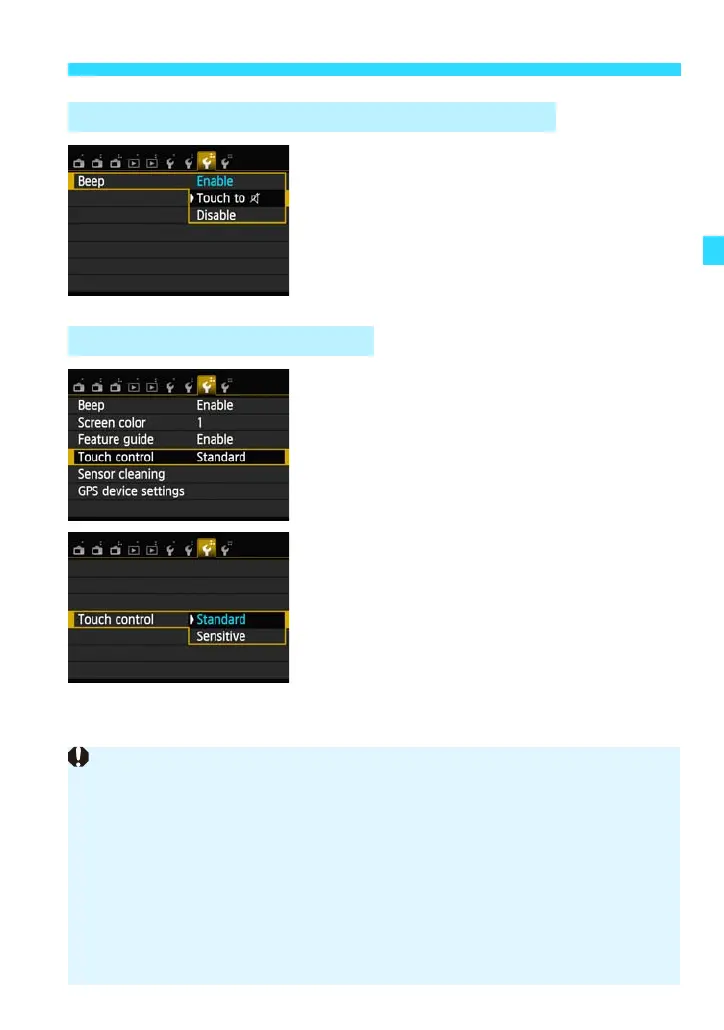
If [53: Beep] is set to [Touch to h] or
[Disable], the beep will not sound during
touch operations.
1
Select [Touch control].
Under the [53] tab, select [Touch
control], then press <0>.
2
Set the Touch control.
[Standard] is the normal setting.
[Sensitive] provides a better touch
response than [Standard]. Try using both
settings and select the one you prefer.
3 Silencing the Beep during Touch Operations
3 Setting the Touch Control
Cautions for Touch Screen Operations
Since the LCD monitor is not pressure sensitive, do not use any sharp objects
such as your fingernail or a ballpoint pen, for touch operations.
Do not use wet fingers for touch screen operations.
If the LCD monitor has any moisture or if your fingers are wet, the touch
screen may not respond or misoperation may occur. In such a case, turn off
the power and wipe the LCD monitor with a cloth.
Do not attach any protective sheet (commercially available) or sticker on the
LCD monitor. It may make the touch operation response slow.
If you perform touch operations quickly when [Sensitive] is set, the touch
response may be slower.















 To Next Page