3-CONTROLSANDINSTRUMENTS
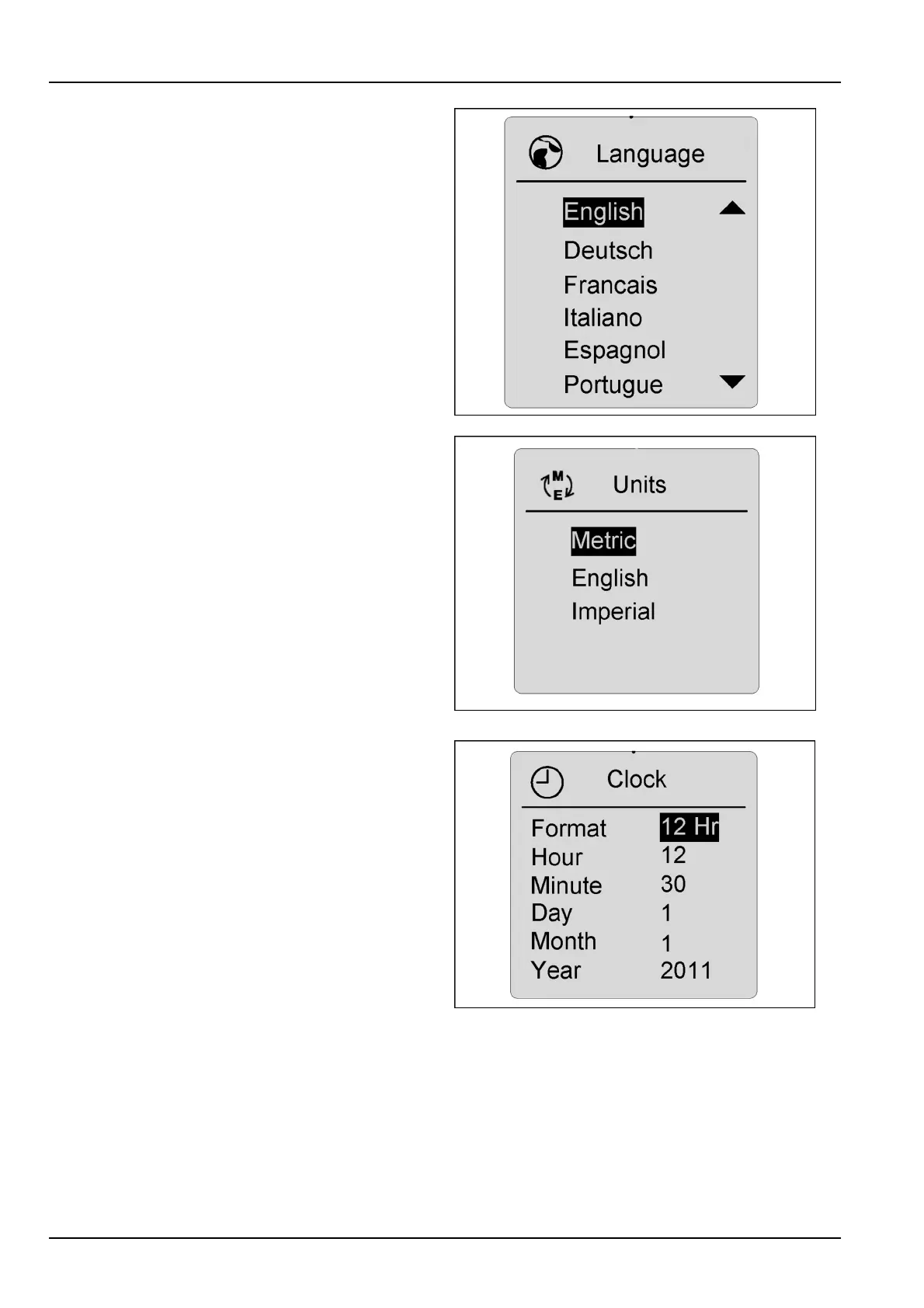
Languages
Choosethepreferencesdesired:languageinEnglish,
Spanish,Portuguese,Italian,German,French;measure-
mentunitsinmetric,English,orImperial;andclockunits
in12or24hourcycles.Highlightthepreferenceyou
wishtochangeandpresstheconrmkey.Theprefer-
encewillashandallowyoutoscrollthroughthechoices.
Whenthecorrectpreferenceischosen,presstheconrm
key,thenusetheescapekeytoreturntothemaindriving
screeninordertolockthepreferenceintomemory.
RCPH10WHL361BAH2
RCPH10WHL362BAH3
Clock
Settingthehouranddate-Fromtheselectscreen,
choosetheclockdesignationandpresstheconrmkey.
Usethearrowkeystoshoweldfortimeanddateby
pressingthearrowkey.Whenthecorrecttimeanddate
havebeenenteredbyusingtheupanddownarrow
keys(upincreasesthenumbers-downdecreasesthe
numbers),presstheconrmkeytolockincorrecttime.
Presstheescapekeytoreturntothemaindrivingscreen
andlockselectionsintomemory.
RCPH10WHL363BAH4
3-54



 To Next Page