M-Series Operator’s Manual 4/9/15
10-75
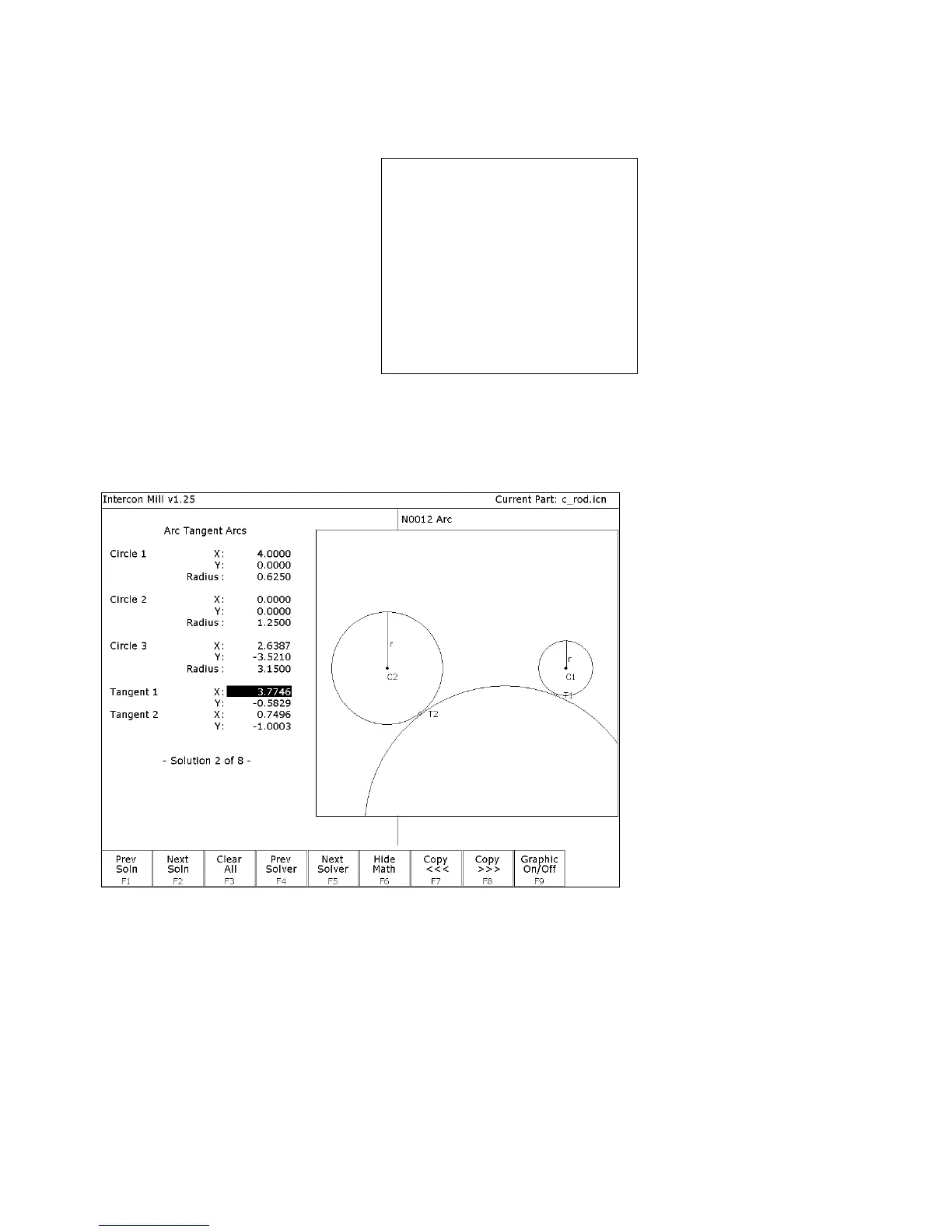
F6 - Tangent Arc Arc Arc This scenario will generate tangent points P2 - P5 of Figure 3.
Enter the values as shown below:
Arc Tangent Arcs:
Circle 1:
X
:
4.0000
Y
:
0.0000
Radius
:
0.6250
Circle 2:
X
:
0.0000
Y
:
0.0000
Radius
:
1.2500
Radius
:
3.1500
Intercon will calculate the missing values for this scenario.
F2 - Next Soln Find scenario that corresponds to the actual arcs being milled.
Observe Figure 4. Point T1 is the one needed.
FIG. 4 - Screen showing Math Help Arc Tangent Arc solutions
ARROWS If necessary, move the block cursor to the Tangent 1 X field as
shown above. Note: Use only <↑> and <↓>. If you press the
right arrow, press the left arrow to get back to the Math Help
fields.
F9 - Graphic on/off Press to hide the graphical display and reveal the arc operation
behind it.
→
→→
→ (ARROW) Move the cursor to the arc operation. The solid block cursor on
the left side of the screen will be replaced by an outlined



 To Next Page