M-Series Operator’s Manual 4/9/15
Parameter 141 – Maximum message log lines
This parameter is the number of lines that will be kept in the message log. If this parameter is set to 10,000, for
example, the newest 10,000 messages will be retained. The CNC software will delete the oldest messages, trimming
the log file to the given number of lines at startup and periodically while the CNC software is in an idle state.
Parameter 142 controls the frequency of the log cleanup.
Parameter 142 – Message log trim amount
This parameter is the number of additional lines above the minimum that can be added to the log before it is reduced to
the minimum size. Setting this parameter to a lower value will cause the log file to be trimmed to its minimum size
more often. The higher the value, the less often the log will be trimmed. The speed of the disk drive and total size of
the log file at the time it is trimmed will determine how long the log cleanup takes. Under most circumstances, using
10,000 and 1,000 for parameters 141 and 142 will provide a reasonable and useful log size with no noticeable effects
on performance. If parameters 141 and 142 are set to excessively high values, the message "Trimming excess lines
from log file" will be presented. This message will appear at startup and very infrequently when the CNC software is
idle. Normal operation can proceed after the message disappears. If the delay is unacceptable, reduce the values of
parameters 141 and 142.
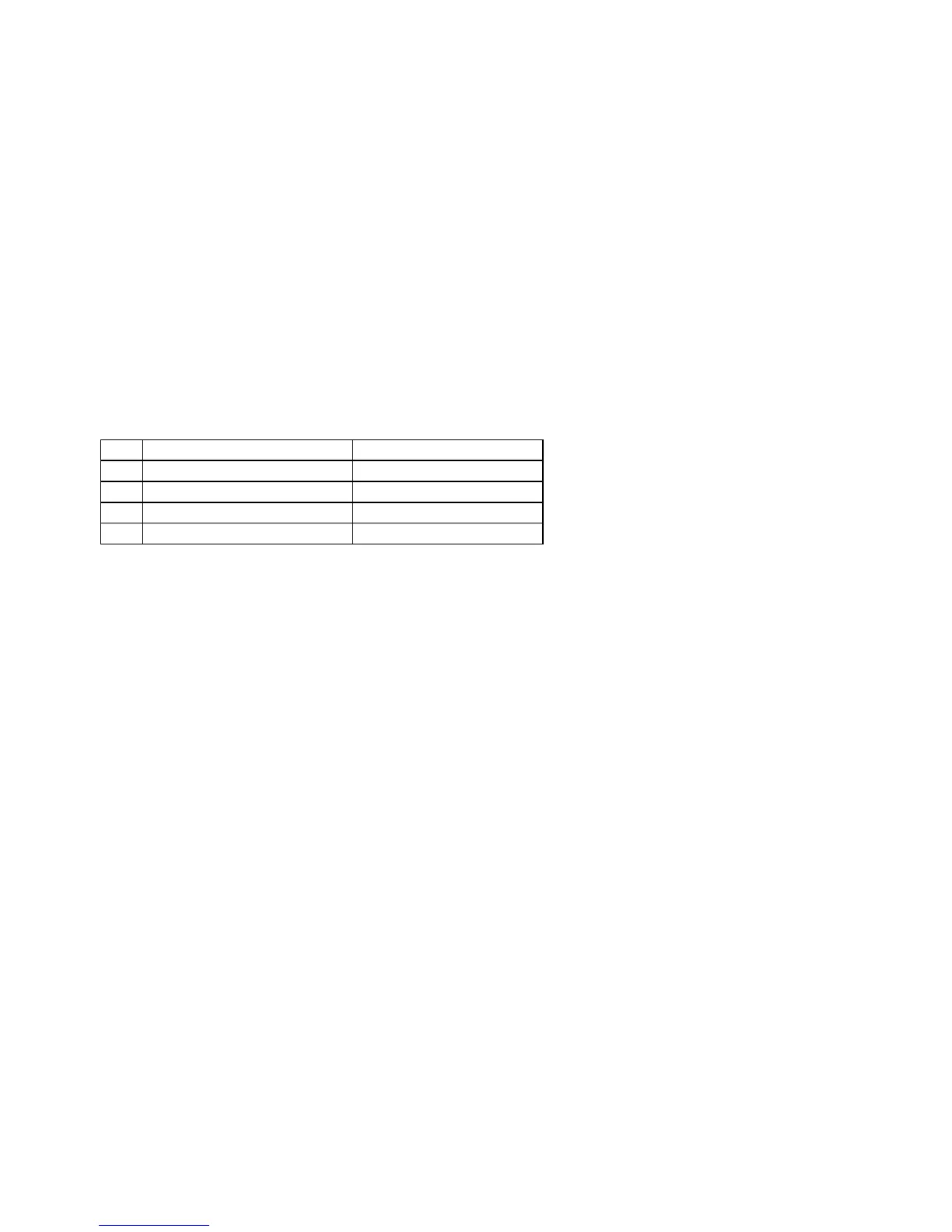
Parameter 143 – DRO Properties (load meters, 4/5 digits, Distance To Go)
This parameter controls the display of the axis load meters and 4/5 digit DRO precision.
Bit Function Description Parameter Value
0 Enable Load Meters Enable = 1, Disable = 0
1 Load Meter Outline Enable = 2, Disable = 0
2 DRO 4/5 Digit Precision 5 digits = 4, 4 digits = 0
3 Mini DRO (Distance to Go) Enable = 8, Disable = 0
Add the values of the desired properties. For example, use a value of 3 to display load meters with outlines. The value
11 will display load meters, outlines and the mini-DRO. The axis load meters will be colored green for values that are
up to 70% of maximum power output, yellow for values between 70% and 90%, and red for values between 90% and
100%. The axis load meters appear below the DRO for each axis (see Chapter 1).
Parameter 144 – Comparison Rounding
This parameter determines the built in rounding for the comparison operators (‘EQ’, ‘NE’, ‘LT’, ‘GT’, etc.) in
expressions. Rounding of comparison arguments is necessary due to extremely small errors that are part of every
floating-point calculation. The result of such errors is that two floating-point values are rarely exactly equal. The
value of parameter 144 represents the precision of comparison in places after the decimal point. If the parameter is set
to 9.0, for example, then comparison operators will declare two numbers that differ in value by less than 0.0000000005
as being equal. The value 0.0 is a special value that turns comparison rounding off. When comparison rounding is off,
it is up to the G code programmer to build the precision into conditional statements, for example “IF ABS[#A - #B] LT
0.00005 THEN GOTO 100”. When comparison rounding is off, the “EQ” usually returns “false”. If parameter 144 is
set to 9, the programmer can shorten the previous example to “IF #A EQ #B THEN GOTO 100”.
Parameter 145 – Advanced Macro Properties (Fast Branching)
This parameter turns fast branching on (1) and off (0). The other bits of this parameter are reserved for future use.
If fast branching is disabled, the CNC software searches forward in the program for the first matching block number
and resumes searching, if necessary, from the top of the program. For this reason, backward branches take longer than
forward branches and backward branch times depend on the total program size. If the program is significantly large,
use of the GOTO statement could introduce temporary pauses.
When fast branching is enabled, the CNC software remembers the locations of block numbers as it finds them during
program execution. Backward branches always take place immediately. The first forward branch to a block not yet
encountered will take additional time as the CNC software searches forward for the block number; however,
subsequent forward branches to that block number will take place immediately. The trade-off for using fast branching
is that all line numbers at a given level of program or subprogram must be unique and programs will use more memory
(approximately 16kilobytes of memory for every 1000 block numbers in the program.)



 To Next Page