M-Series Operator’s Manual 4/9/15
Note: STEP must be in the same units that the control is currently set to (Inches or MM). Once
entered in, if you change units in the control from inches to mm or vice versa the Smoothing parameters will
automatically be converted to the other units for you, so you don't have to re-enter them once you've type them in
properly.
Technical Background description of Smoothing :
Smoothing performs several related functions:
1. Smoothing NBPTS (P221) and STEP (P222)
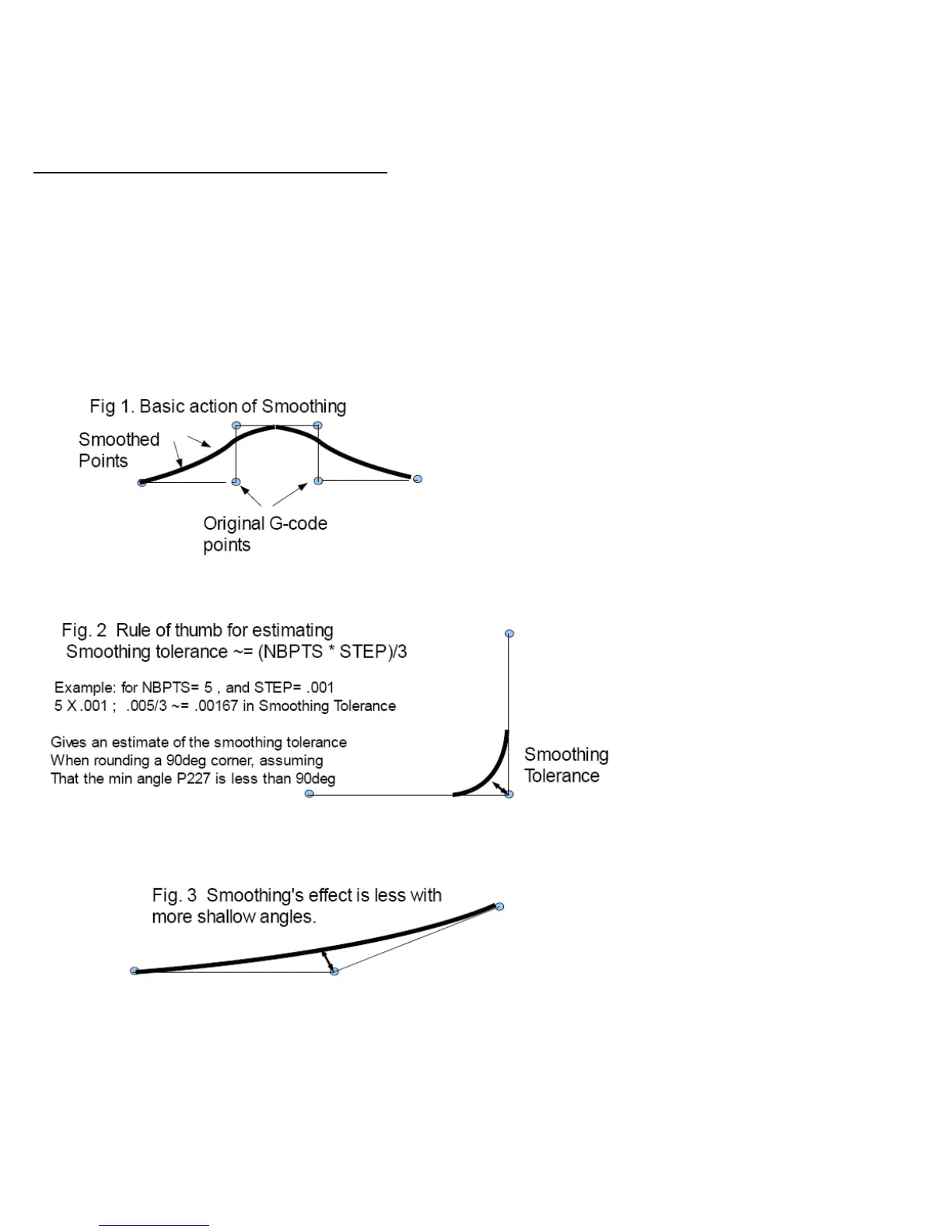
These parameters control geometrical smoothing of the user supplied G-code. Smoothing allows significantly higher
feedrates to be achieved while reducing vibration, bumps and bangs at corners and angles. It is also great for
smoothing over a CAD-CAM generated data with peculiar features. See Fig 1. Smoothing's strength is also a
potential disadvantage, it modifies geometry and rounds corners. See Fig 2. When would you want to use
smoothing? The user may want to run smoothly through rectangular Z movements created by "breakout tabs"
on a router job. Smoothing will allow the job to run at high speed right through the breakout tabs, if the min angle
P227 is set to less than 90 degrees.



 To Next Page