Starting Milling
28
2. Milling
Step 2: Setting Milling Burs
Procedure
A
Open the front cover.
B
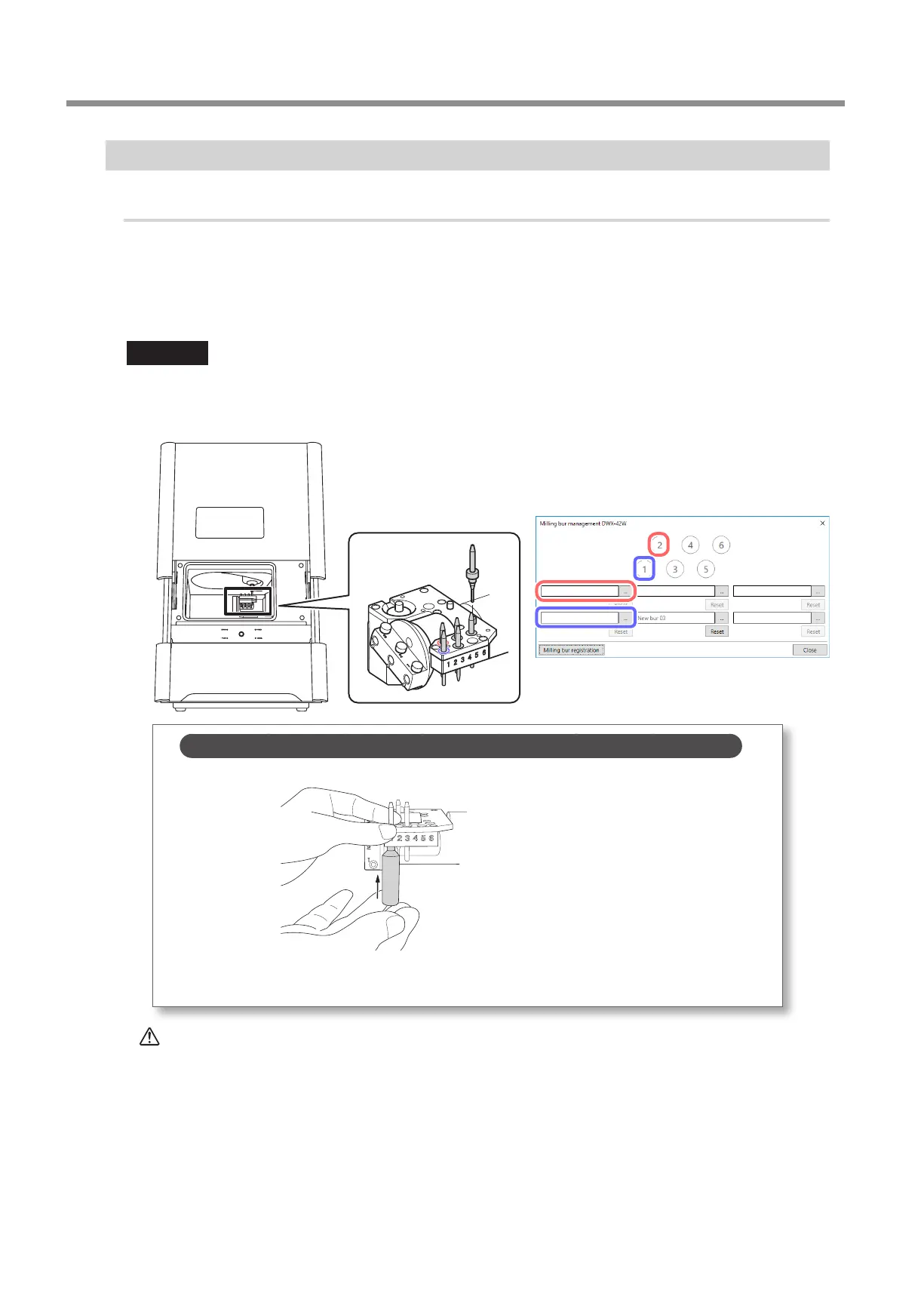
Set the milling burs in the stockers according to the settings made in the [Milling bur management]
window in VPanel.
Set the milling burs in stockers 1 to 6 in the ATC magazine.
Important
• Set milling burs with their tips facing down�
• Push milling burs in until the top of each milling bur holder is at the same height as the ATC magazine surface�
• Do not set a milling bur in the stocker for the dummy pin�
MEMO: When the milling bur is dicult to remove (using the milling bur removal jig)
When the milling bur is dicult to remove, you can remove it easily by using the milling bur removal jig�
Insert the tip of the milling bur into the tip (the narrow end) of the milling bur removal jig, and then push
the milling bur up�
CAUTION
Be careful around the tip and other sharp edges.
Be careful not to touch the tool tip or any other sharp edges. Doing so may cause injury.



 To Next Page