Checking the Operation Status
38
2. Milling
Checking the Basic Status of the Milling Machine
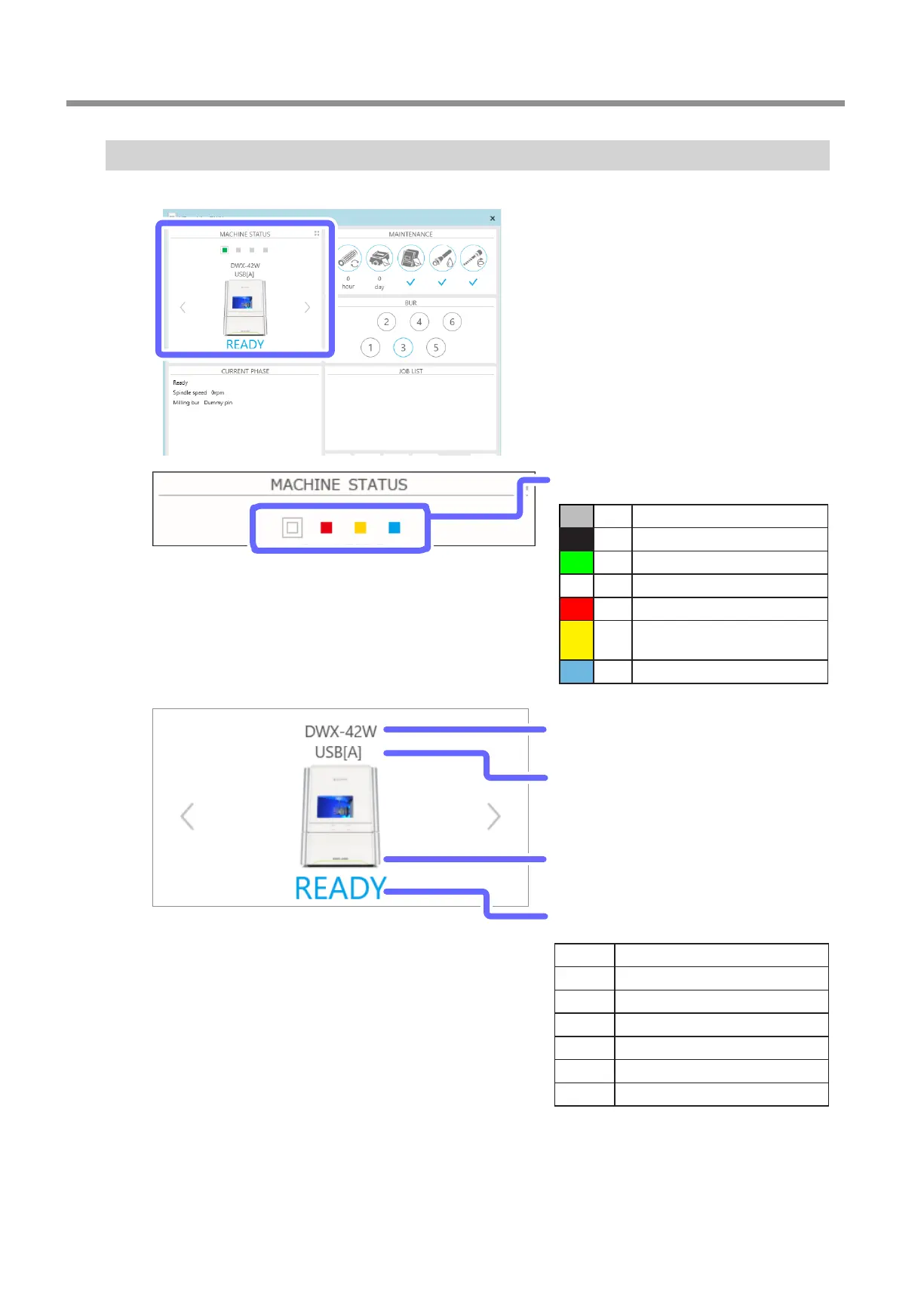
You can check the basic status with the [MACHINE STATUS] area in VPanel�
Operation status
Displays an overview of the operation status as a color
Gray
No milling machine assigned.
Black The power of the milling machine is o.
Green
Milling data can be received.
White
Operation is in progress.
Red
An error has occurred.
Yellow
Operation is paused or the front cover
is open.
Blue Milling is nished.
Machine name
Displays the name of the selected model
Connection status
Displays the USB serial ID for a USB connection and the
IP address for a LAN connection
Machine image
Displays the machine image of the selected model
Operation status
Displays an overview of the operation status as text
READY Milling data can be received.
OFFLINE
The power of the milling machine is o.
BUSY Operation is in progress.
ERROR An error has occurred.
PAUSE Operation is paused.
COVER The front cover is open.
FINISH Milling is nished.



 To Next Page