Checking the Operation Status
40
2. Milling
Checking the Operation Status of the Milling Machine
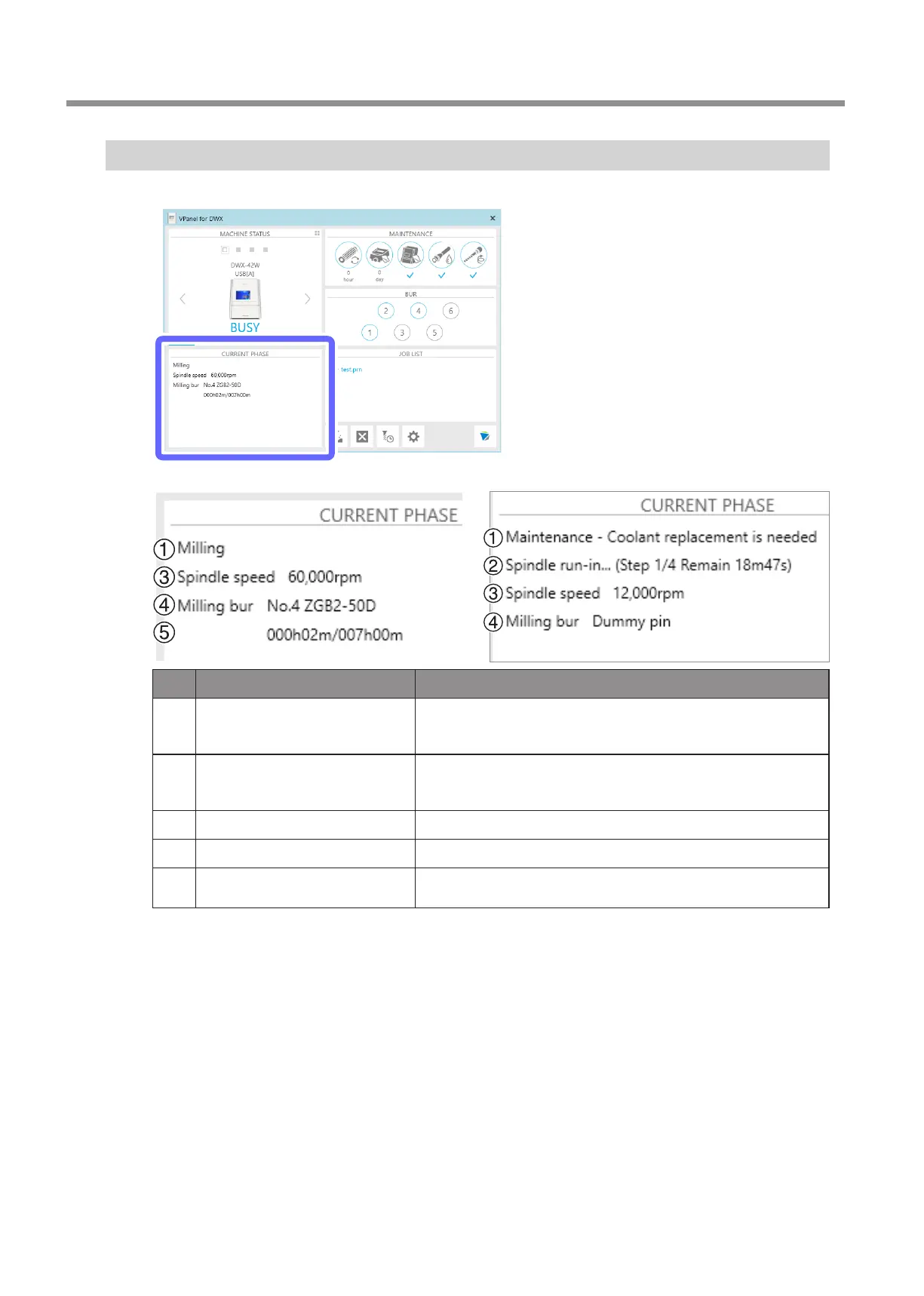
You can check the operation status with the [CURRENT PHASE] area in VPanel�
Example: During milling
Display type Content
1
Status/sub status
Displays the main status such as [Milling] and [Error] and the sub status
(maintenance notication) such as [Spindle run-in required] and [Collet
maintenance required].
2
Maintenance
Displays [Automatic correction], [Milling bur change test], and other such
messages indicating the maintenance progress. Displays [The operation is
being aborted] when an instruction is given to cancel milling.
3
Spindle Displays the spindle rotating speed.
4
Milling bur type Displays the number and name of the grasped milling bur.
5
Milling bur work time and replacement
time
Displays the work time (left side) and replacement time (right side) of the
grasped milling bur.
Example: During maintenance



 To Next Page