Rho 1012/1030 EOperation
6.2 Operating drives of the unwinding and winding
units
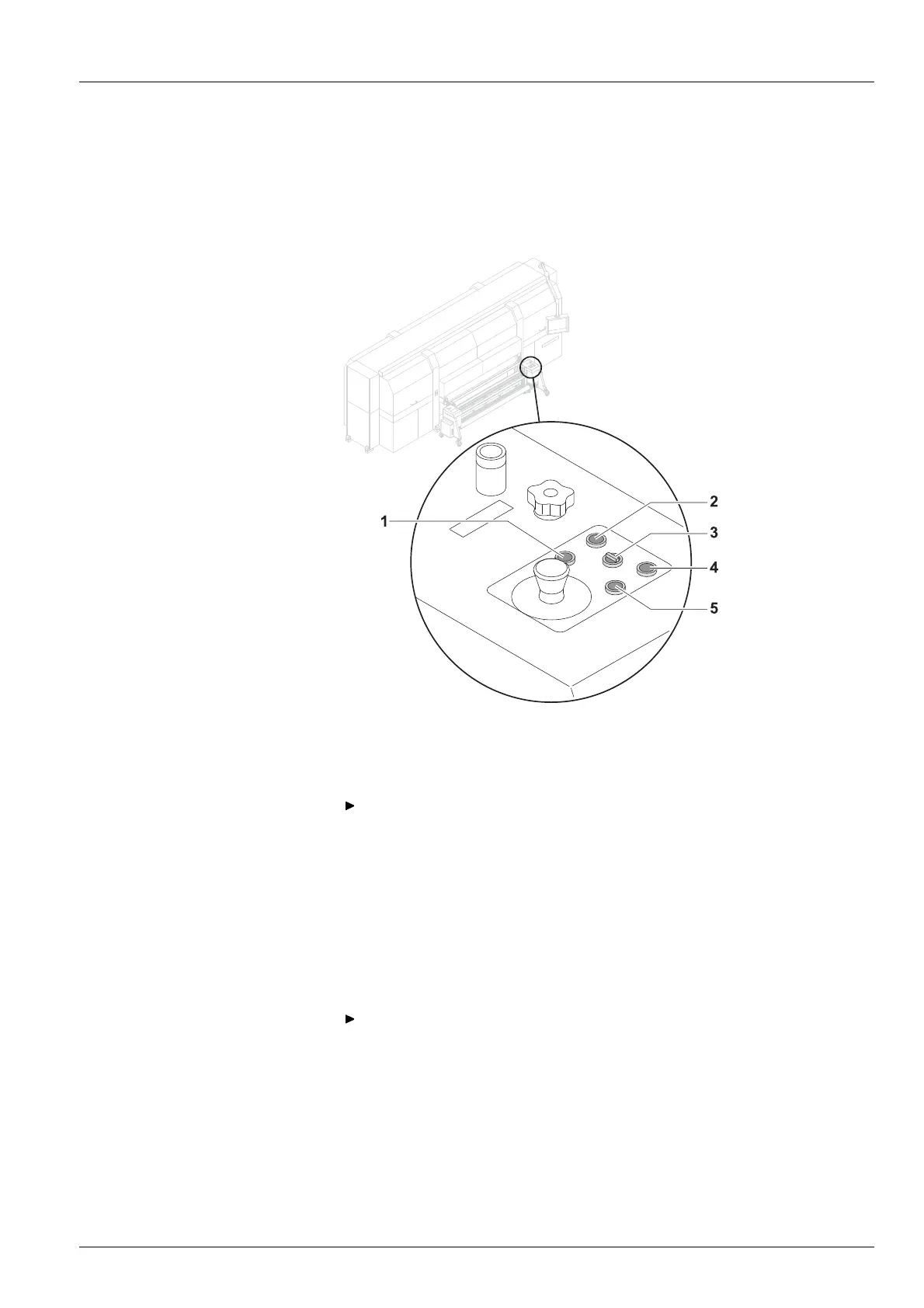
The drives of the unwinding and winding units are operated at the operator
panels, one of which is located on each of the right and left sides.
1 UP button
2 DOWN button
3Selectorswitch
4 REVERSE button
5 FORWARD button
Fig. 28 Operator panel
6.2.1 Setting axis drives to auto matic o peration
Depending on the desired rotat
ion direction, set the selector switch (3) to
Autom. Forward or Autom. Reve
rse.
6.2.2 Rotating axis drives forwa rd and in reverse man u ally
1. Set selector switch (3) to Manual.
2. Press and hold the FO
RWARD or REVERSE button as long as desired.
6.2.3 M oving unwinding or winding unit up or down
Press and hold the UP or DOWN button as long as desired.
7 Heavy rol
l tool 60 (optional)
7.1 Docking Heavy Roll Tool 60
The unwinding unit is docked on the loading side, and the w inding unit is
docked on the unloading side in the same manner.
2004 – 2013 © Durst Phototechnik AG – www.durst-online.com , Rho 1012/10 30 , Issued 07/2013 57 / 147



 To Next Page