EasyManua.ls Logo

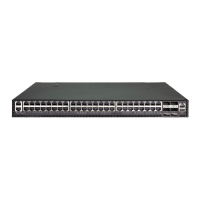
Edge-Core ECS3510-52T - User Manual

Edge-Core ECS3510-52T
1474 pages
Print Icon
To Next Page IconTo Next Page
Loading...
Management Guide
www.edge-core.com
ECS3510-28T/52T
28/52-Port Fast Ethernet
Layer 2 Switch

Table of Contents

Other manuals for Edge-Core ECS3510-52T

Questions and Answers

  • G
    Gary BakerAug 17, 2025
    What to do if I cannot connect to Edge-Core Network Router using Secure Shell?
    • V
      Vanessa MillerAug 18, 2025
      If you're having trouble connecting to your Edge-Core Network Router using Secure Shell (SSH), ensure the SSH server's control parameters are correctly configured on the router, and that your SSH client software is properly configured on your management station. Verify that you've generated both RSA and DSA public keys on the router, exported the key to the SSH client, and enabled the SSH service. Consider trying another SSH client or checking for updates to your current SSH client application. Also, confirm that you've set up an account on the router for each SSH user, including a username, authentication level, and password. If you're using public key authentication, ensure you've imported the client's public key to the router.
  • T
    Terry AtkinsonAug 21, 2025
    How to access the onboard configuration program via a serial port connection on Edge-Core ECS3510-52T Network Router?
    • J
      Jared GonzalesAug 21, 2025
      If you cannot access the onboard configuration program of your Edge-Core Network Router via a serial port connection, check that your terminal emulator program is set to VT100 compatible, with 8 data bits, 1 stop bit, no parity, and a baud rate of 115200 bps. Also, make sure you are using the RS-232 null-modem serial cable supplied with the router. If you're using a different cable, ensure it conforms to the pin-out connections provided in the Installation Guide.
  • J
    Julia JohnsonAug 25, 2025
    What to do if Link/Act LED is off on Edge-Core Switch?
    • D
      Dylan HallAug 25, 2025
      If the Link/Act LED is off on your Edge-Core Switch, first ensure both the switch and the connected device are powered on. Next, confirm the cable is securely plugged into both the switch and the device. Also, verify that you are using the correct type of cable and that its length does not exceed the specified limits. Finally, inspect the adapter on the connected device and the cable connections for any defects, replacing them if necessary.
  • S
    Samantha WilliamsAug 27, 2025
    Why power indicator does not turn on Edge-Core Switch?
    • T
      Tamara DouglasAug 27, 2025
      If the power indicator on your Edge-Core Switch does not turn on, check for potential issues with the power outlet, the power cord, or the internal power supply.
  • L
    Linda MatthewsAug 31, 2025
    What to do if Edge-Core Switch powers off after running for a while?
    • R
      Robert KhanAug 31, 2025
      If your Edge-Core Switch powers off after running for a while, check for loose power connections, power losses, or surges at the power outlet. If the problem persists, the internal power supply may be defective.
  • M
    Martha FrazierSep 3, 2025
    How to fix Pwr LED is off on Edge-Core Switch?
    • C
      Catherine MorrisSep 3, 2025
      If the Pwr LED is off on your Edge-Core Switch, check the connections between the switch, the power cord, and the wall outlet. If this does not solve the issue, contact your dealer for assistance.
  • K
    Kristina ConnerSep 6, 2025
    What to do if Diag LED is off on Edge-Core Switch?
    • A
      Adrian GriffinSep 6, 2025
      If the Diag LED is off on your Edge-Core Switch, power cycle the switch to try and clear the condition. If the problem persists, contact your dealer for assistance.
  • M
    Melissa HartSep 10, 2025
    How to check malfunctioning components on Edge-Core Switch?
    • J
      Joseph LopezSep 10, 2025
      To check if components of your Edge-Core Switch are malfunctioning, test them in an alternate environment where you are sure that all the other components are functioning properly.
  • E
    Emily CrossNov 13, 2025
    How to troubleshoot connection issues with Telnet, web browser, or SNMP on Edge-Core Network Router?
    • T
      Terry McdanielNov 13, 2025
      If you're unable to connect to your Edge-Core Network Router using Telnet, a web browser, or SNMP software, ensure the router is powered on. Verify the network cabling between your management station and the router, checking for proper connections and any cable damage. Confirm you have a valid network connection to the router and that the port you're using hasn't been disabled. Also, check that the VLAN interface, through which the management station connects, is configured with a valid IP address, subnet mask, and default gateway. Make sure the management station's IP address is in the same subnet as the router's IP interface. If connecting via a tagged VLAN group's IP address, ensure your management station and any intermediate switches are configured with the appropriate tag. If you sti...

Edge-Core ECS3510-52T Specifications

General IconGeneral
ModelECS3510-52T
Switching Capacity104 Gbps
Forwarding Rate77.4 Mpps
MAC Address Table Size16K
Jumbo Frames9K Bytes
Ports48 x 10/100/1000BASE-T
VLANs4K
ManagementSNMP
Power Supply100-240V AC, 50-60Hz
Dimensions (W x D x H)440 x 44 mm
Operating Temperature0°C to 45°C
Storage Temperature70°C

Related product manuals