162
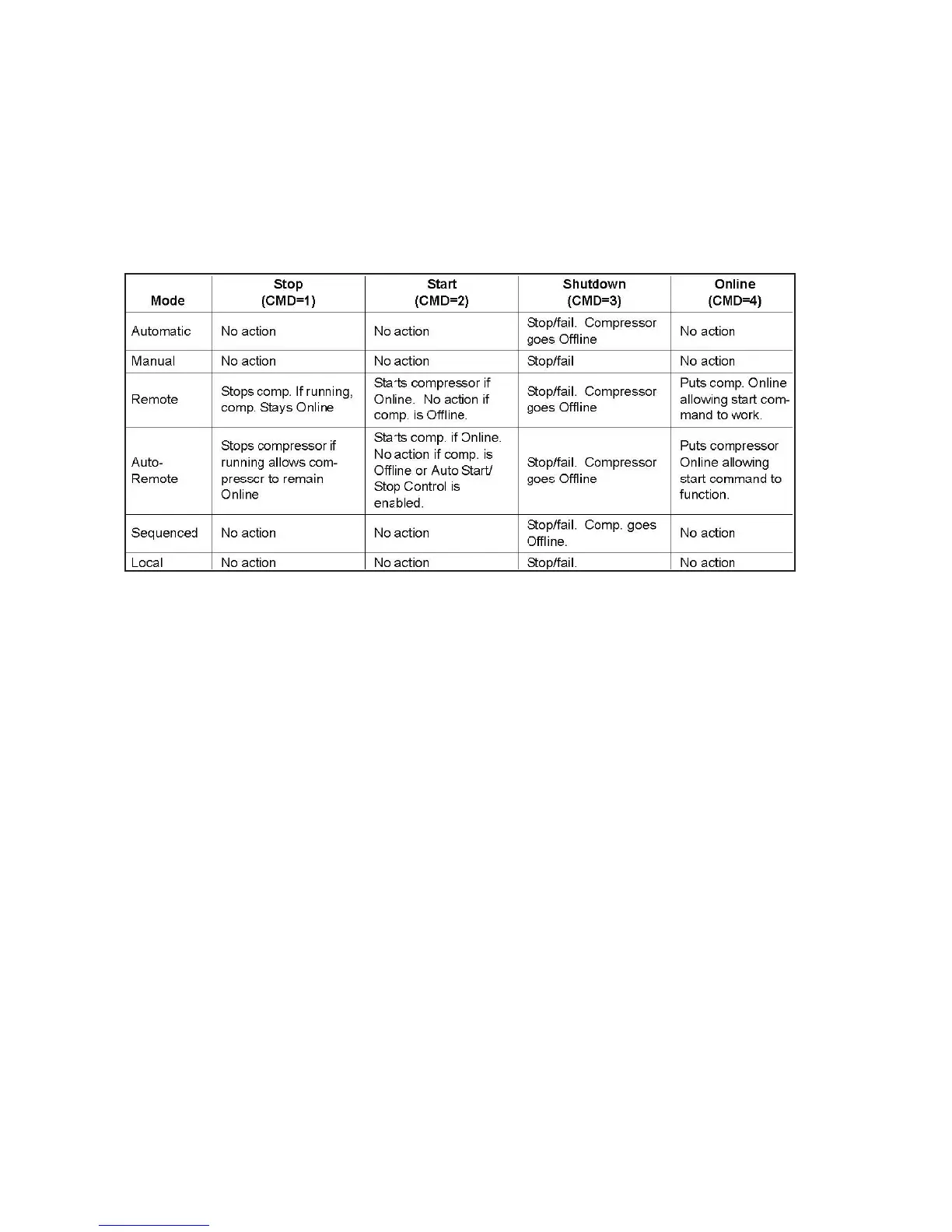
Set Compressor Mode Command
The Set Compressor mode command is used to change the current active mode of the compressor. Normally,
only the Remote mode is used by the master. The SEQ, Sequence, mode is then automatically controlled by
setpoints and loaded and unloaded automatically. Auto-Remote mode allows the master to provide the
control setpoint and the compressor will load and unload to maintain the current active setpoint.
Change Compressor Capacity Command
The Change Compressor Capacity command allows the master to force the compressor to load or unload.
This command word is only processed when the compressor is in the Remote mode. When set to 1 or 2, the
compressor will load or unload respectively. Each time the command is written, a single stage will be added or
removed.
When read, the current value of the compressor capacity register will be returned (1 if the compressor is
loading, 2 if the compressor is unloading, and 0 if the compressor is neither loading or unloading).



 To Next Page